How Does Instagram Know What You Searched For?
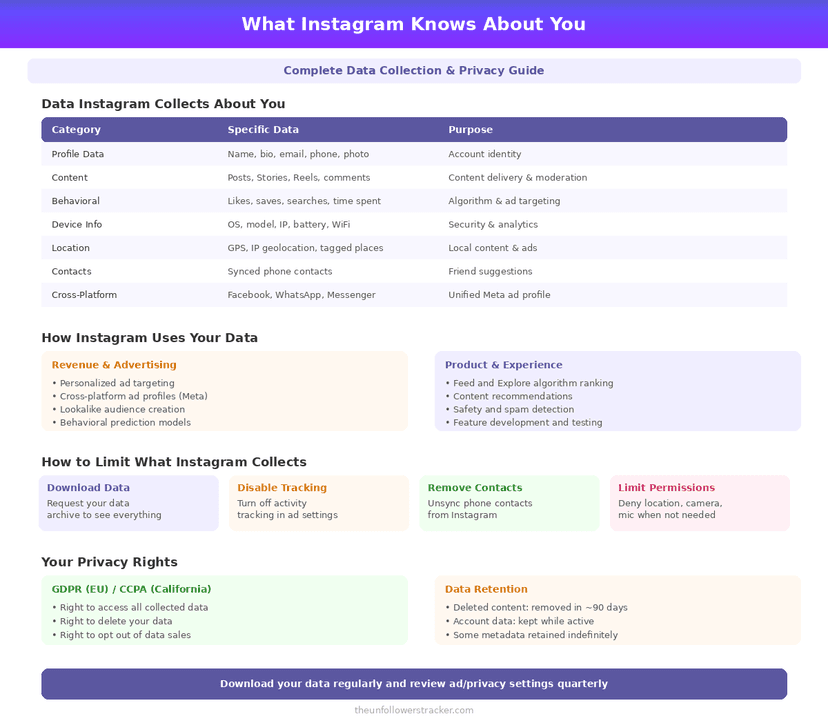
Instagram does not read your Google searches and does not listen through your microphone. The route is duller: the shop you browsed sent Meta a message saying you were there. That happens through a tracking pixel on the site itself, and you can read the list of businesses doing it inside your own settings.
Does Instagram listen through your microphone?
No, and this has been tested. Researchers at Northeastern University ran 17,000 Android apps through an automated analysis in 2018 and found no case of an app switching on the microphone and sending audio out (Panoptispy, PoPETs 2018).
They did find something else, which is why the study is worth citing rather than just the headline: several apps recorded the screen and sent that to third parties. The eavesdropping worry was pointed at the wrong sensor.
The myth survives because the real mechanism produces the same experience. You talk about a jacket, you also searched for one last week, and the ad arrives. The search alone explains it, which is why the question people really mean is how does Instagram know what you searched for.
How does Instagram know what you searched for, then?
How does Instagram know what you searched for? Through the sites you visited, not through Google itself. Most retail sites carry a Meta pixel: a fragment of code that tells Meta an account-holder viewed this product, added it to a basket, or left without buying. Meta matches that event to you and Instagram serves the ad.
Three other routes feed the same profile. Advertisers upload customer lists — email addresses they already hold — for matching. Your phone's advertising ID links activity across apps. And Meta shares signals between Facebook, Instagram and Threads by default, because they are one company rather than three.
| Signal | Does it reach Meta |
|---|---|
| A product page you opened on a shop's website | Yes, if the site runs a Meta pixel |
| Your Google search terms | No |
| Audio from your microphone | No |
| An advertiser's customer list with your email on it | Yes |
| Your activity in other apps, via the advertising ID | Yes, unless you opted out |
| What you tap, watch and pause inside Instagram | Yes |
| Your location, if permission is granted | Yes |
| The content of your DMs | Yes — Meta can read them |
The last row changed in 2026. Meta ended support for end-to-end encrypted messaging on Instagram on 8 May 2026, so message content is no longer technically out of Meta's reach.
Where can you see this for yourself?
Meta publishes the list, which is the part most people never look at. It takes about 2 minutes and it is genuinely specific — business names, with dates.
Step 1: Open Accounts Centre
Instagram → Profile → Menu → Settings and activity → See more in Accounts Centre.
Step 2: Tap "Your information and permissions"
This section holds the data controls that belong to your Meta account rather than to the Instagram app.
Step 3: Open "Your activity off Meta technologies"
You will see a list of businesses that have sent your activity to Meta. Most people find sites they visited once and never signed into.
Step 4: Disconnect it, or clear the history
You can clear the past activity, disconnect future activity, or do both. Note what disconnecting does: the ads stay, they simply stop being informed by that history.
What does Instagram collect inside its own app?
Everything you would expect, plus the timing of it. Which posts you stop scrolling at, how long you watch a Reel, what you search for in the app, who you message, and the pattern of when you open it at all.
Your posts and comments are the smallest part of this. Behaviour is the valuable signal, because a pause is more honest than a like — you can decide not to like something, and you cannot decide not to hesitate.
How much can you actually turn off?
Less than you would like, and more than nothing. Turning off activity off Meta technologies, resetting your advertising ID, and declining app tracking on iOS — Apple has required apps to ask since iOS 14.5 in April 2021 — all cut real signal.
Nothing turns off the in-app collection. Using Instagram means Instagram measuring how you use it, and the only control over that is how much you use it. The settings that reduce what other people see are a different question, covered in how to make your account truly private.
The network you are on collects a different set again, and far less than people assume: what the WiFi owner can see.
Advertising is the part of this you can partly switch off. Four sources decide which ads reach you and exactly 1 of them has an off switch — how your data decides what you see.
Instagram is not the only party holding this: every app you have connected reads a slice of the same account.
FAQ
Does Instagram listen to my conversations?
No. A 2018 Northeastern University study of 17,000 Android apps found no evidence of apps activating the microphone to exfiltrate audio. The ads you notice come from browsing and purchase signals instead.
How does Instagram know what I searched on Google?
It does not see your Google searches. It sees that you visited a site carrying a Meta pixel, which is usually the site you reached from that search.
Can I see which companies send Instagram my data?
Yes. Accounts Centre → Your information and permissions → Your activity off Meta technologies lists them by name, and you can clear or disconnect the history.
Does turning off activity tracking remove my ads?
No. You still see the same number of ads; they simply stop being informed by your off-platform activity, which usually makes them less relevant rather than fewer.
Can Meta read my Instagram DMs?
Yes, as of 8 May 2026. Meta ended support for end-to-end encrypted messaging on Instagram on that date, so message content now travels under standard encryption that Meta itself can read.

Track Your Instagram Unfollowers
Discover who stopped following you and optimize your growth strategy with our free tool.
Discover Unfollowers