What Can Third-Party Apps See on Your Instagram?
An app you authorised properly sees your profile details and your own media, and nothing else. It cannot read your DMs, cannot see who viewed your profile, and cannot reach another account's private data. An app you gave your password to sees everything you see, because it is signing in as you.
Third-party apps on Instagram come in those 2 shapes, and the risk turns on which screen you typed into. The rest of this page tells them apart and clears out what you no longer use.
What can an authorised app reach?
Meta grants access by scope, not in bulk. The table shows what third-party apps on Instagram can and cannot read once you approve them on Instagram's own login screen.
| Data | Available to a connected app |
|---|---|
| Your username, profile picture, bio | Yes |
| Your own posts, Reels and captions | Yes |
| Insights for a professional account | Yes, if you granted it |
| Comments on your posts | Yes |
| Your direct messages | No |
| Your follower list | No |
| Who viewed your profile | No — the data does not exist |
| Another account's private content | No |
The follower row ends most unfollower-app claims. Meta shut down the Instagram Basic Display API on 4 December 2024. Its replacement needs a professional account and still exposes no follower list.
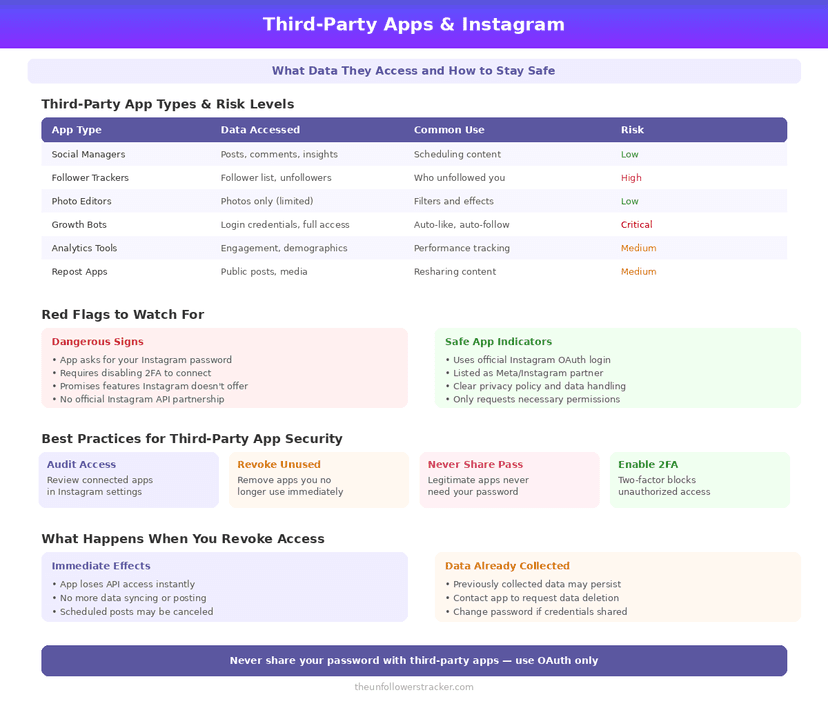
What about apps that ask for your password?
Those apps are a separate class, and no honest service belongs in it. Typing your Instagram password into another company's form hands over the whole account: messages, saved items, any payment details on it, and the power to change the email and lock you out.
No scope, no revoke button and no audit trail covers this. Deleting the app changes nothing, because they hold a credential rather than a permission. The safe route for unfollower tracking is in tracking unfollowers without sharing your password.
If you have already done it, treat the account as compromised and work through how to recover a hacked Instagram account.
How do you audit what has access?
Four steps, about 3 minutes in total. Most accounts carry several third-party apps on Instagram that nobody remembers connecting.
Step 1: Open the connected apps list
In Settings and activity, find Apps and websites. It lists active connections, expired ones and everything you removed — more history than most people expect.
Step 2: Remove anything you do not recognise
Tap Remove on each one. Access ends at once, and the app keeps whatever it already took. Revoking stops the future, never the past.
Step 3: Check your login activity separately
Also in Settings, Login activity shows devices and places signed into the account. A connected app never appears here. A stolen password does, which is why the 2 lists are worth reading together.
Step 4: Change the password if anything looks wrong
Changing it ends every session except the one you are using. Do this before anything else if step 3 showed a device you cannot place.
Why do so many apps want access at all?
Because your data is the product. An app that reads your profile and your posts builds a picture of your interests worth money to advertisers, and a proper connection is cheaper for them than scraping.
The exposure is still smaller than Instagram's own collection, which runs far wider and needs no permission at all — its scope is in what Instagram knows about you.
FAQ
The 5 questions below cover what a connected app can read, what revoking does, and why password-based tools are a different problem. All answers reflect Instagram in September 2026.
Can third-party apps read my Instagram DMs?
No. Message content is outside every scope Meta grants, so an authorised app cannot reach it. An app holding your password can, because it signs in as you.
Can an app see who unfollowed me?
Not directly. No API exposes a follower list, so any tool showing unfollowers is comparing data you supplied, usually from your own export.
Does removing an app delete the data it collected?
No. Revoking access stops future reads. Anything already collected stays with the app unless you ask them to delete it.
Is it safe to log in with Instagram on other sites?
Using Instagram's own login screen is reasonably safe and revocable. Typing your Instagram password into someone else's form is not, and never is.
How do I see which apps have access?
Settings and activity, then Apps and websites. It shows active, expired and removed connections in one place.

Track Your Instagram Unfollowers
Discover who stopped following you and optimize your growth strategy with our free tool.
Discover Unfollowers