Can the WiFi Owner See Your Instagram Activity?
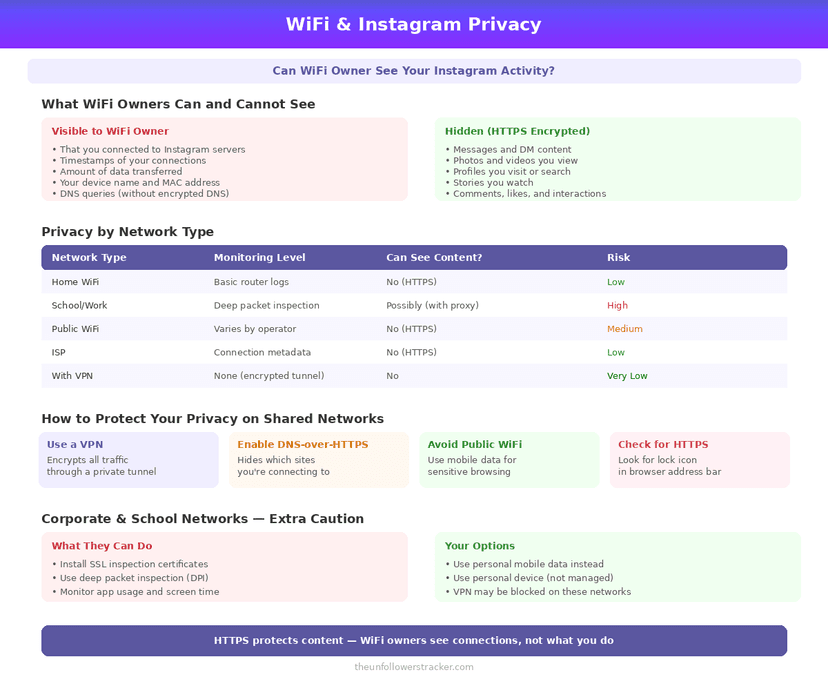
They see that a device on their network talked to Instagram, and not what it said. Every connection between the app and Instagram is encrypted, so the 3 things people worry about — messages, the posts you opened, the accounts you looked at — never appear in a router log.
Whether the WiFi owner can see Instagram activity turns on 1 thing only: who manages the device. A phone or laptop somebody else configured, with a certificate they installed, is the exception. A work laptop or a school-issued phone can be configured to read the contents. An ordinary home router cannot.
What does a network owner actually see?
Nine things, split cleanly by the encryption. The 5 on the left are metadata — who talked to whom, when, and how much — and the 4 on the right are everything people actually worry about.
| Visible to the network | Not visible |
|---|---|
| That you connected to Instagram | Your DMs |
| The time and duration | Which posts you viewed |
| How much data moved | Who you follow or searched |
| Your device's name and MAC address | Your password |
| Domain names, in most setups | Anything inside the app |
The 5th row is the one with a caveat. The domain a connection is headed to is usually readable, though not the path or the content, and newer encrypted handshakes hide even that on some connections.
How do they see the domain but not the content?
Because encryption protects the payload and not the envelope. Setting up a secure connection involves naming the destination before the encrypted channel exists, so the name is visible while everything after it is not.
DNS lookups leak the same way by default. Every time your phone resolves
instagram.com it asks a server, and unless the device uses encrypted DNS that
question crosses the router in the clear. Both leaks stop at the domain: neither
carries a path, an account name or a single tap.
Neither of those lets anyone see Instagram activity in any useful sense. Knowing a device spent 40 minutes connected to Instagram is not knowing what it did there — and what Instagram itself records is a separate matter, covered in what Instagram knows about you.
When can somebody see the contents?
When they control the device, not the network. Installing a root certificate on a phone or laptop lets whoever installed it decrypt that device's traffic, which is how corporate and school networks inspect what passes through them.
Installing one requires access to the device and, on modern systems, explicit confirmation from whoever set it up. It is a normal arrangement on employer-issued hardware and not something a neighbour or a café can do to a phone that is yours.
Software on the device is the other route, and it is the one people mean by monitoring — the boundaries are in what Instagram monitoring can actually see.
Step 1: Check whether your device is managed
On iPhone, open Settings, General, then VPN & Device Management. On Android look under Security for work profiles or installed credentials.
An entry there means somebody else set policy on that device. On a phone you bought yourself, that list should be empty or contain only apps you installed knowingly.
Step 2: Turn on encrypted DNS
Encrypted DNS hides which domains you look up from the network. iOS and Android both support it, and most browsers offer it independently of the system setting.
Encrypted DNS closes 1 of the 2 domain leaks and nothing else. Your traffic still goes to Instagram's servers, and the network still sees that a connection happened.
Step 3: Understand what a VPN moves
A VPN hides the destination from the network owner by sending everything through 1 encrypted tunnel. What the router then sees is a connection to the VPN, and nothing about Instagram.
A VPN relocates the trust rather than removing it. The VPN provider is now in the position the router was in, which is only an improvement if you trust them more than the network you are on.
The network owner sees far less than the apps you have already authorised — what a connected app can read from your account is the larger exposure.
FAQ
The 5 questions below cover what a network sees, what it cannot, and the one arrangement that changes the answer. All answers reflect standard encryption practice in September 2026.
Can the WiFi owner see my Instagram messages?
No. The connection is encrypted, so DMs, posts and searches never appear in router logs. They can see only that a device connected to Instagram.
Can the router owner see which accounts I visited?
No. Only the domain is potentially visible, never the path, so "instagram.com" is the limit of what a URL reveals to the network.
Does using a VPN hide Instagram from the WiFi owner?
Yes, from them. It moves that visibility to the VPN provider, who then sees what the network owner used to.
Can my employer see my Instagram on the work WiFi?
On a device they manage, yes — a certificate they installed can decrypt traffic. On your own phone connected to their network, no.
Does incognito or private browsing hide activity from the network?
No. Private modes affect what your own device stores and change nothing about what leaves it.

Track Your Instagram Unfollowers
Discover who stopped following you and optimize your growth strategy with our free tool.
Discover Unfollowers