What Can Instagram Monitoring Actually See?
Two kinds exist and no third. Anyone can read what a public account posts, follows and is followed by, because that is published. A parent can use Family Center supervision, which the teen has to accept. Everything sold as Instagram monitoring beyond those 2 either scrapes the first or wants a password.
Neither kind reveals private messages, who viewed a profile, or who watched a Story from anywhere but the owner's own viewer list. Those records either do not exist or never leave the account.
What is visible by each route?
Six things people expect Instagram monitoring to show, and where each one actually stands. The pattern is simple: public data is public, and everything else stays inside the account.
| What somebody wants to see | Public scraping | Family Center |
|---|---|---|
| Posts, followers, following | Yes, if public | Yes |
| Who the account messages | No | Contacts only, not content |
| Message contents | No | No |
| Who viewed the profile | No | No — the data does not exist |
| Time spent in the app | No | Yes |
| Reported accounts | No | Yes |
The 3rd row is the one worth repeating, because it is what most monitoring services imply they deliver. Meta built its own supervision tools not to show message contents, and those tools are the most privileged access anyone other than the account holder can get.
Who can legitimately monitor an account?
The account holder, and a parent whose teen accepted supervision. That is the whole list.
Family Center supervision needs the teen to accept an invitation, and a decline leaves the parent with nothing. Switching supervision off later notifies the parent. Meta expanded what it shows in May 2026, adding the topics a teen engages with and what they asked Meta AI in the last 7 days. Message contents stayed out.
Everyone else is reading public data or breaking in. There is no legitimate third-party monitoring tier between those 2.
What do monitoring services actually do?
Two things, and neither is what the marketing implies. The honest ones poll a public profile on a schedule and diff the results, which produces a log of posts, follower counts and new follows — all of it visible to anyone who looks.
The dishonest ones ask for the target's login, which is not monitoring but account takeover, and it usually requires the target's password to already be known. What that access allows is set out in third-party apps and Instagram data access.
Neither can produce DMs, profile views or Story viewers. No API exposes any of the three, so there is nothing to buy.
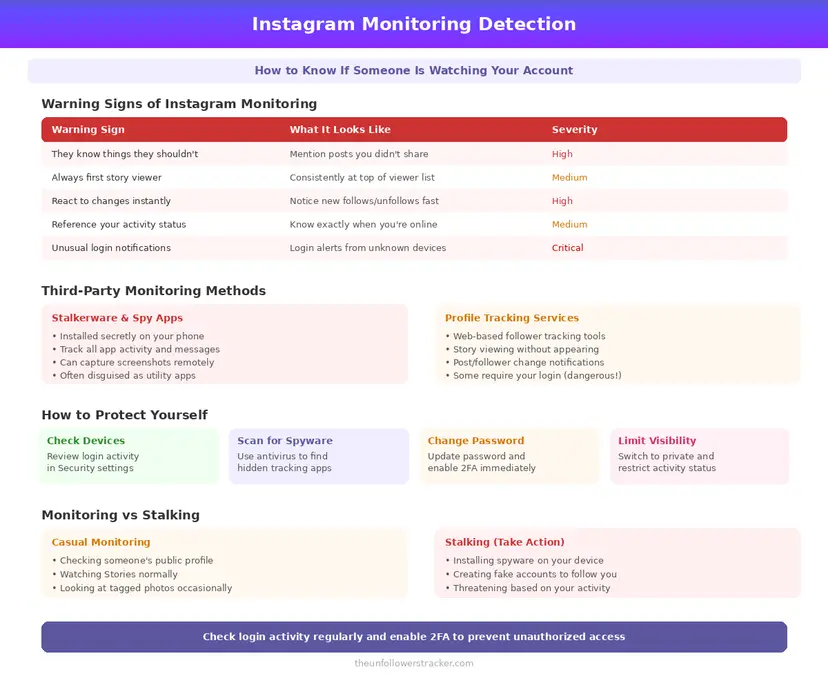
Step 1: Check what has access to your account
Open Settings, then Website permissions, then Apps and websites. Anything listed there can act with the permissions you granted it.
Remove what you do not recognise. Access ends immediately, and this list is where a real monitoring arrangement would show up.
Step 2: Read your login activity
Open Settings, then Accounts Centre, then Password and security, then Where you're logged in. Every active session is listed with a location.
A session in a place you have not been means somebody has the password, which is the only route by which another person reads your DMs. Change the password, which logs every other session out, then switch on two-factor authentication.
Step 3: Check whether supervision is active
Open Settings and look for Supervision or Family Center. That screen lists any active arrangement, and nobody can enable one without the account holder accepting it.
Nothing hidden lives in that screen. If supervision is off and no unfamiliar app or session is listed, nobody is monitoring the account beyond what you publish.
Can somebody tell if you look at their profile?
No, and that is the mirror image of this question. Instagram records no profile views on any account type, so neither monitoring nor anxiety on that point has anything to work with — the fuller answer is in is someone stalking your Instagram.
The same tooling points both ways, which is why what an unfollower app asks for, and what it does with it is worth reading before installing one.
FAQ
The 5 questions below cover what monitoring can reach, what it cannot, and how to check your own account. All answers reflect Instagram's behaviour in September 2026.
Can someone monitor my Instagram without me knowing?
Only by reading what you publish, or by having your password. Instagram's own supervision requires you to accept it and tells you if it is turned off.
Can a parent read their teen's Instagram messages?
No. Family Center shows who a teen has chats with and never the contents of those chats.
Do Instagram monitoring apps work?
The ones that read public profiles work and show you nothing private. The ones promising DMs or profile views need the account's password, because no API exposes either.
How do I know if someone has access to my account?
Check Apps and websites for connected tools and Where you're logged in for active sessions. Anything unfamiliar in either is access you did not intend.
Can anyone see who viewed my profile?
No. Instagram keeps no record of profile views, so no monitoring service, account type or subscription can surface a list that was never written.

Track Your Instagram Unfollowers
Discover who stopped following you and optimize your growth strategy with our free tool.
Discover Unfollowers