Instagram Ads: How Your Data Decides What You See
Four things decide which ads reach you: what you do on Instagram, what you do on Facebook, what advertisers report about you from their own sites and apps, and the basics on your profile. You can switch 1 of those off in most countries, and it is the third one.
Instagram ads targeting is often described as reading your microphone or your messages. It does not need either. Activity that advertisers hand back to Meta is a bigger input than anything mysterious, and it has a switch.
What feeds the ads you see?
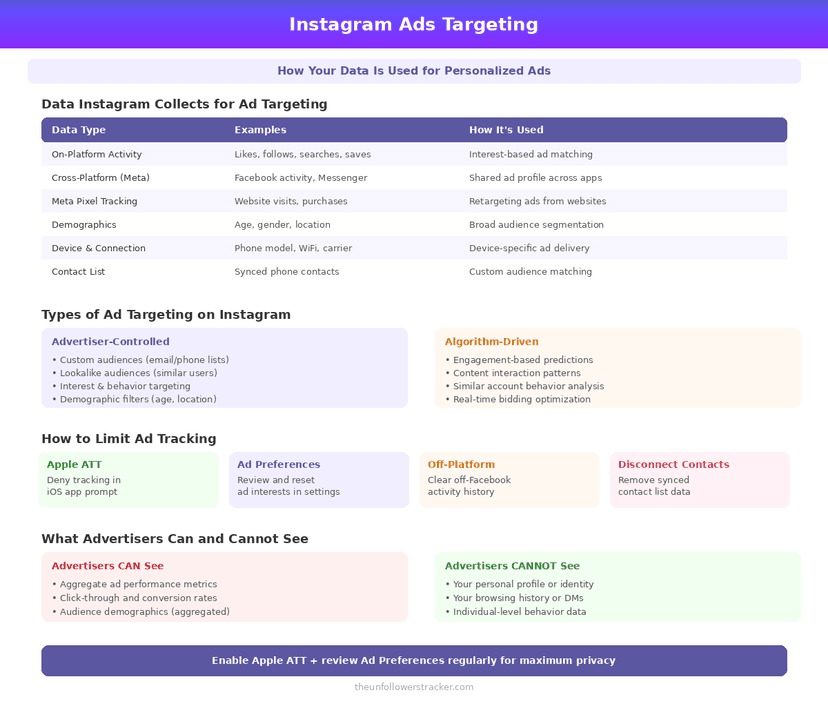
Four sources feed Instagram ads targeting and exactly 1 of them has an off switch. The middle column below is what each source really contributes, rather than what people assume it contributes, and the difference is where the surprises live.
| Source | What it contributes | Can you turn it off |
|---|---|---|
| Your Instagram activity | Accounts followed, posts opened, Reels watched | No |
| Your Facebook activity | The same, from the linked account | No |
| Advertisers' own data | What you did on their site or app | Yes |
| Your profile basics | Age, gender, location, language | No |
The 3rd row is where most of the "how did they know" moments come from. A shop you browsed sends that visit back to Meta through its own tracking, and the ad follows you to Instagram minutes later.
What can you actually change?
Four steps, and only the 1st reduces what Meta receives at all. The others shape what you are shown out of data the company already holds, which is worth doing and is a different kind of change.
Step 1: Turn off activity from ad partners
In Settings and activity → Ads → Ad preferences, find the control for activity that advertisers share with Meta. Switching it off stops off-platform behaviour feeding your ad profile from that point.
Step 2: Prune ad topics
The same section lets you see fewer ads on specific topics — alcohol, gambling, parenting, body image among them. This filters the output rather than the input, and the topics list is worth reading for what it reveals about you.
Step 3: Use "Why am I seeing this ad?"
Tap the 3 dots on any ad. It names the reason: an interest, an advertiser's customer list, or a lookalike audience. It is the fastest way to find which source is driving something you did not expect.
Step 4: Audit what else has access
Ads are not the only route your data travels. Connected apps read their own slice, and that audit is in what third-party apps can see.
Where you live changes the options
The EU and the UK have controls the rest of the world does not, and regulation put them there rather than product design. Three options exist in total, and 2 of them are unavailable to most of the world.
| Option | Where |
|---|---|
| Personalised ads, free | Everywhere |
| Less personalised ads, free | EU |
| Ad-free subscription | EU, and the UK since September 2025 |
Less personalised ads is the more interesting of the 2. Meta limits targeting to what you do in the current session plus age, location, gender and how you engage with ads — a genuinely smaller input rather than a rebranded preference.
The subscription costs €5.99 a month on the web and €7.99 on mobile, after Meta cut both prices by 40% in November 2024 under pressure from EU regulators.
Does Instagram listen to your microphone?
No, and the ads that feel like proof are explained by the 3rd row of the first table. Meta receives what you did on other companies' sites, plus what people who share your location and interests are buying.
The result is a system that predicts conversations rather than overhearing them, and it is unsettling for better reasons than the microphone story. The full extent of what is collected is in what Instagram knows about you.
Do ads cost you followers?
Ads can cost you followers, on the other side of the transaction. Running them brings in people who saw a promotion rather than the account, and some leave when the next post is ordinary — that pattern is in why you lose followers after running ads.
FAQ
The 5 questions below cover what drives Instagram ads targeting, which control does what, and what is available where you live. All answers reflect Instagram in September 2026.
Can I turn off personalised ads on Instagram?
Not entirely outside the EU. You can stop advertisers' off-platform data feeding your profile, but your own Instagram and Facebook activity still targets ads.
Does Instagram listen through my microphone?
No. Ads that feel overheard are usually explained by activity advertisers reported back to Meta from their own sites and apps.
What are ad topics?
Categories you can ask to see less of, such as alcohol or gambling. They filter what you are shown; they do not change what Meta collects.
Is there an ad-free Instagram?
In the EU and, since September 2025, the UK. The subscription costs €5.99 a month on the web and €7.99 on mobile.
What do less personalised ads use?
Only your current session in the app, plus age, location, gender and how you engage with ads. The option is available in the EU.

Track Your Instagram Unfollowers
Discover who stopped following you and optimize your growth strategy with our free tool.
Discover Unfollowers