How Does Instagram Suggest People to Follow?
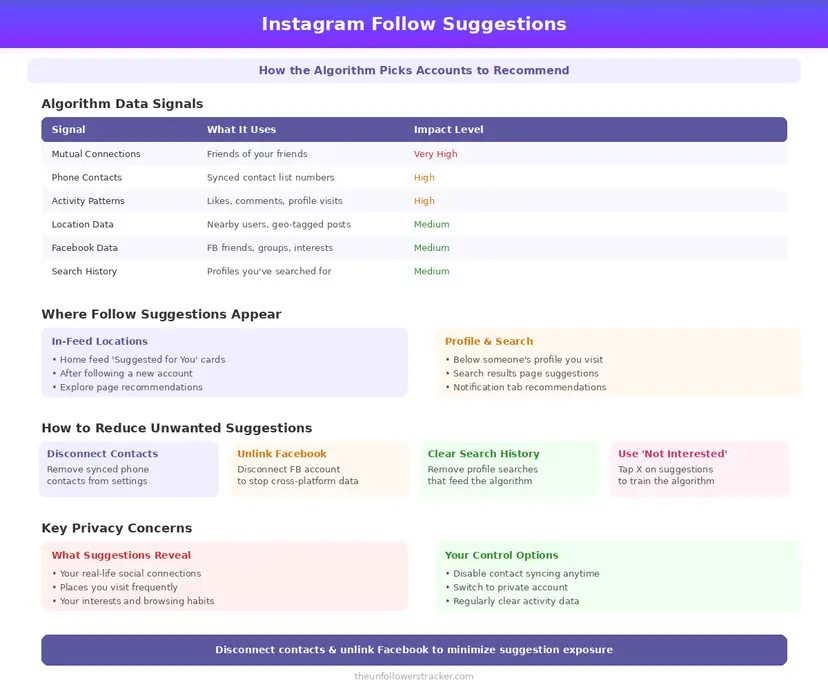
Meta publishes the answer. Its Transparency Center describes the suggested accounts system as 5 predictions, each fed by the same small set of inputs. Those inputs are mutual connections, whether that account already follows you and for how long, your follow activity over the last 28 days, follower counts, your region and your uploaded contacts.
What is not on that list matters as much as what is. Profile views and searches appear nowhere in it, which is the single most common belief about Instagram follow suggestions and the one Meta's own description contradicts.
What does the system actually use?
Six inputs, and every one of them is either public or something you handed over yourself. None of them require Instagram to track who looked at whom, which is why the list is shorter than most people expect.
| Signal | What it is | Where it comes from |
|---|---|---|
| Mutual connections | People you both follow | Public follow graph |
| Their follow status | Whether they already follow you | Public follow graph |
| Follow duration | How long they have followed you | Instagram's own records |
| Your recent activity | Your follows in the last 28 days | Your account |
| Follower counts | Theirs, and their popular followers | Public |
| Contacts | Phone numbers you uploaded | You, via contact syncing |
The last row is the one that surprises people, and the only one you can delete. Everything above it is either public or a record of your own actions.
Does Instagram suggest you to people who viewed your profile?
No. Meta's description of the system lists no profile-view signal, and a simpler reason sits underneath that. Instagram does not record who views a profile, on any account type, so no such data exists to feed anything.
Searches are equally absent. Looking somebody up does not put you in their suggestions, and it does not put them in yours — the ranking documentation names follows, engagement and contacts, and stops there.
The belief persists because the output looks uncanny. Somebody you were just thinking about appears in your suggestions. The real explanation is duller: you share 4 mutual followers, or their number sits in your phone.
Where do the candidates come from before ranking?
Ranking picks an order; something has to assemble the list first. Meta names 3 sources: your engagement history across posts, Stories and Reels, your geographical region, and your contact list where you have uploaded it.
Contact syncing is the one that reaches outside Instagram. Once uploaded, a phone number links your account to everybody who has that number saved. That is how people who never exchanged a word on Instagram end up suggested to each other. The wider picture is in what Instagram knows about you.
Contact syncing is not the only upload to audit: what else a connected app can read belongs in the same clear-out.
Step 1: Disconnect contact syncing and delete what was uploaded
Turning it off stops future uploads. Deleting removes what is already there. They are 2 separate actions on the same screen, and doing only the first leaves every number you have already given it in place.
Open Accounts Centre, then Your information and permissions, then Manage contacts upload. Disconnect syncing, then use the delete option on the same screen. Suggestions built on those numbers stop after the deletion propagates.
Step 2: Take your own account out of suggestions
The control lives on the website rather than in the app, which is why most people never find it, and it is the only setting that governs how other people see you rather than what you see.
Open instagram.com, go to Settings, and find Similar account suggestions. Unchecking it stops Instagram recommending your profile to people looking at accounts like yours. It does not hide you from search or from contacts.
Step 3: Dismiss the suggestions you keep seeing
Each suggested account carries an X in its corner. Dismissing one removes that account from your suggestions and feeds the ranking a negative signal about accounts like it, which is the only per-item control on offer.
Instagram gives no switch that turns suggestions off entirely. The controls are per-account and cumulative, so a feed full of unwanted suggestions takes a dozen dismissals rather than 1 setting.
Why does it suggest people I know in real life?
Because 2 of the strongest signals are exactly that. A mutual-follower overlap means your social circles intersect, and an uploaded contact means somebody has your number saved or you have theirs.
Neither requires Instagram to know anything about your life offline. It is set arithmetic on a follow graph plus a phone book you or somebody else handed over, which is also why the suggestions get worse, not better, after you delete the contacts.
Suggestions and feed ranking run on overlapping signals — what the main algorithm weighs explains most of what you see.
FAQ
The 5 questions below cover what drives Instagram follow suggestions, what does not, and which parts you can switch off. All answers reflect Meta's published description in September 2026.
How does Instagram decide who to suggest?
Through 5 ranked predictions about whether you will follow an account and whether it will follow back, using mutual connections, existing follow status, follow duration, your last 28 days of follows and follower counts.
Does Instagram suggest people who looked at my profile?
No. Instagram keeps no record of profile views on any account type, so there is nothing for the suggestion system to use.
Why does Instagram suggest someone I only searched for?
It does not suggest based on searches. A search and a suggestion can coincide because both are driven by the same mutual connections.
How do I stop my account being suggested to others?
Uncheck Similar account suggestions in Settings on instagram.com. The option is not in the mobile app.
Can I turn off suggestions completely?
No. You can dismiss them one at a time with the X, disconnect contact syncing and opt your own profile out, but Instagram provides no master switch.

Track Your Instagram Unfollowers
Discover who stopped following you and optimize your growth strategy with our free tool.
Discover Unfollowers