How to Recover a Hacked Instagram Account
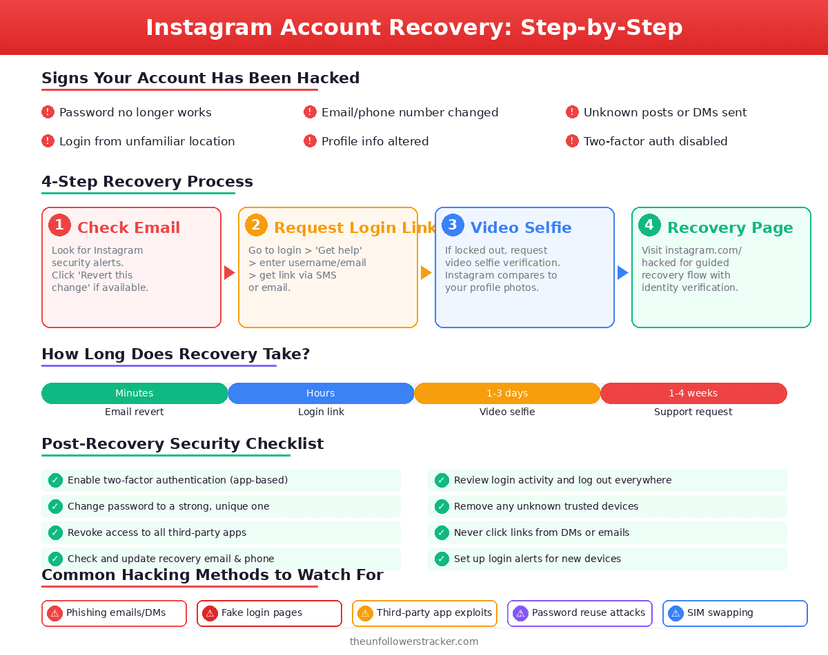
Check your old email inbox before anything else. When somebody changes the email on an account, Instagram writes to the previous address with a Revert this change link, and clicking it undoes the takeover in seconds. That link expires, which is why it comes first.
If the link is gone or was never there, the official way to recover a hacked Instagram account is instagram.com/hacked, which sends a login or security code to the contact details Instagram still holds. Everything else is slower.
Which route applies to you?
A hacked Instagram account has 4 recovery situations and 4 different answers. Work out which one you are in before spending an hour on the wrong one.
| What happened | Fastest route |
|---|---|
| Email changed, you still have the old inbox | Revert this change link |
| Password changed, email still yours | Security code to your email |
| Email and phone both changed | Video selfie verification |
| Account gone entirely | Report as hacked, then wait |
The 3rd row is the common one and the slowest. Once an attacker owns the contact details, Instagram has no way to reach you and identity verification becomes the only proof left.
Step 1: Search your old inbox for the revert link
Search every mailbox you have ever attached to the account for messages from Instagram, including spam and promotions folders. The message says your email was changed and carries a link that reverses it.
Click it immediately. The link is time-limited and it is the only route that needs no verification, no waiting and no support queue.
Step 2: Request a code at instagram.com/hacked
Open instagram.com/hacked in a browser and enter the username, email or phone number the account used. Instagram sends a login link or a 6-digit security code to every contact method it still has on file.
Try the app's own Get help logging in as well if the site fails. The 2 flows reach different recovery paths, and accounts that stall on one sometimes clear on the other.
Step 3: Verify with a video selfie
When no contact method reaches you, Instagram offers to confirm identity with a short video selfie, matched against the photos already on the account. It takes about 30 seconds to record.
It only works on accounts with your face in them. A brand or meme account has nothing to match against, and those cases go to the support queue instead.
Why did no code arrive?
Because the attacker changed what the codes go to. Removing your email, swapping the phone number and switching on their own two-factor authentication is the standard sequence, and it is done within minutes of a takeover.
Check the accounts you did not think of. Instagram sends to every contact method it has historically held, so an old address you stopped using years ago may be the one holding the message.
Should you pay somebody to recover it?
No. The services advertising guaranteed Instagram recovery have no channel into Meta that you do not have, and the ones calling themselves hackers are selling you the same instagram.com/hacked form you can open yourself.
The pattern repeats what happened in the first place. Handing your details to a third party is how most accounts are lost, and the mechanics are the same as in are Instagram unfollower apps safe.
What to do the moment you are back in
Four things, in this order. Change the password to one used nowhere else, which ends every other session. Then open Password and security and read Where you're logged in, removing anything unfamiliar.
Third, switch two-factor authentication on and choose an authentication app over SMS — a text can be intercepted through a SIM swap, an app cannot. Fourth, open Apps and websites and remove every third-party connection you do not recognise; that list is where most takeovers begin, as set out in third-party apps and Instagram data access.
FAQ
The 5 questions below cover the recovery routes, why codes go missing, and what to do afterwards. All answers reflect Instagram's process in September 2026.
How do I recover a hacked Instagram account?
Start at instagram.com/hacked for a login or security code. If the attacker changed your email, look in the old inbox first for Instagram's Revert this change link, which is faster.
What if the hacker changed my email and phone number?
Use the video selfie verification Instagram offers when no contact method reaches you. It matches your face against photos already on the account.
How long does Instagram take to respond?
There is no published time. The revert link is instant, security codes arrive in minutes, and identity verification can take days.
Can I get the account back after it is deleted?
Deletion is reversible for 30 days, so an account the attacker deleted can be restored inside that window by logging in. After that it is gone.
How do I stop it happening again?
Two-factor authentication through an authentication app rather than SMS, a password used nowhere else, and no third-party app that asks for your Instagram login.

Track Your Instagram Unfollowers
Discover who stopped following you and optimize your growth strategy with our free tool.
Discover Unfollowers