Instagram Threads Privacy: What Is Shared With Instagram
Instagram Threads privacy works per app, not per account. The 2 share a login and a profile, but your Threads profile can be private while your Instagram is public, Threads messages have had their own inbox since July 2025, and a Threads profile can now be deleted without touching Instagram.
Most of what is written about Instagram Threads privacy describes the 2023 version of the app, where everything ran through Instagram. That version is gone, and the differences are the whole answer.
What does Threads share with your Instagram account?
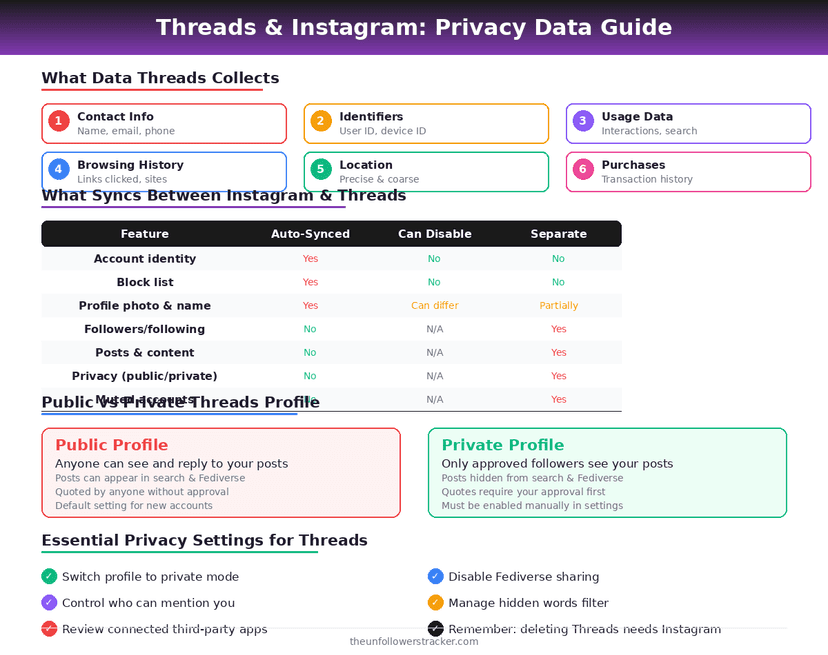
Threads borrows your identity from Instagram and very little else. The login, the username and the verification badge come across; the audience, the settings and the message inbox do not.
| Setting | Shared with Instagram |
|---|---|
| Login and username | Yes |
| Verified badge | Yes |
| Followers | No — separate lists |
| Public or private status | No — set per app |
| Blocked accounts | Yes, blocks carry across |
| Muted accounts | No |
| Direct messages | No, since July 2025 |
| Advertising data | Yes, both feed the same Meta profile |
The blocking row is the one worth remembering. Blocking someone on Instagram blocks them on Threads too, which is deliberate — the alternative is a blocked person reaching you through the other app.
Do Threads DMs go to your Instagram inbox?
Not any more. Threads launched its own message inbox on 1 July 2025, and conversations started there stay there instead of appearing among your Instagram DMs, which is how it worked before.
The rollout was not universal. Messaging opened to users 18 and over in most markets where Threads operates, and it excluded Japan, Australia, the UK and the EU at launch, so an older account in those places may still behave differently.
Threads messages are not described by Meta as end-to-end encrypted, and neither are Instagram DMs any more — that changed in May 2026, and the detail is in what vanish mode actually protects.
What does fediverse sharing actually expose?
Everything you post, to servers Meta does not run and cannot clean up. Fediverse sharing is off until you turn it on, it requires a public profile and an account holder aged 18 or over, and once a post has federated it exists on other people's servers permanently.
Meta's own product decisions show how firm that limit is. Disappearing Threads posts are never shared to the fediverse at all, precisely because Threads cannot delete them from an independent server afterwards.
So treat fediverse sharing as publishing rather than posting. Deleting a Threads post removes it from Threads, and does nothing about the copies already sitting on Mastodon instances that fetched it.
Can you use Threads without an Instagram account?
In the EU, sometimes. Meta has been testing Threads sign-up with an email address or phone number for some users in the EU since 2025, which came out of European competition rules rather than a global product decision.
Everywhere else Instagram is still the front door. You can, however, run a Threads profile that shares nothing recognisable with your Instagram audience, because the follower lists are separate.
How do you lock down a Threads profile?
Four settings do most of the work, and 2 of them are not where people look for them. Work through them in this order — the first is the only one that changes who can read your posts at all.
Step 1: Make the Threads profile private
Open Settings, then Privacy, and switch the profile to private. This is set per app: a private Threads profile does not make your Instagram private, and a private Instagram does not make Threads private.
A private profile also disqualifies you from fediverse sharing, which is the cleanest way to keep Threads posts off other servers permanently.
Step 2: Check fediverse sharing separately
Under Account, look for Fediverse sharing. It is off unless you turned it on, and turning it off stops future posts from federating — it does not retrieve anything already sent.
Step 3: Decide who can message you
Threads message controls sit in its own inbox settings now, not in Instagram's. Restricting who can start a conversation is a separate decision from your Instagram DM settings, and changing 1 does not change the other.
Step 4: Read what the profile carries over
Your bio, links and profile photo are pulled from Instagram at sign-up and can be edited afterwards. Anything you leave untouched is the Instagram version, including links you may have forgotten are there.
What happens if you delete Threads?
Your Instagram account survives it. Threads settings carry a Delete or deactivate profile option that removes the Threads profile on its own, which was not true at launch — until late 2023, deleting Threads meant deleting the Instagram account it was built on.
Deactivating is the reversible half: the profile disappears from Threads and comes back when you return. The equivalent decision on the Instagram side, and what it does and does not delete, is in how to deactivate without losing anything.
What neither action touches is the advertising profile. Both apps feed the same Meta record, and deleting one surface does not remove what has already been collected — the scope of that is in what Instagram knows about you.
FAQ
The 6 questions below cover Instagram Threads privacy end to end: what the apps share, where messages live, and what fediverse sharing gives away. All answers reflect both apps in September 2026.
How does Instagram Threads privacy differ from Instagram's?
Every audience setting is separate. Private status, muted accounts, followers and messages are all per app; only the login, the badge, blocks and the advertising profile are shared.
Does Threads share my Instagram followers?
No. The follower lists are separate, and following someone on one app does not follow them on the other. Blocks are the exception and do carry across.
Are my Threads DMs in my Instagram inbox?
No, not since 1 July 2025. Threads has its own message inbox, and conversations started there do not appear among your Instagram DMs.
Can I make Threads private but keep Instagram public?
Yes. The private setting is per app, so a private Threads profile has no effect on who can see your Instagram, and the reverse is also true.
Can I delete Threads without deleting Instagram?
Yes. Threads settings offer a delete-or-deactivate option for the Threads profile alone. That was not possible when Threads launched in 2023.
Can I take back a post I shared to the fediverse?
No. Once a post federates it lives on servers Meta does not control, and deleting it from Threads does not remove those copies.

Track Your Instagram Unfollowers
Discover who stopped following you and optimize your growth strategy with our free tool.
Discover Unfollowers