Can You See Who Viewed Your Highlights?
For the first 24 hours only. While a Story is still live you see its viewer list as normal, and that list covers people watching it through a Highlight too. After 24 hours the Story leaves your feed, the list disappears, and who viewed your highlights becomes unknowable.
Nothing accumulates after that. A Highlight watched a thousand times over a year reports nothing at all — not a list, not a count, not a number in Insights.
What does a Highlight report?
Five things people expect, and 1 of them exists. The cut-off is the same 24-hour window that governs Stories.
| What you want | Available |
|---|---|
| Viewers in the first 24 hours | Yes, the Story's own list |
| Viewers after 24 hours | No |
| A total view count for the Highlight | No |
| Who rewatched it | No |
| Which Highlight is most watched | No |
The 3rd row surprises people most. A Highlight is a permanent shelf for temporary content, and Instagram kept the temporary measurement rather than adding a permanent one.
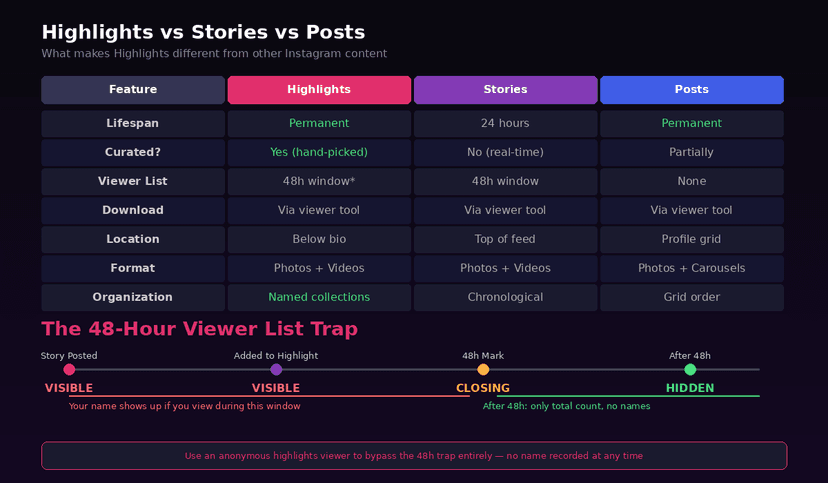
Why does the list disappear?
Because the Highlight is a pointer, not a copy. A Story you add to a Highlight is the same Story, and its viewer list expires on the Story's own schedule — 24 hours from posting, plus the 48 hours the names stay readable afterwards.
Adding it to a Highlight does not restart that clock. A Story archived and then added to a Highlight 6 months later carries no viewer data at all, because the window closed long before.
The mechanics of the underlying list, including why its order is not a ranking, are in what your Story viewer list means.
Step 1: Check inside the window
Open the Story from your own profile while it is still live and tap the viewer count at the bottom left. Every account that opened it is listed, whether they watched it in your Story ring or through a Highlight.
Do it before the window closes. There is no later, and no setting extends it.
Step 2: Note what you want before it goes
Screenshot the list if the information matters. Instagram provides no export, no archive of viewers and no way to recover the names once the 48 hours pass.
The Archive keeps the Story itself and its view count. It does not keep who.
Step 3: Stop looking for a Highlight-level number
No screen anywhere reports Highlight views. Professional accounts see reach and impressions per Story inside the window and nothing per Highlight, so the metric people go hunting for does not exist to be found.
If somebody offers it, they are inventing it. The same is true of tools claiming to name Highlight viewers — the details are in the Instagram highlights viewer.
What about Highlight replies and shares?
Those persist, unlike the views. A reply to a Story inside a Highlight arrives as a DM and stays in the thread, and a share into somebody's Story or DMs behaves the same way it does for any Story.
So the Highlight keeps every trace except the passive one. Somebody who reacted left a record you can read months later; somebody who only watched left nothing after the first day.
Do non-followers show up?
Yes, on a public account, and during the same 24 hours. Anyone can open a public Highlight without following you, and while the Story is live they appear in its viewer list like everybody else.
A private account limits Highlights to approved followers, which is the only control over who reaches them. Watching still registers either way — how to watch Stories without being seen covers the other side of that.
FAQ
The 5 questions below cover what a Highlight reports, for how long, and what it never reports. All answers reflect Instagram's behaviour in September 2026.
Can you see who viewed your Instagram Highlights?
Only within the first 24 hours, through the Story's own viewer list. After that Instagram keeps no viewer data for Highlights at all.
Can you see Highlight viewers after 24 hours?
No. The list expires with the Story, and adding it to a Highlight does not extend or restart that window.
Does Instagram count Highlight views?
No. There is no view count for a Highlight on any account type, including professional accounts with Insights.
Do people know I watched their Highlight?
Only if the Story is under 24 hours old. Watching an older Highlight registers nowhere the owner can read.
Can non-followers watch my Highlights?
Yes, if your account is public. Switching to private is the only way to limit Highlights to approved followers.

Track Your Instagram Unfollowers
Discover who stopped following you and optimize your growth strategy with our free tool.
Discover Unfollowers