How to Remove a Follower Without Blocking
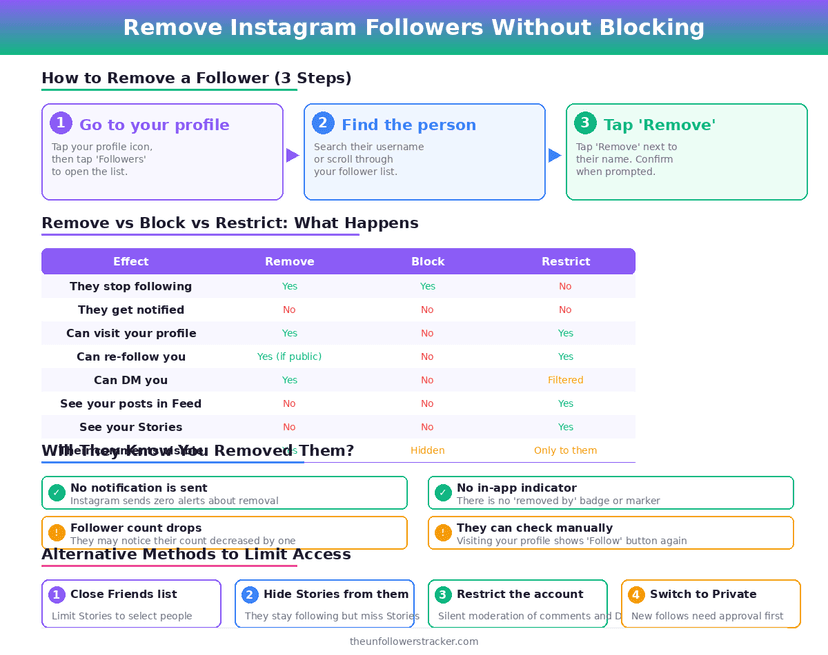
Open your profile, tap Followers, tap the three dots beside the person and choose Remove. Instagram sends them no notification, the removal takes effect at once, and it works the same on a public account as on a private one.
Knowing how to remove followers on Instagram is the easy half. The hard half is that it does not stop them coming back: a removed follower can follow again in 1 tap while your account is public, which is the whole difference between removing somebody and blocking them.
Remove, block or restrict — which one?
Three actions, 3 different outcomes, and people reach for the wrong one often enough that it is worth a table. Only the middle column stops somebody returning.
| Action | They stop seeing your posts | Can they come back |
|---|---|---|
| Remove follower | Only if your account is private | Yes, instantly |
| Block | Yes, completely | No, not while blocked |
| Restrict | No | They never left |
| Go private, then remove | Yes | Only by request |
The 1st row carries the catch. Removing a follower from a public account changes almost nothing they can see: your posts are public, so they can open your profile and read everything a second later.
Does Instagram tell them?
No. There is no notification, no message and no entry in their activity feed, and the same is true whether your account is public or private.
It is not undetectable, though. Their following list no longer contains you, your posts stop appearing in their feed, and a private account they used to see goes locked. Anybody paying attention will work it out within days.
Old likes and comments stay where they are. Removing a follower is not a retroactive erasure, and clearing their traces means deleting those comments yourself.
Step 1: Remove the follower
Open your profile and tap Followers. Find the person, tap the three dots to the right of their name, and choose Remove. The list updates immediately and your follower count drops by 1.
Instagram gives no bulk option here. Removing 50 followers means 50 rounds of the same 3 taps, and there is no supported tool that automates it.
Step 2: Go private if you want it to mean something
On a public account, removal is cosmetic. Switching to private is what turns it into an actual barrier, because a removed follower then has to send a request you can decline.
Open Settings, then Account privacy, and switch on Private account. Do this before or right after the removal — the full checklist is in how to make Instagram truly private.
Step 3: Block instead when the point is to be unreachable
Blocking removes them as a follower and does the rest as well: your profile becomes unfindable for that account, their DMs stop arriving, and their existing comments disappear from your posts.
Blocking is visible in a way that removal is not — a profile reading "User not found" is a clear signal. The trade between the 3 is set out in restrict vs block vs mute.
Do they stop seeing your Stories?
Only on a private account. Stories follow the same rule as posts: a public account publishes them to anyone who opens the profile, so a removed follower still sees every Story you post.
Close Friends is the exception in the other direction. A removed follower drops off your followers list but stays on your Close Friends list until you take them off it, and that list is where the 24-hour Stories you meant for a small group go. Check it after any removal that mattered.
What happens to your messages?
Nothing. Removal is a follow-graph action and leaves the conversation intact — the thread stays in both inboxes, the history is readable, and they can still send you a message.
If the messages are the problem, removal is the wrong tool. Blocking ends the thread's ability to receive new messages, and restricting moves them to your Requests folder silently.
What if you want to remove a lot of them?
That is usually a different problem. Wanting rid of hundreds of followers points at bought or bot accounts rather than at people, and those are better identified than removed one by one.
Instagram's own Remove flow is the only supported route, so a large cleanup is slow by design. Anything promising bulk removal wants your password, and the identification half is covered in detecting fake Instagram followers.
Removing followers is 1 pass of a larger audit. Which of the other cleanup tasks change something and which are theatre is set out in the Instagram cleanup checklist.
FAQ
The 5 questions below cover what removal does, what it does not, and how it differs from blocking. All answers reflect Instagram's behaviour in September 2026.
Does Instagram notify someone when you remove them as a follower?
No. Instagram sends no notification at all. They can only find out by checking whether they still follow you.
Can a removed follower follow me again?
Yes, immediately, if your account is public. On a private account they have to send a follow request that you can decline.
Does removing a follower delete their likes and comments?
No. Everything they left on your posts stays visible. Blocking removes their comments; removing them does not.
Can I remove followers in bulk?
Not through Instagram. Removal is one account at a time, and tools claiming to do it in batches need your login credentials.
Is removing a follower the same as blocking?
No. Removal takes them off your followers list and lets them return; blocking makes your profile unreachable for them entirely.

Track Your Instagram Unfollowers
Discover who stopped following you and optimize your growth strategy with our free tool.
Discover Unfollowers