How the Instagram Explore Page Decides What You See
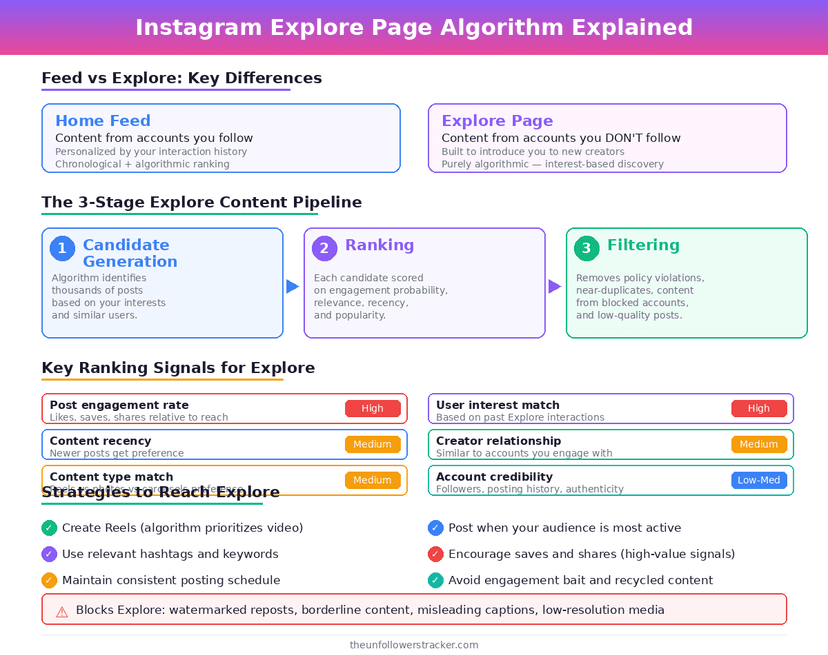
Explore ranks almost entirely on what you do with posts, not on what you look at. Saving, sending to a friend, watching a Reel to the end and liking are the strong signals; opening a profile, scrolling past and searching are close to invisible to it.
That is why the Instagram Explore page fills with things you never searched for. It is modelling people who behave like you rather than reading your intentions.
What feeds Explore?
Five inputs, and the top 2 do most of the work. Notice that the actions with the most weight are also the quietest ones socially — a save tells nobody, and it tells the model a great deal.
| Signal | Weight in Explore |
|---|---|
| Posts you saved | High |
| Posts you sent to somebody | High |
| Reels watched to the end, or replayed | High |
| Likes and comments | Medium |
| Accounts you opened without interacting | Low |
Explore is also the surface with the strictest content rules. Posts that break the Recommendation Guidelines are excluded from it while staying perfectly visible on their own profile, which is why an account can look healthy and reach nobody new.
Why does it show things I never searched for?
Because your search history is not one of its inputs. Explore builds from the accounts and posts that people with a similar interaction pattern engaged with, so a topic can arrive without you ever having typed it.
Searching is stored, but for you rather than for the model — where that history lives and who can read it is in can someone see if you searched them.
The other common surprise is a single save 3 months ago. High-weight signals persist, so 1 deliberate action can shape a corner of Explore long after you have forgotten it.
How do you retrain Explore?
Four steps, in order of effect. The 1st 2 change the model; the last 2 change what you are shown out of it.
Step 1: Use Not interested
Press and hold any post in Explore and choose Not interested. This is the only direct negative signal the surface accepts, and it works faster than people expect when used on several posts in a row.
Step 2: Change what you save and send
Saves and sends carry the most weight, so they are the fastest way to steer it. Saving 5 posts on a topic you actually want moves Explore further than an hour of scrolling ever will.
Step 3: Check Your Algorithm
Instagram's Your Algorithm dashboard reached Explore in April 2026, after Reels in December 2025. It shows the topics the model has attached to you and lets you turn them down directly — the wider picture is in how the Instagram algorithm works.
Step 4: Give it a week
Ranking models update over days, not taps. Judging the result immediately after a session of Not interested is the most common way people conclude that none of this works.
What does not reset Explore?
Clearing your search history. Logging out. Deleting the app. Switching account type. None of these touch the interaction history Explore is built from, and all of them circulate as fixes.
Saving is worth a special mention because of how quiet it is. A save notifies nobody and appears nowhere, which makes it easy to forget that it is the strongest thing you can tell the model — the notification map is in does Instagram notify when you save a post.
FAQ
The 5 questions below cover what drives the Instagram Explore page, what actually retrains it, and which fixes do nothing. All answers reflect Instagram in September 2026.
How does the Instagram Explore page choose posts?
It ranks on your interactions — saves, sends, completed Reels, likes — and on what people with similar patterns engaged with. Your searches are not an input.
Why does Explore show things I never searched for?
Because search is not part of the model. Explore predicts from behaviour patterns, so topics arrive through people like you rather than through anything you typed.
Does Not interested actually work?
Yes, and it is the only direct negative signal Explore takes. Use it on several posts and give the model a few days.
Does clearing my search history reset Explore?
No. Search history and Explore ranking are separate. Clearing one changes nothing about the other.
Why is my content not reaching Explore?
Either the ranking signals are weak, or the post falls outside the Recommendation Guidelines, which excludes it from Explore while leaving it visible on your profile.

Track Your Instagram Unfollowers
Discover who stopped following you and optimize your growth strategy with our free tool.
Discover Unfollowers