Does Instagram Notify When You Save a Post or Reel?
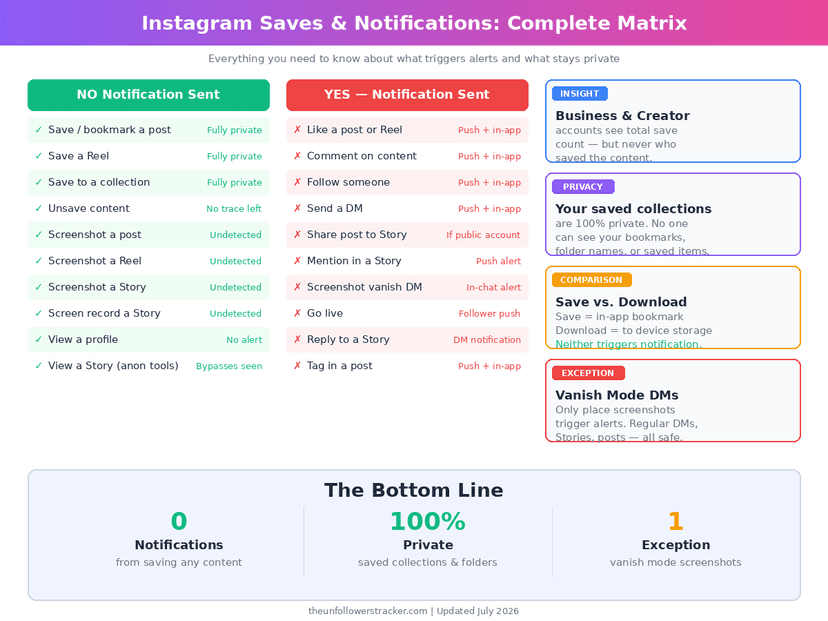
Instagram sends no notification when you save a post or a Reel. The account that posted it gets no alert, no badge, and no name. A professional account can see a running total of saves in Instagram Insights, but the number carries no identities.
Saving is one of the few Instagram actions that leaves nothing behind.
Can people see your bookmarks on Instagram?
People who ask does Instagram notify when you save a post are usually worried about a second thing as well: whether the saved list itself can be opened.
Nobody can open your saved items. The bookmark tab lives inside your own profile menu, and Instagram gives no other account a route to it, including the person whose post you saved. Collection names are private too, so a folder called "apartment ideas" or "his account" is visible only to you.
That privacy is the whole design of the feature. A bookmark on Instagram is a personal filing cabinet, not a public signal like a like or a comment, and Unfollowers Tracker has never seen a single API field that exposes an individual save to anyone but the person who made it.
If you save a Reel, will your followers know?
Your followers see nothing. Saving a Reel adds no entry to any activity feed, and unlike the old public "Following" activity tab that Instagram removed in March 2019, there is no surface left where one person's engagement is shown to their followers.
The behaviour is identical for a Reel with 12 views and a Reel with 12 million. Account size, account type and whether you follow the creator change nothing about a save.
What can a creator actually see about your save?
A creator on a professional account sees a count and nothing else — for example "47" beside a bookmark icon. Instagram never attaches names to that number, never shows a timestamp, and never lets the creator sort or export it. Personal accounts see no save data at all, not even the total.
Here is the exact screen a creator looks at, so you can judge for yourself how much it gives away.
Step 1: Open the post from your own profile grid
The save count lives on individual posts, not in the account-level dashboard. A creator opens their profile and taps the post they want to check.
Step 2: Tap "View insights" under the post
The link sits directly beneath the post, under the like and comment row. It appears only on Business and Creator accounts.
Step 3: Scroll to "Content interactions"
Likes, comments, shares and saves are grouped together in this block. The save figure is the one next to the bookmark icon.
Step 4: Read the number, because there is nothing else to read
Tapping the save count does nothing. There is no list behind it. A creator who sees 47 saves knows 47 people found the post worth keeping and cannot learn a single thing about who they were.
Which Instagram actions do send a notification?
Saving sits in the silent half of a short list. The table below is the whole picture as of September 2026 — every row was checked against current app behaviour rather than carried over from an older version of this page.
| Action | Creator notified? | Creator sees a count? |
|---|---|---|
| Save a post or Reel | No | Yes, aggregate only |
| Save to a named collection | No | No |
| Unsave | No | The total drops by one |
| Screenshot a post or Reel | No | No |
| Screenshot a Story | No | No |
| Screenshot a disappearing DM photo | Yes | — |
| Screen record a disappearing DM photo | Yes | — |
| Add someone to Favorites | No | No |
| Like a post | Yes | Yes |
| Comment | Yes | Yes |
| Share a post to your Story | Yes | Yes |
| Send a post by DM | No | Yes, aggregate only |
One row is the exception people get caught by. A photo or video sent as a disappearing message in a DM — the one-view or vanish-mode kind — is the only content Instagram defends: since December 2024 it blocks the screenshot, and alerts the sender where one gets through. Regular Story screenshots have not notified anyone since Instagram withdrew that test in 2018.
Does unsaving a post tell them anything?
Unsaving is as quiet as saving. No alert leaves your device, and the creator's total simply shows one fewer save the next time they open Insights.
A creator with 47 saves who later sees 46 has no way to work out which account changed its mind. Instagram gives no timestamps in that view, so the number is a level, not a history.
Is downloading a Reel the same as saving it?
Saving and downloading are different actions with the same silence. A save stores a pointer inside Instagram; the file stays on Instagram's servers, and the post disappears from your saved tab if the creator deletes it. A download puts the actual video file on your device, where it survives whatever the creator does next.
Neither one notifies anybody. Instagram has no mechanism to detect that a file reached your camera roll, which is also why a tool like the Instagram posts viewer can open public content without touching the creator's notifications.
Does saving a post help the creator?
Saving helps the creator more than liking does, which is the honest reason to keep saving posts you actually value. Instagram's own ranking explainer lists likes, saves and shares as the interactions it predicts, and says the speed of saves counts for far more in Explore than it does in Feed or Stories (Instagram Ranking Explained).
So a save is an anonymous vote. The creator learns that the post was worth keeping and learns nothing about who kept it.
FAQ
Can someone see if I saved their post to a specific collection?
No. Collection names and their contents are private to your account, and the creator cannot see that you saved the post at all, let alone where you filed it.
Does Instagram notify when I add someone to Favorites?
No. Instagram's own announcement of the feature states that people are not notified when they are added or removed, and the list holds up to 50 accounts. More detail is in our guide to Instagram Favorites.
Can a third-party app show a creator who saved their posts?
No. Instagram's API exposes no per-user save data, so any app advertising a list of savers is either guessing or inventing it. The creator-side limits are covered in can you see who saved your Instagram post.
Will Instagram ever add save notifications?
Nothing announced, and the incentive runs the other way. Saves are valuable to Instagram precisely because they are private — people bookmark far more freely when nobody is watching, which is what makes the signal worth ranking on.
Does saving a private account's post work the same way?
Yes, if you are approved to follow the account. The save is silent, the content stays visible to you in your saved tab while you remain a follower, and it disappears from that tab if the account removes you.

Track Your Instagram Unfollowers
Discover who stopped following you and optimize your growth strategy with our free tool.
Discover Unfollowers