How to See Instagram Followers Without Them Knowing
Instagram sends no notification when you open someone's followers or following list, and it keeps no record you could be found in. On a public account anyone can read both lists, signed in or not. On a private account nobody outside the approved followers can read either one, and no tool changes that.
Can you see a private account's followers?
No, and this is the question most people arrive with. A private profile's follower and following lists reach only the accounts it has approved. The 3 counts stay public above the lock; the names behind them load for nobody else, signed in or signed out.
That limit sits on Instagram's servers, not in the app. A request from an unapproved account returns a permission error rather than a partial list, which is why every site advertising a "private following list viewer" is selling something else — the mechanics are in private Instagram viewer scams.
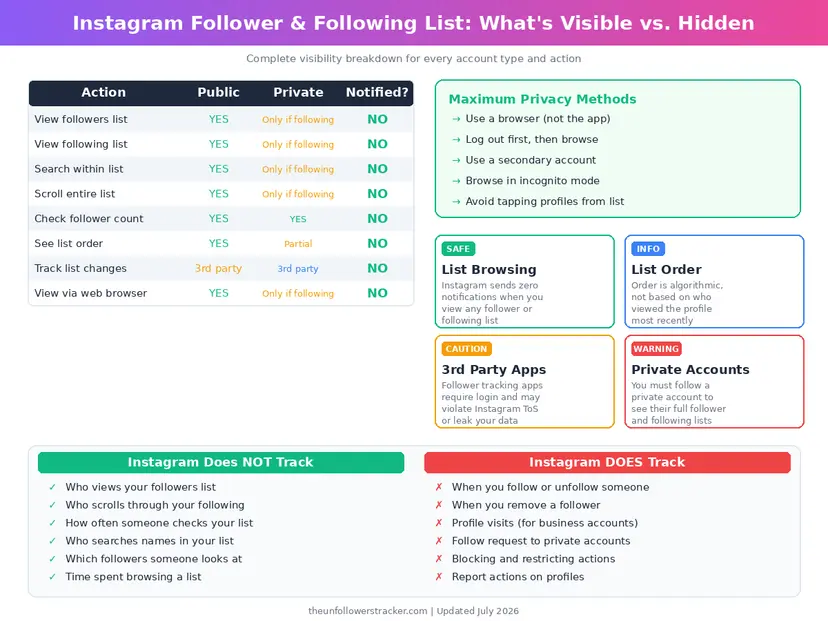
Does Instagram tell someone you looked at their followers?
No notification exists for it. You can see Instagram followers without them knowing because opening a list is not an event Instagram reports, counts or stores against your name — unlike a Story view, which names you for 24 hours.
The account owner sees exactly 1 thing about their lists: the totals, which they would see anyway. There is no visitor log behind them.
| What you do | Owner is notified | Owner can identify you |
|---|---|---|
| Open their followers list | No | No |
| Open their following list | No | No |
| Scroll the whole list | No | No |
| Search inside the list | No | No |
| Open it signed out, through a viewer | No | No |
| Open it 50 times | No | No |
| Follow someone from the list | Yes | Yes |
| Open a private account's list | — | Not possible at all |
Only the follow button changes anything, and that is the action people take by accident while scrolling.
How do you browse a follower list without signing in?
Instagram blocks logged-out browsing after 3 or 4 taps, so reading a public list without an account takes a viewer rather than patience. 4 steps, no login, and nothing in them reaches the account owner.
Step 1: Copy the username
Everything after instagram.com/ and before the next slash. The @ is not part
of it.
Step 2: Open the profile viewer
The Instagram profile viewer loads the public profile with its counts, grid and Highlights, without a login and without an account of your own.
Step 3: Read what is public
A public account's information is open by definition. A private one is not, and no tool on the internet changes that — the counts will load, the names will not.
Step 4: Avoid the follow button
The single way to turn a silent visit into a notification is to tap follow while scrolling. It is easy to do by accident on a phone.
Does the order of a follower list mean anything?
Not what people assume. Instagram orders a follower list by its own relevance model, built from 3 things — recent interactions, mutual connections and the accounts you engage with — and not by who followed first or who looks at whom.
The order also differs per viewer. Two people opening the same account's list see different sequences, which is enough to disprove every theory built on whose name appears at the top.
For the following list, the order does mean something: Instagram returns a public profile’s following list newest-first, so the accounts at the top are the ones followed most recently. Our free recent follow tracker reads that order for any public username — type a handle and see who someone recently followed, no login, and the profile owner is never notified.
Can a third-party app tell someone who browsed their list?
No app has that data, because Instagram never generates it. All 3 possible routes are closed — no API field, no export, no setting — so a tool claiming to show who read a follower list is inventing the names.
The same is true in reverse. Apps that track follower changes work by comparing snapshots of the public list over time — they see who left, never who looked.
What does a follower list actually tell you?
The 2 lists carry more signal than the follower count does. A following list shows what an account chooses to read, which is usually more revealing than what it posts, and the overlap between two accounts' lists exposes a shared circle without anyone announcing it.
What the lists do not show is order of arrival, dates, or anything about who has been reading them. Instagram publishes no timeline for either list.
How do you keep your own lists private?
Switch the account to private. That closes both lists to everyone you have not approved, and it is the only control Instagram offers over them — there is no setting that hides the lists while leaving the account public.
The counts stay visible either way. Instagram publishes all 3 numbers — followers, following and posts — on every profile regardless of privacy, as covered in how to make your account truly private.
FAQ
Can I see a private Instagram account's followers?
No. Only approved followers see those lists. The counts remain public above the lock, and no third-party tool can retrieve the names behind them.
Does Instagram notify when you look at someone's following list?
No. Instagram has never sent a notification for it, and the account owner has no log or list showing who opened theirs.
Can I browse a follower list without an account?
Yes, on a public profile, through a viewer that reads public data without a login. Instagram's own site cuts logged-out browsing off after about 3 taps.
Why does the follower list appear in a different order each time?
Instagram sorts it by relevance to whoever is looking, so two people see two orders. It is not a ranking of closeness and not the order people followed in.
Can someone tell I searched for them inside their follower list?
No. Searching within a list happens on your device and sends nothing that identifies you to the account owner.

Track Your Instagram Unfollowers
Discover who stopped following you and optimize your growth strategy with our free tool.
Discover Unfollowers