Can Someone See If I Viewed Their Instagram Profile?
No. Opening someone's profile, reading their bio and scrolling their grid leaves nothing behind on Instagram — no notification, no list, no counter they can open. What gives you away is never the visit itself but the taps around it: a Story opened, a like, a follow.
So the useful version of the question is not whether they can see the visit. It is which of the 12 things you might do while you are there carry your name, and which do not.
What does the account owner actually see?
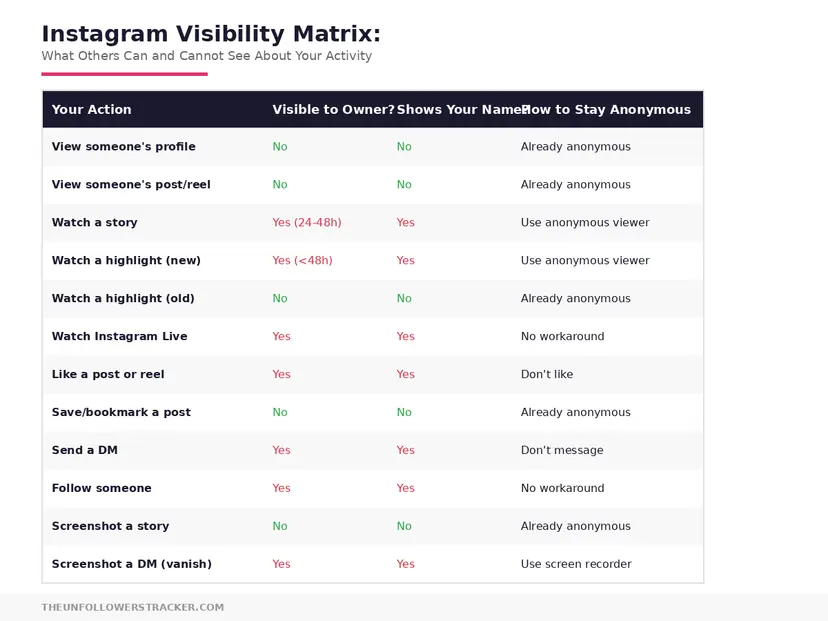
Instagram attributes some actions to you and not others, and the split is consistent enough to memorise: deliberate interactions carry your username, reading carries nothing. The table below covers everything you can plausibly do on somebody else's account, and 6 of the 12 rows leave no trace at all.
| What you do on their account | Do they see your name |
|---|---|
| Open their profile | No |
| Scroll their grid | No |
| Open one of their posts | No |
| Watch a Reel from their profile | No |
| Search for their username | No |
| Screenshot a post or Story | No |
| Open a Story in the last 24 hours | Yes, on the viewer list |
| Open a Highlight under 48 hours old | Yes, same list |
| Like or comment | Yes, immediately |
| Follow, or request to follow | Yes |
| Unfollow | Only if they check their follower list |
| Send a message | Yes, as a request if you are a stranger |
Six of those 12 leave nothing at all. The confusion around can someone see if I viewed their Instagram profile comes almost entirely from the 2 rows in the middle, because a Story is often the thing people open first.
Why do Stories name you and profiles do not?
Because Instagram treats opening a Story as an interaction and opening a profile as reading. A Story is a piece of content someone published with a 24-hour life, and the viewer list is part of how it works.
The distinction holds everywhere in the app. Anything you press — like, comment, follow, share, Story tap — carries your username. Anything you merely look at — profile, grid, post, search result — carries nothing.
Highlights sit exactly on the seam and catch people out. A Highlight names you only while the Story inside it is under 48 hours old; past that there is no viewer list at all, which is covered in can people see if you watch their Highlights.
Can they see how many times I looked?
No, because the first view is not recorded either. There is no counter to increment, so visiting once and visiting 40 times produce identical evidence: none.
The count question is worth answering plainly, because it is the fear underneath most versions of this one. Repeated visits to a profile, a grid or a post are invisible in exactly the same way a single visit is.
Do business and creator accounts see more?
A professional account sees a number, never a name. Business and creator accounts get a profile visits total in Insights covering the last 7 days, aggregated across everyone who came, with no way to attribute any part of it to a particular person — and personal accounts get no figure at all.
The profile-visits total is also why the myth persists. The owner really does see something they did not see before, and it is easy to assume names come with it. They never have, and no announcement suggests they will, which is the subject of is Instagram adding who viewed your profile.
Does showing up in their suggestions mean they saw me?
Suggested accounts are not a visitor list in disguise, and no evidence supports the theory. Instagram builds suggestions from mutual follows, synced contacts and accounts that interact with the same content — signals that exist whether or not either of you has ever opened the other's profile, and that do not change when somebody looks at you.
The theory feels true because it is unfalsifiable. Two people who think about each other tend to appear in each other's suggestions for ordinary reasons, and each takes it as confirmation.
How do you undo what you already left?
Three of the attributable actions can be reversed and 1 cannot, so the order matters. Undo the like first, because it is the one that fires a push notification the moment it happens; the follow request and the comment can wait a minute without changing anything.
Step 1: Remove an accidental like
Tap the heart again straight away. The like disappears from the post, and it disappears from their activity feed too — the notification is removed rather than left behind as a record.
The alert may have landed anyway. A push notification that already reached their lock screen is not recalled by unliking, so speed is the whole game here.
Step 2: Withdraw a follow request
Open their profile and tap Requested to cancel. A pending request stops being visible to them, and on a private account it disappears before they have decided anything.
An accepted follow is different — undoing that is an unfollow, which shows up only if they compare their follower list against memory.
Step 3: Delete a comment
Press and hold your own comment and delete it. It vanishes from the post for everyone, including anybody who had not read it yet.
The notification behaves like the like: removed with the comment. What you cannot control is whether they read it in the seconds it existed.
Step 4: Accept the Story view
A Story view cannot be withdrawn. Once your name is on that list it stays for the 24 hours the Story runs, and neither blocking, unfollowing nor deleting your own account reliably clears it.
If you want to read Stories without joining that list at all, that is a different mechanism from anything above — the signed-out route is in browsing profiles anonymously.
FAQ
The 5 questions below cover what a profile visit leaves behind, what the owner can see instead, and which actions can still be undone. All answers reflect the app in September 2026.
Can someone see if I viewed their Instagram profile?
No. Instagram records no profile visitors on any account type, so there is nothing for the owner to look at, and no notification is sent.
Can someone tell if I looked at their profile many times?
No. The first view is not recorded either, so 1 visit and 40 visits leave the same evidence — none at all.
Can a business account see who viewed their profile?
No. Insights shows a 7-day total of profile visits with no names attached, and that total is the only extra thing a professional account gets.
Does viewing someone's post or Reel notify them?
No. Opening a post or watching a Reel from a profile is invisible. Only liking, commenting or sharing puts your name on it.
If I unlike a post quickly, do they still get the notification?
The notification is removed with the like, but a push alert that already reached their phone is not recalled. Speed decides it.

Track Your Instagram Unfollowers
Discover who stopped following you and optimize your growth strategy with our free tool.
Discover Unfollowers