Instagram Viewer Tools Compared: What Actually Works
Instagram viewer tools come in 4 categories, and they are not equivalent. Web-based viewers ask for nothing and read public content; extensions, apps and desktop software all want access you should not give, and none of the 4 can open a private account.
The difference is what they ask for, not what they can reach.
What can any viewer tool actually do?
All 4 categories of Instagram viewer tools do the same single thing: fetch public content without putting you through the login wall. A public profile, its grid, its Reels, its Highlights and its live Stories are readable by anyone; the wall is a growth prompt rather than a lock.
No category reaches further than that. Private accounts, DMs, Close Friends Stories and subscriber posts are gated on Instagram's own servers, so the ceiling is identical for a website and for a paid desktop application.
Which category should you use?
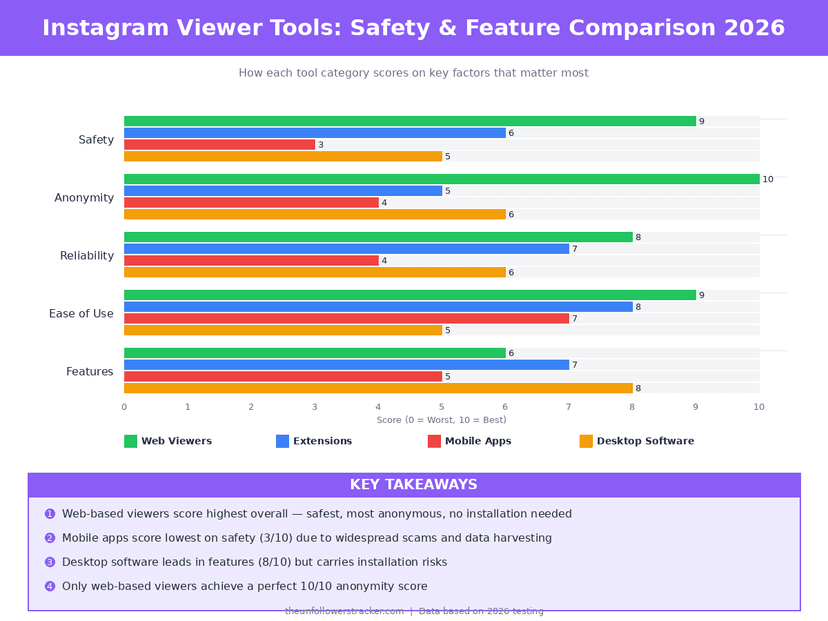
A web viewer, unless you have a reason not to — it is the only 1 of the 4 that never touches your device or your session. Every row below reflects what these tools can do as of September 2026, across 8 points of comparison.
| Web viewer | Browser extension | Mobile app | Desktop software | |
|---|---|---|---|---|
| Reads public content | Yes | Yes | Yes | Yes |
| Reaches private accounts | No | No | No | No |
| Needs an install | No | Yes | Yes | Yes |
| Wants your Instagram login | No | Often | Often | Usually |
| Can read your logged-in session | No | Yes | Sometimes | Sometimes |
| Survives an update that breaks it | — | Often abandoned | Often abandoned | Often abandoned |
| Costs money | Rarely | Sometimes | Subscription | One-off or subscription |
| Leaves anything on your device | No | Yes | Yes | Yes |
The row that decides it is "can read your logged-in session". A browser extension granted access to instagram.com sees the account you are signed into — every DM, every private post you can see, every page you open — which is far broader access than any website obtains.
Why are browser extensions the worst option?
An extension asks for permission to read and change data on a site, and people grant it without reading the sentence. That permission is not scoped to the feature you wanted; it covers the whole domain, permanently, in the background.
Extensions also change hands. A useful one gets bought, an update adds tracking or ad injection, and the permission you granted the original developer transfers silently to whoever owns it now. The permission survives every one of those handovers, because it was granted to the extension rather than to a person.
What about mobile apps?
The app stores are the noisiest end of this market, and most listings promising Instagram viewing are subscription traps. The pattern repeats almost word for word: a 3-day free trial, a weekly charge after it, and functionality that does no more than a free website does in 1 step.
Some go further and ask you to sign in with Instagram, which is the credential harvest described in private Instagram viewer scams. An app asking for your Instagram password to show you public content has no technical reason to need it.
How do you check a tool before using it?
4 questions settle it, they take about 30 seconds, and none of them requires running the tool. Any single failure is enough to close the tab — these are not weighted signals to balance against each other, because a tool that fails one of them is not a borderline case.
Step 1: Does it ask for your Instagram login?
If yes, stop. Public content needs no credentials, so the request has exactly one purpose.
Step 2: Does it claim private accounts?
If yes, stop. The claim is impossible, so everything else on the page is written by someone comfortable lying to you.
Step 3: Does it want an install or a survey?
A website that returns results in the browser has no reason to need either. Both are monetisation steps rather than technical ones.
Step 4: Does it fail honestly?
Type a username that does not exist. An honest tool says so within a second; a scam runs an animation and then asks for something.
What does a legitimate tool look like?
A legitimate tool takes a username, returns public content, and asks for nothing else. That is 4 absences — no account, no install, no verification step, no payment — plus 1 clear statement that private accounts are out of scope. Our own profile viewer is built to that shape.
That is a low bar, and most of the market fails it. The reason is that honest tools have nothing to sell beyond the tool, while the dishonest ones are selling your credentials, your phone number or your attention.
If you only need to read a public profile once, viewing without an account at all skips the comparison entirely.
FAQ
The 5 questions below are the ones that decide which category to trust, and all 5 answers hold across every tool in that category rather than for one product. Checked against behaviour in September 2026.
Do any Instagram viewer tools work on private accounts?
No, in any of the 4 categories. Private content never leaves Instagram's servers for unapproved accounts, so there is nothing for a tool to fetch.
Are browser extensions safe for Instagram?
They are the riskiest category. An extension with access to instagram.com can read your logged-in session, which is far more than a website can ever see.
Is a paid Instagram viewer better than a free one?
No. Paying changes the business model, not the technical ceiling. A paid tool reaches exactly the same public content a free one does.
Will using a viewer tool get my account banned?
Reading public content without signing in involves no account, so there is nothing to ban. Handing your credentials to a third party is the thing that puts an account at risk.
Can the account owner tell which tool I used?
No. A signed-out fetch carries no identity, so the owner learns neither that you looked nor what you looked with.

Track Your Instagram Unfollowers
Discover who stopped following you and optimize your growth strategy with our free tool.
Discover Unfollowers