Anonymous Instagram Viewer: How to Browse Instagram Without an Account or a Trace
Instagram has over 2 billion monthly active users. But roughly 40% of US internet users aren't among them. When someone texts you a profile link and Instagram demands a login before showing you a single photo, the problem is obvious: public content locked behind a wall that exists to harvest data, not protect privacy.
An anonymous instagram viewer removes that wall. You type a username, and the tool loads everything the account owner made public — stories, highlights, reels, posts, profile data. No account needed. No app. No trace left for anyone to find.
But "anonymous" means different things for different content types. Some parts of Instagram track who views them. Others don't. Knowing the difference is what separates informed browsing from accidental exposure.
Which Instagram Content Tracks Your Identity (And Which Doesn't)
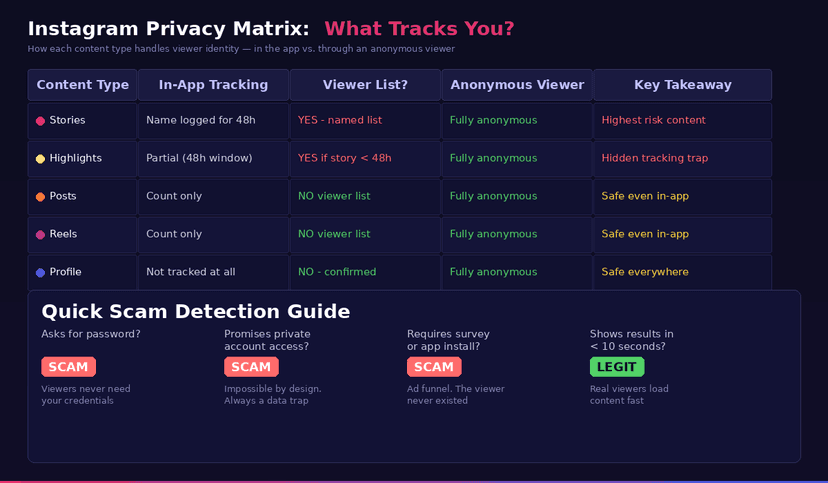
Not all Instagram content works the same way for viewer tracking. Here's what happens when you open each type from the regular app with a logged-in account.
Stories track you by name. Every Story view gets logged to a viewer list that the poster can check for 48 hours. Your username, your profile photo, your name — all visible. The list is sorted by engagement, so if you interact with that account often, you land near the top.
Highlights partially track you. A Highlight is a saved Story. If the Story inside it was added within the last 48 hours, the original viewer list is still active. Your name shows up even though you accessed it through a Highlight, not the Story feed. After 48 hours, tracking stops.
Posts never track individual viewers. The creator sees like counts and comments, but there is no viewer list for photos, carousels, or video posts. You can scroll through someone's entire grid, and they'll never know.
Reels never track individual viewers either. The creator sees a total view count — a number, not a list of names. No way to identify who watched.
Profile visits are invisible. Instagram confirmed in their Help Center that profile visits are not tracked or shown to the account owner. Apps claiming to reveal "who viewed your profile" fabricate data from the follower list.
The bottom line: Stories and recent Highlights are the two places where your identity gets recorded. Everything else is safe even from the app. An anonymous viewer protects you across all five types — but for Stories and Highlights, the protection actually matters most.

What an Anonymous Instagram Viewer Actually Does
The mechanics are simple. Instead of your browser talking to Instagram under your session, the viewer's servers make the request. Instagram sees traffic from the tool's infrastructure, not from your account. No session token, no cookies, no viewer-list entry.
This is different from using incognito mode. Private browsing hides your history from your own device, but Instagram still blocks logged-out users after a few posts. The login wall fires regardless of browser mode.
It's also different from a VPN. A VPN hides your IP address from Instagram, but if you're logged in, your account identity still gets recorded on viewer lists. A VPN changes where you connect from. An anonymous viewer changes whether you connect as you at all.
What the viewer does not do: bypass private accounts. If someone set their profile to private, the content is locked behind follower approval. No legitimate tool can access it. Any tool claiming otherwise is running a scam. This limit exists by design, and it's a feature — private means private.
Five Content Types, One Search Bar
Our Anonymous Instagram Viewer works as an instagram content viewer for all five types from a single page. Search a username once, then switch between tabs to browse what you need.
Stories. Active Stories appear as cards with thumbnails. Click to view in full resolution. Video Stories play directly in your browser. Each one has a download button — images save as JPEG, videos as MP4. Your name never appears on the poster's viewer list. Browse Stories anonymously →
Highlights. Every pinned Highlight collection loads with covers and titles. Click into any collection to see the individual stories inside. Download individual clips or scroll through entire sets. No risk from the 48-hour viewer list trap. Browse Highlights anonymously →
Posts. The full photo and video grid loads in chronological order. Captions, hashtags, and like counts are included. Carousels show all slides, not just the cover image. Download any photo as JPEG or video as MP4. Browse Posts anonymously →
Reels. Short-form videos play at full quality with no autoplay queue of unrelated content. One-click MP4 download. No accidental likes, no accidental reposts — the button-placement hazards from the Instagram app don't exist here. Browse Reels anonymously →
Profiles. Bio, avatar, follower and following counts, total post count, website link — all visible without login. A quick way to check an account's public presence without joining the platform. Browse Profiles anonymously →
Works on any device with a browser. No app install. No registration.
The Hidden Costs of Making an Account Just to Browse
Some people create Instagram accounts purely to view content. Others set up burner accounts for anonymous browsing. Both approaches carry costs most users don't consider.
Phone verification is mandatory. Instagram requires a real phone number for new accounts. Disposable numbers get flagged. Your phone number connects the account to your identity even if you use a fake name.
Device fingerprinting links your accounts. Instagram ties burner accounts to your main account through device ID, IP address, and contact list syncing. A "separate" account on the same phone is not separate in Instagram's database.
Inactive accounts get purged. Instagram's bot detection flags new accounts with zero posts and high browsing activity. Most browse-only accounts get suspended within weeks.
The algorithm watches everything. Even a burner account feeds Instagram's recommendation engine. The profiles you view influence what the account owner sees in their "suggested users" list. Your browsing shapes your ad profile, your Explore feed, and the behavioral model Instagram builds about you.
The time cost compounds. Maintaining a burner means periodic logins, occasional activity to avoid suspension, and managing two sets of credentials. For a tool you could use in 10 seconds without any of that overhead, the math doesn't work.
An instagram viewer online skips every one of these costs. No account to create, no phone number to surrender, no fingerprint to accumulate, no algorithm to feed. Open, search, view, close.
Three Steps to Browse Any Public Profile
The process is the same regardless of which content type you're after.
Search. Open the Anonymous Instagram Viewer and enter any public account handle. You can also drop in a full profile link — the tool pulls the username from it on its own.
Browse. Content loads in seconds. Switch between Stories, Highlights, Posts, Reels, and Profile using the tabs. Everything renders in your browser at the same resolution Instagram serves in the app.
Download. Each content piece has a download button. Photos save as JPEG or PNG, videos as MP4 with audio. Files arrive at the creator's original upload quality. Save what you need, close the tab, done.
No CAPTCHA. No "complete a survey." No email verification. This instagram viewer without login handles public accounts only — and tells you that upfront rather than pretending to offer more.
When Anonymous Viewing Solves a Real Problem
Most guides list generic use cases. Here are the specific scenarios where a viewer is the right tool — and the situations where it's overkill.
Worth using: You don't have Instagram and someone sent you a link. You're comparing vendor portfolios without alerting competitors. You research brands and don't want your browsing shaping your ad profile. You left Instagram for personal reasons and need to check a specific post. You want to view Stories or Highlights without your name appearing.
Skip it: You already follow the account and don't mind being visible. You're checking a single post from someone you know — the app doesn't track post views anyway. You only need to see a profile photo — Google Images might have it cached.
The clearest use case is view instagram without account access. If you don't have an account and don't want one, a viewer is the only reliable option. Direct browser access shows three posts before the login wall drops, and that limit has only gotten stricter since 2023.
The 10-Second Scam Test
The first page of search results for "anonymous instagram viewer" is full of traps. You can filter them almost instantly with four checks.
Does it ask for your password? Close the tab. A viewer accesses public data. It never needs your credentials.
Does it promise private account access? Lie. Private content requires follower approval. No web tool bypasses that. These sites exist to collect personal data through fake "verification" steps.
Does it make you complete a survey or install an app? Ad funnel. The viewer never existed. You'll fill out forms, maybe hand over a phone number, and never see any content.
Does it show results within 10 seconds? A real viewer loads content fast. If you've been watching a progress bar for a minute, you're looking at theater, not a tool.
A legitimate anonymous ig viewer is boring. Username in, content out, public accounts only, no surprises. If the experience feels complicated, something is wrong.
FAQ
Is an anonymous Instagram viewer actually anonymous?
Yes. The viewer requests content from Instagram's public endpoints without attaching your account session. No login, no cookies, no session token. The account owner's viewer list and analytics stay untouched. This applies to all content types — Stories, Highlights, Reels, Posts, and Profiles.
Can I view private accounts with this tool?
No. Private accounts restrict all content to approved followers. No legitimate tool can bypass this restriction. Any viewer claiming access to private content is collecting your personal data through fake verification flows.
Is it legal to use an anonymous Instagram viewer?
Yes. Public content is public by the account owner's choice. The Ninth Circuit's hiQ Labs v. LinkedIn ruling (2022) confirmed that accessing publicly available social media content through third-party tools does not violate computer fraud laws. The legal boundary sits at what you do after viewing — research and personal reference are fine, republishing without credit is not.
What devices does the viewer work on?
Anything with a browser. Phone, laptop, tablet, Chromebook — it doesn't matter. The viewer is a web page, not software. Open it in whatever browser you already use and it works.
Can I download content through the viewer?
Yes. Stories, Highlights, Reels, and Posts all have individual download buttons. Images save as JPEG or PNG, videos as MP4 with audio. Files download at the same quality the creator uploaded. Copyright still belongs to the creator — download for personal use, research, or fair-use purposes only.
How is this different from just using Instagram in a browser?
Instagram's login wall blocks content after a few posts for logged-out visitors. Even if you see some thumbnails, the full grid, Stories, Highlights, and Reels are all gated. Our viewer accesses the same public data without hitting that wall and without creating any session on Instagram's servers — so watch instagram anonymously without the platform knowing you visited.
Track Your Instagram Unfollowers
Discover who stopped following you and optimize your growth strategy with our free tool.
Discover Unfollowers