Instagram Posts Viewer: How to View Instagram Posts Without an Account

Instagram cut off logged-out browsing in 2023. Open any profile link today without signing in, and you see three posts before a login wall drops. The feed is public. The photos are public. But Instagram demands an account before it shows you anything useful.

An Instagram posts viewer bypasses that wall entirely. Paste a username, and the tool pulls every public post — photos, carousels, videos, captions, hashtags. No Instagram account needed. No login. No trace left for the profile owner to find.

This guide covers how to view Instagram posts without an account, what an anonymous Instagram post viewer actually shows, where the scams hide, and how to use our free Instagram posts viewer to browse any public feed in seconds.

Why Instagram Hides Public Posts Behind a Login Wall

Public posts on Instagram are public by design. The account owner chose that setting. Google indexes them. Instagram’s own API serves them to authorized apps. Yet Instagram blocks casual browsing without an account.

The reason is business, not privacy. Logged-out visitors don’t generate engagement signals — no likes, no saves, no comments, no session data for the ad algorithm. Instagram’s ad revenue depends on knowing who views what, for how long, and what they interact with next. A logged-out visitor is invisible to that machine, and invisible visitors don’t generate ad dollars.

The login wall appeared alongside a broader push toward account creation. Instagram wants more signed-in users, not more anonymous browsers. But the content itself remains public. Post viewers simply access it through a different path — one that doesn’t require you to join the platform first.

What You Actually See Through an Instagram Posts Viewer

A posts viewer reconstructs the same grid you’d browse inside the app — but without the login requirement, the algorithmic feed, or the “suggested posts” clutter. Here’s what loads when you search a public username:

Every photo, carousel, and video from the account’s feed appears in chronological grid order. Captions render in full, including hashtags, mentions, and emoji. Like counts display next to each post. For carousels, all slides load — not just the cover image — so you can swipe through an entire product showcase or photo series without missing frames.

Videos play natively in your browser tab. No “open in Instagram” redirect, no app prompt, no autoplay of unrelated Reels underneath. Just the video the creator uploaded, at full resolution, with a download option for MP4.

Post metadata comes along for the ride: publish date, engagement figures, caption length, and hashtag selections. This is where a posts viewer becomes a research tool rather than just a browsing convenience — you can scan months of content strategy in a few scrolls instead of tapping through Instagram’s mobile interface one post at a time.

The hard limits are worth knowing upfront: a posts viewer shows only what the account owner has made public. Archived posts, Close Friends content, DMs, draft posts, and Instagram Insights remain invisible. Private accounts display a username and avatar — nothing beyond that. These are platform-level restrictions that no legitimate tool can bypass.

Who Actually Needs to View Posts Without Logging In

The login wall created a gap between Instagram's content being public and people being able to actually see it. These are the groups it affects most.

People without Instagram accounts. Roughly 40% of US internet users don't use the platform. When someone texts them a link to a restaurant's menu post, a photographer's portfolio, or a local event announcement, they hit a wall. An Instagram posts viewer lets them see the content without creating an account they'll delete in five minutes.

Marketers monitoring competitors. Checking what a rival brand posts — their visual style, caption strategy, posting frequency, hashtag use — is standard competitive research. Doing it from a branded Instagram account alerts the competition through Instagram's suggestion algorithm. Anonymous viewing removes that signal entirely.

Journalists verifying sources. When a public figure or brand posts something newsworthy, journalists need to access and document it quickly. Logging in with a personal account creates a paper trail. A posts viewer provides clean, credential-free access to public content.

Content creators building swipe files. Designers, copywriters, and social media managers collect examples of effective posts for inspiration. Scrolling through dozens of profiles in the Instagram app is slow and ad-cluttered. A posts viewer strips away the noise and shows just the content.

People who quit Instagram. You deleted your account for screen-time or mental health reasons. Someone sends you a post link you actually want to see — a friend's travel photo, a local business update. A posts viewer lets you look without re-entering the platform.

How to View Instagram Posts Without Login (Step by Step)

Our Instagram Posts Viewer loads a full post grid in under 10 seconds. No account, no app, no strings.

Step 1: Search by username. Open the posts viewer and type the Instagram handle you want to browse. Drop the @ or keep it — the tool handles both. Direct profile URLs work too if someone shared a link with you.

Step 2: Wait for the grid to populate. Hit the search button. The viewer pulls publicly available post data and assembles the feed — thumbnails, captions, like counts, and video indicators all appear in a scrollable grid layout.

Step 3: Dig into individual posts. Click any thumbnail to expand it. Photos display at full resolution. Carousels let you arrow through every slide. Videos play inline. Each post includes a download button — JPG for images, MP4 for video clips — so you can save what you need to your device without screenshots.

The whole process runs client-side in your browser. No Instagram session is created, no cookies are planted, and the account owner's notification inbox stays empty. This is the most direct way to view Instagram posts without login from any device — phone, tablet, laptop, whatever has a browser.

Instagram Posts Viewer vs. Other Ways to Browse Without an Account

There are several ways to view Instagram posts without logging in. Each has trade-offs.

Google cache and search results. Google indexes some Instagram posts, so searching site:instagram.com username sometimes returns individual posts. The catch: Google only indexes a fraction of posts, images are often missing, and Instagram has been progressively blocking Google's crawler from post content. Coverage is spotty and unreliable.

Web archive services. The Wayback Machine captures some Instagram pages, but posts are JavaScript-rendered, so archived versions usually show blank grids or partial content. Not practical for current posts.

Burner accounts. Creating a fake Instagram account works, but Instagram now requires phone verification, flags low-activity accounts for bot behavior, and uses device fingerprinting to link burner accounts to your real one. A burner created solely for browsing will likely get suspended within weeks. Plus, any account — burner or not — still shows up in the profile owner's "suggestions" algorithm.

Dedicated posts viewers. Tools like ours load public post data directly, with no account, no login, and no algorithmic footprint. The main limitation: they only work with public accounts. Private profiles stay private, and that's by design.

For most use cases, using an Instagram post viewer online is the simplest option. No account creation, no maintenance, no risk of suspension, no trace on the platform.

The Scam Problem: Most "Instagram Post Viewer" Tools Are Traps

The first page of Google for "view Instagram posts without account" is a minefield. We tested a dozen of the top-ranking tools in 2026 and found a clear pattern: most of them never actually show you a single post. Here's how the traps work.

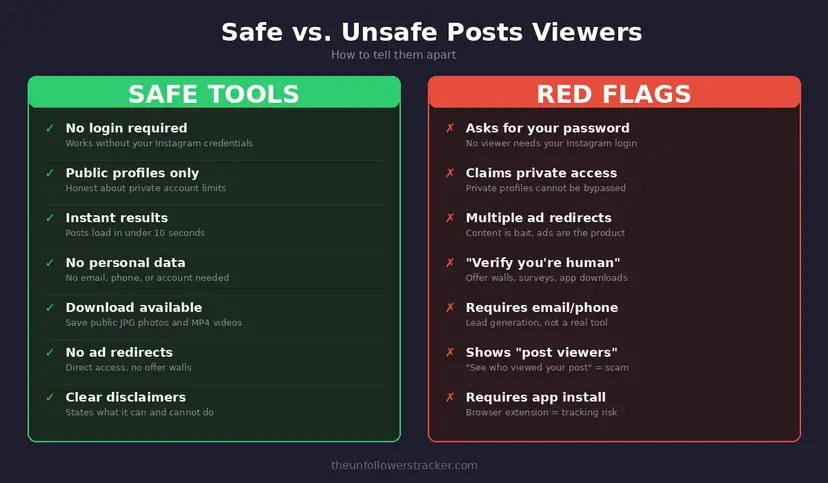
The most common scheme is a password prompt disguised as a "login to continue" step. Think about the logic: you're looking for a tool specifically because you don't want to log in. A tool that asks for credentials is not solving your problem — it's harvesting your account. One widely-shared tool in this category changed its domain three times in six months to dodge abuse reports.

Another pattern is the "private account unlocker." These tools promise full access to any Instagram account, private or not. That's not how Instagram works. Private content sits behind authentication tokens tied to approved followers. No web tool can fake those tokens. Every "private unlocker" we tested led to a survey wall, an adware app download, or a credit card form.

Then there are redirect mazes. These tools bounce you through four or five ad pages, each one planting cookies and loading trackers. After the last redirect, you land on a page that says "try again later." The viewer never existed. The ads were the product.

A trustworthy posts viewer is boring by comparison. It asks for a username, shows results in seconds, works only with public accounts, and doesn't pretend otherwise. Our Instagram Posts Viewer fits that description — no login, no promises about private content, no redirect chain.

Safe vs unsafe Instagram posts viewers comparison showing red flags to avoid

What Post Data Tells You (And What It Doesn't)

Browsing someone's posts through a viewer gives you the same grid any Instagram visitor sees. But raw data needs context to be useful.

Posting frequency reveals commitment. An account posting three times per week is actively maintained. One post in three months suggests abandonment or a pending rebrand. If you're evaluating a business, posting frequency is a reliability signal.

Engagement patterns matter more than follower count. A local café with 1,500 followers and 200 likes per post has stronger engagement than an influencer with 500,000 followers and 300 likes. The follower-to-following ratio gives additional context — accounts that follow 5,000 people to get 5,000 followers back are playing a numbers game.

Caption style signals audience. Long-form captions suggest an audience that reads. Emoji-heavy one-liners target quick scrollers. Hashtag volume indicates how aggressively the account pursues discovery. These patterns are useful for competitive analysis and content planning.

Carousel usage tracks trends. Accounts using more carousels are likely chasing Instagram's algorithm, which has been favoring multi-slide posts since late 2025. If competitors shifted to carousels, there's probably a performance reason behind it.

Does Instagram Notify When Someone Views Your Posts?

Instagram tracks exactly two types of content views: Story watches and Live viewer counts. Regular feed posts — photos, carousels, videos — have never had a viewer list, and Instagram's Help Center explicitly states that post-view tracking does not exist.

This creates an important distinction. If you watch someone's Story, your username appears in their viewer list within seconds. But scroll through their entire post history, and they'll never know. This applies whether you're browsing in the app, through a mobile browser, or through a third-party viewer like ours.

The App Store and Play Store are full of apps promising to reveal "who viewed your posts." Every single one fabricates data. They typically shuffle names from your follower list and display them with timestamps to look convincing. Instagram's API has never exposed post-view identities to third-party developers, so these apps are generating fiction. Most exist to serve in-app ads or upsell a subscription for imaginary premium insights.

When you browse through our posts viewer, there's an extra layer of separation — no Instagram session is created at all. The account owner's notification center stays completely untouched.

Downloading Posts: What's Allowed and What's Not

Our posts viewer includes a download function for public photos and videos. This is useful for saving restaurant menus, archiving product photos for comparison, building mood boards, or keeping a copy of a post you want to reference later.

That said, downloading doesn't mean ownership. Every Instagram post belongs to its creator under copyright law. Downloading for personal reference, research, or fair-use purposes is standard practice. Reposting someone's photos as your own, using them in ads without permission, or scraping entire profiles for republication crosses legal lines.

The practical rule: download what you need for legitimate purposes. Credit creators when sharing. Don't build a business on someone else's content.

Anonymous Post Viewing: The Legal Picture

Viewing public Instagram posts through a third-party viewer is legal in every major jurisdiction. The data is public by the account owner's explicit choice. The hiQ Labs v. LinkedIn ruling (Ninth Circuit, 2022) confirmed that accessing publicly available social media data does not violate computer fraud laws.

Instagram's Terms of Service prohibit automated scraping. But viewing public content through a web tool falls in the same bucket as using a different browser or a Google search. Courts draw a clear line between mass commercial scraping and individual content access.

The real boundaries are about what you do after viewing. You can't bypass privacy settings on private accounts. You can't use content for harassment or impersonation. You can't bulk-republish copyrighted photos. Stay within those lines, and using an anonymous Instagram post viewer to browse public content is legal and routine.

FAQ

Can I view posts from a private Instagram account?

No — and any tool that says otherwise is lying. Private accounts lock their post grid behind a follow-request approval. A viewer can only display what Instagram makes publicly accessible: for private accounts, that's limited to the username, avatar, and follower stats. The posts themselves stay hidden.

Is using an Instagram posts viewer safe?

The safety test is simple: does the tool ask for your Instagram password? If yes, close the tab. A legitimate posts viewer accesses only public data and never needs your credentials. Since your account is never connected, there's no mechanism for Instagram to flag or suspend it. Stick with tools that are transparent about their limitations — public accounts only, no private content access.

Will the account owner know I viewed their posts?

No. Feed posts on Instagram have no viewer tracking — unlike Stories, which maintain a watch list. The account owner can see like counts and comments but has no way to identify passive viewers. Our tool adds further separation because it doesn't create any session on Instagram's servers.

Can I download photos and videos from the viewer?

Yes — public photos save as JPG files, and videos download as MP4. Our Instagram Posts Viewer includes a download button on each expanded post. Just remember that downloading doesn't transfer copyright. Use saved content for personal reference, mood boards, or research, and credit the original creator if you republish.

How is this different from opening Instagram in a browser?

Try opening any Instagram profile in Chrome without logging in. You'll see three posts, then a full-screen login wall blocks everything else. Our Instagram posts viewer free tool routes around that wall by accessing the same public data through a different method — no account required, no login prompt, and no session tracked on the platform.

Does the viewer work on mobile?

Yes. It's a browser-based tool, not an app, so it runs on anything with a web browser — iPhones, Android phones, iPads, laptops, Chromebooks. No download, no install, no storage space used.

Track Your Instagram Unfollowers

Discover who stopped following you and optimize your growth strategy with our free tool.

Discover Unfollowers

We use cookies. Policy