How to Watch Instagram Reels Without an Account (And Save Them Too)

Reels are the most-watched content type on Instagram. They account for roughly half of all time users spend on the platform, and their median view count is nearly six times higher than a typical TikTok. Brands, creators, and casual users all pour effort into Reels because Instagram's algorithm pushes them harder than any other format.

But here's the friction: if you try to view Instagram Reels without account credentials, you barely get a glimpse. Tap a shared Reels link without being signed in, and you get a few seconds of playback before a full-screen prompt demands you log in or download the app. The video is public. The creator wants it seen. Instagram just won't let you see it unless you're inside the ecosystem.

An anonymous Reels viewer solves that in about five seconds. Paste a username, browse their public Reels, watch in full quality, and download the MP4 if you need it. No account, no app, no trace left behind for the creator to find.

Try It: How to View Reels Without Login

Skip the theory — here's the tool in action.

Our Instagram Reels Viewer loads any public account's Reels directly in your browser. The entire process takes three steps:

Enter a username. Type the Instagram handle into the search field. The @ symbol is optional. Full profile URLs work too — handy if someone texted you a link.

Browse the Reels grid. The viewer pulls all publicly available Reels and displays them as a scrollable grid with thumbnails. Each thumbnail shows a preview frame so you can spot the Reel you're looking for without clicking through every one.

Play or download. Click a thumbnail to watch the Reel at full resolution in your browser. No "open in app" redirect, no autoplay queue of unrelated content. Below the player, there's a download button — one click saves the Reel as an MP4 file to your device.

The whole thing runs in your browser. No Instagram session gets created, no cookies land on your machine, and the Reel's creator sees no trace of your visit. Works on phones, tablets, laptops — anything with a web browser.

Why Reels Are Worth Watching Outside of Instagram

Reels aren't just entertainment clips. They've become the primary content format for product launches, tutorials, behind-the-scenes footage, and brand storytelling. Understanding why people need to watch Reels outside the app explains why viewers like ours exist.

Market research runs on Reels now. A competitor's Reels tell you their content strategy in 30 seconds: what products they're pushing, how they frame their brand, which hooks they use to stop the scroll. Watching from a logged-in business account broadcasts your interest through Instagram's suggestion engine. An anonymous viewer keeps your competitive intelligence invisible.

Reels are the new portfolio. Videographers, editors, makeup artists, fitness trainers — creators across every niche use Reels as their showcase. If you're hiring a freelancer or evaluating a vendor, their Reels grid is often more revealing than their website. A Reels viewer lets you review that portfolio without joining Instagram.

Offline access matters for video. Unlike a photo you can screenshot, a Reel is a video file that doesn't pause when you lose signal. An Instagram Reels download saves the MP4 to your device — watch a tutorial on a plane, reference a recipe in a dead-signal kitchen, or archive a product demo for a client presentation. The Instagram app deliberately blocks saving videos to your camera roll. A Reels viewer gives you the file directly.

Not everyone uses Instagram. About 40% of US internet users don't have an account. When someone shares a Reels link in a group chat, those people hit a wall. A Reels viewer lets them watch reels anonymously — the video everyone is talking about — without creating an account they'll abandon in five minutes.

What Sets Reels Apart From Other Instagram Content

If you've used a viewer for Instagram posts or Stories before, Reels work differently in a few ways worth knowing.

Reels are algorithm-first content. Instagram pushes Reels to non-followers far more aggressively than feed posts. A photo might reach 10-15% of an account's followers. A Reel can reach millions of people who've never heard of the account. This means Reels from small, unknown accounts can go viral — and you might want to view them before they disappear from your feed.

Reels carry audio tracks. Many Reels use trending sounds, original voiceovers, or licensed music. When you download a Reel as MP4, the audio comes with it — unlike screenshots of posts, which lose all audio and video context.

Engagement metrics are more visible. Reels display view counts prominently (posts don't show view counts for photos). A Reel with 500,000 views and 200 comments tells a different story than one with 500,000 views and 5 comments. These signals help you evaluate whether an account's reach is genuine or inflated.

The format keeps evolving. Instagram has extended Reels from 15 seconds to 90 seconds, added collaboration features, and introduced Reels-specific analytics for creators. A viewer gives you access to the current state of someone's Reels without needing to track every platform update from inside the app.

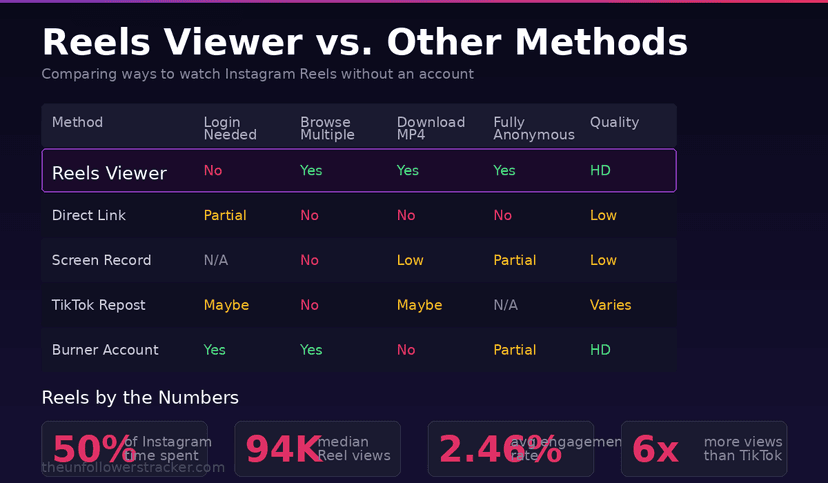
Comparison of methods to watch Instagram Reels without an account — Reels Viewer vs direct links, screen recording, TikTok reposts, and burner accounts
Reels Viewer vs. Other Methods: a side-by-side comparison

Other Methods for Watching Reels Without an Account (And Their Problems)

An Instagram Reels viewer isn't the only option. But every alternative comes with friction.

Direct links in a browser. If someone sends you a Reels URL, you can sometimes watch a few seconds before Instagram's login modal covers the screen. The video plays in low resolution, there's no way to browse other Reels from the same account, and Instagram tracks the visit even though you didn't sign in. This works for a single Reel in a pinch, but it's unusable for browsing.

Screen recording. You can screen-record the few seconds Instagram shows before the login wall drops. You end up with a low-quality capture that includes the UI chrome, the login popup partially covering the video, and no audio if your phone was muted. For research or archiving, this is a last resort.

Reels reposted to TikTok or YouTube Shorts. Creators often cross-post Reels to other platforms. You might find the same video on TikTok without needing an Instagram account. The problem: cross-posting is inconsistent, the video quality sometimes degrades, and you can't browse a specific creator's Reels catalog this way.

Creating a throwaway account. You could sign up for Instagram with a burner email. But Instagram now requires phone verification, flags new accounts with zero activity as suspicious, and uses device fingerprinting to link burner accounts to your real identity. A burner account is more effort than a viewer and carries suspension risk within weeks.

For watching one shared Reel, a direct link might be enough. For anything beyond that — browsing a creator's entire Reels library, downloading videos, or doing research — a dedicated Instagram Reels viewer is faster and leaves no platform footprint.

The Fake Viewer Problem: How to Spot Scams

The market for Instagram viewer tools is saturated with scams. Reels viewers are especially popular targets because video content attracts more clicks than photo-based tools.

The "survey unlock" scheme. These tools show you a loading animation for 30 seconds, then display a message: "Complete a short survey to unlock your results." The survey is an ad funnel. You fill out forms, maybe enter a phone number, and the Reel never loads. The tool never had access to begin with.

The app install trap. Some sites claim they need you to install a browser extension or mobile app to "enable video playback." The extension tracks your browsing. The app serves ads. Neither one plays Reels.

Password phishing dressed as verification. A tool asks for your Instagram credentials to "verify you're a real person." This makes no sense — you're looking for a viewer precisely because you don't want to log in. Any tool requesting your Instagram password is stealing it.

The private Reels promise. Tools claiming to show Reels from private accounts are lying without exception. Instagram does not expose private content through any publicly accessible method. These sites exist to collect personal data through fake "verification" steps.

A legitimate Reels viewer is straightforward: enter a username, see results in seconds, public content only. No survey, no install, no credentials. Our Instagram Reels Viewer follows this exact pattern — because that's all a real tool needs to do.

Does Instagram Track Who Watches a Reel?

Instagram tracks Reel views as a count, not a list. The creator sees how many views their Reel received, but they cannot see individual viewer identities. This is different from Stories, which maintain a named viewer list for 48 hours.

This means you can watch every Reel on someone's profile from the Instagram app, and they'll never know it was you. The view counter increments, but your name never appears anywhere.

When you watch through our Reels viewer, even that counter stays untouched. The tool fetches video data without creating an Instagram session, so the platform doesn't register a view at all. The creator's analytics remain exactly as they were before you looked.

Third-party apps promising to show "who watched your Reels" are manufacturing fake data. Instagram's API has never exposed Reel viewer identities. These apps typically shuffle names from the creator's follower list and display them with random timestamps. They exist to sell subscriptions for imaginary analytics.

Downloading Reels: Format, Quality, and Copyright

Our viewer saves Reels as MP4 files — the standard video format that plays on every device and editing app. The video downloads at the quality Instagram serves, which is typically 1080x1920 for vertical Reels shot in HD.

What downloading is good for: saving tutorials for offline reference, archiving competitor content for internal strategy meetings, building a swipe file of creative approaches, keeping a backup of your own Reels before deleting them from Instagram.

What downloading doesn't give you: ownership. Every Reel is copyrighted by its creator the moment they publish it. Downloading for personal use, research, or fair-use commentary is standard practice. Reposting someone's Reel as your own content, using it in paid advertising without permission, or building a compilation channel from other people's Reels crosses into copyright infringement.

The practical guideline: save what you need, credit creators when referencing their work, and don't monetize someone else's video without a license.

FAQ

Can I watch Reels from a private Instagram account?

No viewer tool can access private account content — Reels, posts, Stories, or anything else. Private accounts restrict all content to approved followers only. Any tool claiming otherwise is a scam designed to collect your data. Our viewer shows Reels exclusively from public profiles.

Do I need to install anything to use the Reels viewer?

Nothing. The viewer runs entirely in your web browser. No app download, no browser extension, no software installation. Open the page, type a username, and the Reels load. It works on Chrome, Safari, Firefox, Edge — on any device with internet access.

What video quality do the downloaded Reels have?

Reels download as MP4 files at the resolution Instagram provides, which is typically 1080x1920 for standard HD vertical video. The quality matches what you'd see playing the Reel inside the Instagram app. Audio is included in the download.

Is it legal to watch Reels through a third-party viewer?

Yes. Public Reels are visible to anyone on Instagram — the creator chose to make them public. Accessing public content through a different interface is legal in all major jurisdictions. The hiQ Labs v. LinkedIn ruling (Ninth Circuit, 2022) confirmed that viewing publicly available social media content through third-party tools does not violate computer fraud laws.

Can the creator see that I downloaded their Reel?

No. Instagram does not notify creators when someone downloads, screenshots, or screen-records their Reels — even inside the app. Our viewer adds another layer of separation since no Instagram session is created during the download. The creator has no way to know the download happened.

How is this different from Instagram's built-in Save feature?

Instagram's Save feature bookmarks a Reel within your account — you need to be logged in, and the saved Reel only plays when you have internet and an active session. Our viewer downloads the actual MP4 file to your device. You own the file. It plays offline, works without an Instagram account, and doesn't disappear if the creator deletes the original Reel.

Track Your Instagram Unfollowers

Discover who stopped following you and optimize your growth strategy with our free tool.

Discover Unfollowers

We use cookies. Policy