Instagram Highlights Viewer: How to Browse Saved Stories Without Being Seen
Instagram Highlights are the only content on the platform that someone chose to keep visible forever. Posts happen in the moment. Stories vanish after 24 hours. But Highlights are curated — handpicked stories grouped into named sets and pinned to the top of a profile. They show what an account considers most important.
That makes them useful for anyone doing research, checking a brand, or trying to see what a business offers. The problem: Instagram's login wall blocks this content from anyone without an account. Try to browse Highlights in a logged-out browser, and you get a username, an avatar, and a demand to sign in.
An instagram highlights viewer solves this in seconds. Enter a username, and the tool loads every public Highlight collection — covers, individual stories within each collection, and download options for everything. No account required. No login. The profile owner never knows you looked.
Why Highlights Are Instagram's Most Underrated Content
Most discussions about Instagram focus on Reels, feed posts, or disappearing Stories. Highlights rarely get mentioned, but they contain some of the most intentional content on the platform.
A Story is off the cuff. Someone films a coffee, posts a poll, shares a sunset. It vanishes in a day. A Highlight is that same content filtered through a second choice: the creator watched it expire and said, "this one stays." That filter is what gives Highlights their value.
Restaurants pin their best dishes and seasonal menus. Photographers organize portfolio pieces by genre — weddings, portraits, street. Service businesses showcase client testimonials and process walkthroughs. Fitness trainers archive transformation stories and workout routines. E-commerce brands catalog product launches by category.
For anyone evaluating a brand or creator, Highlights function like a self-curated portfolio. They answer the question "what does this account want you to see first?" in a way feed posts never can. The grid shows everything chronologically. Highlights show what matters, organized by topic.
That's why being able to view instagram highlights without account access is genuinely useful — these collections carry more signal per tap than almost any other content format on the platform.
The 48-Hour Trap: When Viewing Highlights Exposes You
Here's something most people don't realize about Highlights, and it catches even careful browsers off guard.
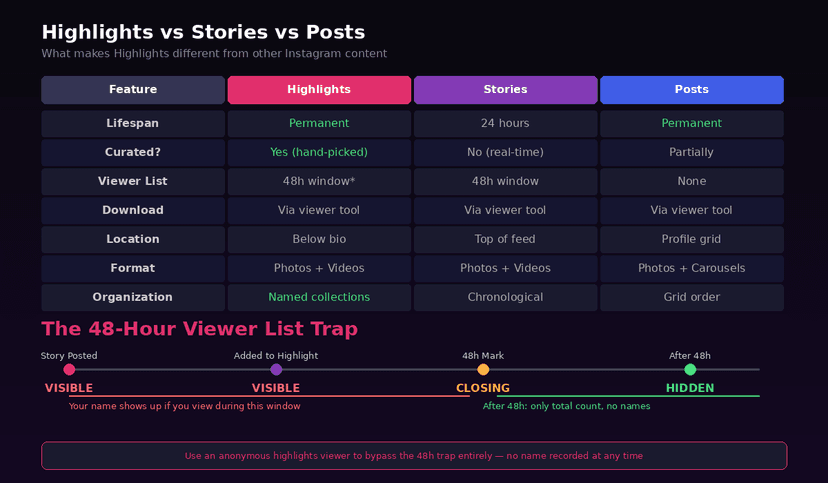
When a creator adds a Story to a Highlight, the original Story's viewer list doesn't reset. If the Story was posted less than 48 hours ago, it still has an active viewer list. Anyone who watches it — whether through the regular Story feed or through the Highlight — gets their name logged.
This means a Highlight isn't necessarily "old" content. A business might post a Story at 9 AM and add it to their "Menu" Highlight by noon. If you tap that Highlight from a logged-in account at 3 PM, your name appears on the Story's viewer list even though you accessed it through a Highlight. The creator can see you.
After 48 hours, the viewer list closes. Instagram stops tracking individual names and shows only a total view count. At that point, watching through the app or any viewer is equally invisible.
The problem is obvious: you have no way to tell which stories inside a Highlight were added recently. A Highlight titled "Summer 2025" might contain a story added ten minutes ago. There's no timestamp visible before you tap.
An anonymous highlights viewer eliminates this risk entirely. The tool fetches Highlight data without creating an Instagram session, so your name never enters any viewer list — regardless of when the story was originally posted. This is the strongest practical reason to use a viewer instead of browsing Highlights in the app.

How to Browse Highlights Without an Account
The fastest way to view highlights without login is through a dedicated tool. Our Instagram Highlights Viewer skips the login wall and shows every pinned collection on a public profile. Four steps, no account:
Enter the account name. Paste a username or a full profile URL into the search bar. No @ needed, though the tool accepts it either way.
See all Highlight collections. The viewer displays every Highlight the account has pinned, with cover images and titles. You can scan the full set before clicking into anything — unlike the app, where you have to tap each circle individually to see what's inside.
Browse individual stories. Click a Highlight to open it. Every story inside loads as a scrollable gallery — photos at full resolution, videos with playback controls. No "open in app" redirect, no login popup cutting you off mid-scroll.
Download what you need. Each story within a Highlight has a download button. Images save as JPEG or PNG. Videos save as MP4. You can grab individual items or work through an entire collection.
The viewer runs in your browser on any device — phone, tablet, laptop. No Instagram session gets created, no cookies are planted, and the profile owner's analytics remain unchanged. This is the simplest way to view highlights without login from anywhere.
What Someone's Highlights Tell You That Posts Don't
Posts show what an account publishes. Highlights show what an account values. The distinction matters if you're doing any kind of research or evaluation.
Brand positioning becomes transparent. A skincare company with Highlights titled "Before & After," "Ingredients," and "Reviews" is positioning itself around proof and transparency. A competitor with Highlights titled "Sales," "New Drops," and "Collabs" is focused on urgency and partnerships. You can map a brand's entire strategy from their Highlight titles alone.
Service businesses reveal their process. Tattoo artists show healed results alongside fresh work. Wedding planners archive full event walkthroughs. Contractors document build progress. These collections answer the question "what will working with this person actually look like?" in a way a polished feed post never does.
Content gaps become visible. If a competitor has no Highlight for a topic you cover — say "FAQ" or "How It Works" — that's a gap you're filling and they're not. If they have a Highlight you lack, that's worth noting.
Outdated Highlights signal neglect. A restaurant with a "Holiday Menu 2024" Highlight still pinned in mid-2026 probably isn't maintaining their Instagram actively. That's a useful data point when evaluating vendors or partners.
A viewer lets you do this kind of scan across multiple accounts. No login. No platform footprint. No feed of "suggested posts" eating half your screen.
Saving Full Highlight Collections to Your Device
Individual Story downloads are useful, but Highlights are designed as collections — and downloading them that way preserves the context.
Our viewer lets you save each story from a Highlight one by one. For a collection with 15 items, that means 15 downloads. An instagram highlights download saves files in their original quality: images at the resolution the creator uploaded, videos as MP4 with audio intact.
When full sets matter. A restaurant's full menu Highlight tells a different story than one food photo pulled out of context. A trainer's "12-Week Program" set is useless as loose files. A brand's full "Reviews" set is research gold — a lone screenshot of one review is not.
Downloaded Highlights work as offline reference material. Save a competitor's product catalog before a strategy meeting. Archive a vendor's portfolio before their account changes. Keep a recipe collection from a food blogger for your kitchen, where your phone signal is unreliable.
Copyright applies the same way it does everywhere. Every story in a Highlight belongs to its creator. Download for personal reference, research, competitive analysis, or fair-use commentary — that's standard. Republishing someone's Highlight content as your own, using it in paid campaigns without permission, or distributing it commercially is copyright infringement regardless of how easy the download was.
Do You Actually Need a Viewer? A Quick Decision Guide
Not every situation calls for a third-party tool. Here's when you do and don't need an anonymous highlights viewer.
Use a viewer when: you don't have an Instagram account and don't want one. You need to browse multiple profiles without leaving a trail. A Highlight might contain recently-added stories (the 48-hour trap above). You want to download stories from Highlights for offline access. You're doing competitive analysis and don't want your business account surfacing in the creator's suggestions.
Skip the viewer when: the Highlight is old and you don't care about the viewer list. You already follow the account and have no reason to hide your visit. You only need to glance at one Highlight cover — the app shows those without logging in.
The honest assessment: if you're a casual user checking one Highlight from a friend's public account, the Instagram app is fine. If you're doing research across multiple accounts, need downloads, or want guaranteed anonymity, a highlights viewer online saves time and removes risk.
Separating Real Viewers From Fake Ones
The search results for "instagram highlights viewer" are cluttered with tools that exist to collect data, not display it. The scam patterns are consistent across the category.
Credential requests are always a trap. A Highlights viewer accesses public content. It doesn't need your Instagram password for anything. If a tool asks you to log in, it's harvesting credentials. Close the tab.
Private Highlight access is impossible. Instagram locks private content behind follower approval. No web tool can bypass that restriction. Tools promising to show Highlights from private accounts are collecting personal data through fake "verification" flows that never end.
Survey gates mean the tool doesn't work. If you search a username and get "complete a survey to unlock results," the tool never had access. The survey is an ad funnel. You'll fill out forms, possibly hand over a phone number, and never see a single Highlight.
App installs are unnecessary. A Highlights viewer runs in a web browser. Any tool requiring you to download an extension or mobile app is delivering adware or tracking software, not Highlight content.
A legitimate viewer is simple: username in, Highlights out, public accounts only. Our Instagram Highlights Viewer follows that exact model — no login, no install, no pretense about accessing private content.
FAQ
Can I view Highlights from a private Instagram account?
No. Private accounts restrict all content — posts, Stories, Reels, and Highlights — to approved followers. No viewer tool can bypass this. Any tool claiming to show private Highlights is running a scam to collect your data. Our viewer works exclusively with public profiles.
Does Instagram tell the account owner I viewed their Highlights?
It depends on timing. If a story inside the Highlight was posted within the last 48 hours, viewing it through the Instagram app adds your name to its viewer list. After 48 hours, the list closes and only shows a total count. Our viewer avoids this entirely — no Instagram session is created, so your name never appears on any list regardless of when the story was posted.
Do I need to install an app to use the viewer?
No. The viewer runs entirely in your web browser — Chrome, Safari, Firefox, Edge, any modern browser on any device. No download, no extension, no software to maintain. Open the page, search a username, and the Highlights load.
What format do downloaded Highlights save in?
Images save as JPEG or PNG files. Videos save as MP4 with audio included. Files download at the same resolution the creator uploaded — typically 1080x1920 for vertical story content. The files play and open on any device without special software.
Is it legal to view someone's Highlights through a third-party tool?
Yes. Highlights on a public account are available to every Instagram user by default — the owner pinned them there for anyone to see. Accessing the same public data through a web tool rather than the app doesn't change the legal picture. The Ninth Circuit's hiQ Labs v. LinkedIn decision (2022) established that viewing publicly shared social media content via third-party tools falls outside computer fraud statutes.
The legal line sits at what happens after viewing. Research, personal reference, and fair-use commentary are all fine. Reposting without credit or selling someone else's content is not.
How are Highlights different from regular Stories?
Regular Stories disappear after 24 hours. Highlights are Stories the account owner saved and pinned to their profile permanently. They're organized into named collections with custom cover images. Think of Stories as a daily journal and Highlights as a curated portfolio — both use the same vertical format, but Highlights are kept because the creator considers them worth keeping.
Track Your Instagram Unfollowers
Discover who stopped following you and optimize your growth strategy with our free tool.
Discover Unfollowers