Instagram Profile Viewer: How to Browse Any Profile Anonymously
Instagram stopped letting logged-out visitors browse profiles in 2023. Open a profile link now without being signed in, and you hit a login wall after three posts. The profile is public. The content is public. But Instagram blocks you unless you hand over an account.
An anonymous Instagram profile viewer gets around that wall. Type a username, and the tool pulls public data — bio, avatar, posts, Reels, Highlights. No Instagram account needed. No login. The profile owner has no idea you looked.
This guide covers how to view an Instagram profile without login, what these tools show and hide, where the scams are, and how to use our free IG profile viewer to browse any public page in under 10 seconds.
Why Instagram Blocks Logged-Out Profile Browsing
Until 2023, anyone could open an Instagram profile URL in a browser and scroll through every public post. Instagram changed this for one reason: data.
Logged-out visitors don't generate the signals Instagram sells to advertisers. They don't like, comment, save, or follow. They consume content without feeding the algorithm. So Instagram added the login wall. Not to protect privacy — to force everyone into the tracked ecosystem.
The content is still public. Instagram's own API serves it. Public profiles are indexed by Google. The login wall is a business decision, not a privacy feature. Profile viewers access the same public data through a different door — letting you view Instagram without account restrictions.
What You Can See When You View an Instagram Profile Anonymously
When you view an Instagram profile anonymously through a profile viewer online, you see whatever the account owner has made public. For a public account, that includes:
Profile basics — username, display name, bio text, profile photo, website link, follower and following counts, total post count.
Posts — photos, carousels, and videos published to the feed grid. Captions and hashtags are included. Comment counts are visible, though individual comments may not load depending on the tool.
Reels — short-form videos from the Reels tab.
Highlights — saved Story collections the user has pinned to their profile.
Tagged and mentioned content — some viewers surface posts where the user has been tagged.
What a profile viewer cannot show: DMs, private account content, Stories from private accounts, archived posts, Close Friends Stories, deleted content, insights and analytics, or any content the user has restricted. If the account is set to private, the viewer shows the avatar, bio, and follower count — nothing else.
Who Needs to View Instagram Without an Account
The login wall created real problems that have nothing to do with stalking. Plenty of people need to view Instagram without an account, and their reasons are practical.
People who don't use Instagram. About 40% of US internet users aren't on the platform. When a friend texts them a profile link — a restaurant, a photographer, a local business — they hit a wall. An Instagram profile viewer online lets them check the page without creating an account they'll never use.
Journalists and researchers. Verifying a source's public presence, checking a business's social proof, or documenting public posts for reporting — all routine tasks that don't require (and shouldn't require) logging in with a personal account.
HR and hiring teams. Many companies review applicants' public social presence. Doing this through a personal Instagram account creates GDPR questions and leaves a digital trail. An anonymous viewer separates professional research from personal browsing.
Small business owners. Checking competitor profiles — what they post, how often, what captions they use — is basic market research. An IG profile viewer lets you do it anonymously. This avoids alerting the competitor through Instagram's "suggested users" algorithm, which surfaces accounts that interact with similar profiles.
People who deleted their account. You closed Instagram for mental health reasons. You still need to check a business's hours, a venue's photos, or a friend's public post someone mentioned. A profile viewer without login lets you do that without reactivating.
How to View an Instagram Profile Without Login (Step by Step)
Our Instagram Profile Viewer is free, works on any device, and requires nothing — no account, no login, no app download.
Step 1: Enter the username. Go to the profile viewer page and type the Instagram username (with or without the @ symbol) into the search bar. You can also paste the full profile URL.
Step 2: Load the profile. Click "View profile." The tool queries publicly available data and loads the profile information — avatar, bio, post count, followers, following.
Step 3: Browse the content. Scroll through the user's public posts, Reels, and Highlights. Everything loads in your browser. Nothing touches your Instagram account because you never connect one.
The process takes about 10 seconds. No CAPTCHA, no email verification, no "sign up to continue" popup. The profile owner gets no notification. This is the fastest way to view an Instagram profile anonymously from any device.
Profile Viewers vs. Burner Accounts: Which Is Better?
Some people create throwaway Instagram accounts to browse anonymously. This works, but it carries risks that a profile viewer avoids entirely.
Account creation requires real data. Instagram now requires phone verification for new accounts. Disposable email addresses are banned. If you use your real phone number, the account is traceable to you. Instagram also links burner accounts to your main account through device fingerprinting, IP address, and contact syncing.
Burner accounts get banned. Instagram's 2026 crackdown on bot-like behavior flags new accounts with no posts, no followers, and high browsing activity. A burner created just to view profiles will likely get suspended within days.
You still appear in suggestions. When you view profiles through any Instagram account — burner or not — Instagram's recommendation engine takes note. The profile owner may see you in their "suggested for you" list or in their Story viewer queue if you slip and watch a Story.
A profile viewer eliminates all of this. No account to create, no phone number to verify, no algorithm tracking your behavior, and no way for your name to surface on the platform. If you want to view an Instagram profile without login, this is the cleaner path.
The Scam Landscape: Why Most "Profile Viewer" Tools Are Dangerous
Search "Instagram profile viewer" and most results are traps. A 2026 security analysis of profile viewer tools found that roughly 70% exist primarily to collect user data, serve malicious ads, or phish credentials.

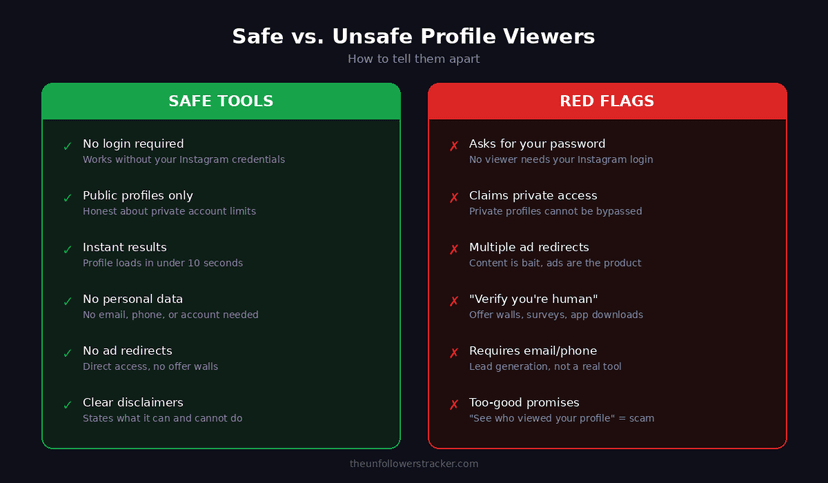
Red flags to watch for:
A tool that asks for your Instagram password is a credential harvester. No legitimate profile viewer needs your login — the entire point is viewing public data without authentication.
A tool that claims to show private profiles is lying. Instagram's API does not expose private content to unauthorized requests. Any tool promising access to private accounts is either a scam or something that will get your own account banned.
A tool that redirects through three ad pages before showing results is adware. The content is the bait; the ads (and the tracking cookies they plant) are the product.
A tool that asks you to "verify you're human" by completing offers, downloading apps, or entering your phone number is a lead-generation funnel. You will never see the profile.
What safe tools look like: They work immediately. No login required. No personal data collected. Public profiles only, with an honest disclaimer about private account limits. Fast results — under 10 seconds from search to profile display. Our Instagram profile viewer online meets all of these criteria.
Does Instagram Notify You When Someone Views Your Profile?
No. Instagram does not notify users when someone views their profile — whether through the app, a web browser, or a third-party viewer.
This is different from Stories, where the poster sees a viewer list. Regular profile visits are not tracked in any user-facing way. Instagram confirmed this in their Help Center: "Instagram doesn't let you see who views your profile."
Some third-party apps claim to show "profile visitors." These are scams. They generate random names from your follower list and present them as visitors. Instagram does not provide this data to any app, and any tool claiming otherwise is fabricating information.
With our profile viewer, the separation is even stronger. Your visit never touches Instagram's servers as a logged-in session. There is no session to log, no viewer ID to record, and no notification to trigger. If you also want to watch someone's Stories without appearing in their viewer list, our anonymous Story viewer works the same way.
What Public Profile Data Tells You (And What It Does Not)
Reading a profile through a viewer gives you the same information any Instagram user sees when they visit that page. But interpreting that data correctly matters.
Follower count is context-dependent. A local bakery with 2,000 followers and high engagement is healthier than an influencer with 200,000 followers and no comments. The follower-to-following ratio matters more than raw numbers.
Post frequency signals activity. A profile with no posts in three months is either abandoned, pivoting, or about to rebrand. Recent activity means the account is maintained.
Bio links are checkable. If you are verifying a business, click the website link in their bio. Does it match the business you expected? Is it a legitimate domain? Bio links are one of the fastest ways to confirm or rule out a fake account.
Highlights tell the curated story. Highlights are the content the user actively chose to keep visible. They reveal priorities — menus for restaurants, portfolios for photographers, testimonials for service businesses. You can also browse them separately through our Highlights viewer.
Anonymous Profile Viewing: Legal and Ethical Boundaries
Viewing a public Instagram profile through any tool is legal. The data is public by the account owner's choice. Courts in multiple jurisdictions have ruled that scraping publicly available social media data does not violate computer fraud laws (most notably, hiQ Labs v. LinkedIn, affirmed by the Ninth Circuit in 2022).
That said, what you do with the data matters. Viewing is fine. Downloading someone's photos and reposting them without credit is copyright infringement. Compiling profile data into a dossier for harassment is illegal. Monitoring someone's profile obsessively crosses ethical lines even if no law applies.
The tool itself is neutral. Use it the way you would use any browser — to view publicly available information for a legitimate purpose.
FAQ
Can I view a private Instagram profile without following them?
No. Private profiles show only the avatar, username, bio, and follower count through any viewer. The feed, Stories, Reels, and Highlights remain hidden. Any tool claiming to bypass this is a scam.
Is using an Instagram profile viewer safe?
Safe viewers — including ours — never ask for your Instagram credentials, don't require an account, and only access public data. You face no risk of account suspension because you never connect an account in the first place. Avoid tools that ask for passwords or promise private profile access.
Will the profile owner know I viewed their page?
No. Instagram does not track or display profile visitors. With our viewer, your visit doesn't create any logged session on Instagram at all, so there is nothing for the owner to see.
Can I download content through a profile viewer?
Our viewer is designed for browsing, not bulk downloading. You can view posts, Reels, and Highlights in your browser. If you need to save specific content, check whether the creator's licensing allows it first.
How is this different from just opening Instagram in a browser?
Instagram requires login to view most content — even public profiles. Without an account, you see three posts and then a login wall. When you view Instagram profile without login through our tool, you access the same public data without hitting that wall and without creating any tracking session.
Does the viewer work on mobile?
Yes. The viewer runs in any browser — Chrome, Safari, Firefox — on iOS, Android, desktop, or tablet. No app download needed.
Track Your Instagram Unfollowers
Discover who stopped following you and optimize your growth strategy with our free tool.
Discover Unfollowers