How to View Instagram Stories Without Being Seen: All Methods Compared (2026)
You watched their Story. They know. That single "Seen by" line at the bottom of every Instagram Story is enough to make anyone cautious — especially when you're checking on an ex, scouting a competitor, or simply browsing without wanting to leave a trail. However, the good news is that several methods let you view Instagram Stories without appearing in the viewer list. Unfortunately, most "tricks" people share online no longer work in 2026.
Therefore, this guide breaks down every known method for anonymous Story viewing, explains exactly what Instagram tracks today, and compares the real options side by side so you can pick the one that fits your situation.
How Instagram Story Viewing Works in 2026
Every time you tap on an Instagram Story, the platform logs your username in the poster's "Seen by" list. This list is visible to the Story creator for 48 hours while the Story is live, and remains accessible in the Archive afterward. Furthermore, Instagram records the exact timestamp and the order in which viewers watched.
Importantly, there is no native setting inside Instagram to disable this. Unlike profile visits — which remain completely invisible — As a consequence, Story views are always attributed to your account when you watch through the app normally.
Instagram also tracks the following interactions on Stories: screenshot attempts (no notification sent in 2026 for regular Stories), replies via DM (visible to the poster), poll and quiz responses (visible with your username), and sticker taps. Notably, the only element that stays private is how many times you replayed a Story.

All Methods for Viewing Stories Anonymously — Compared
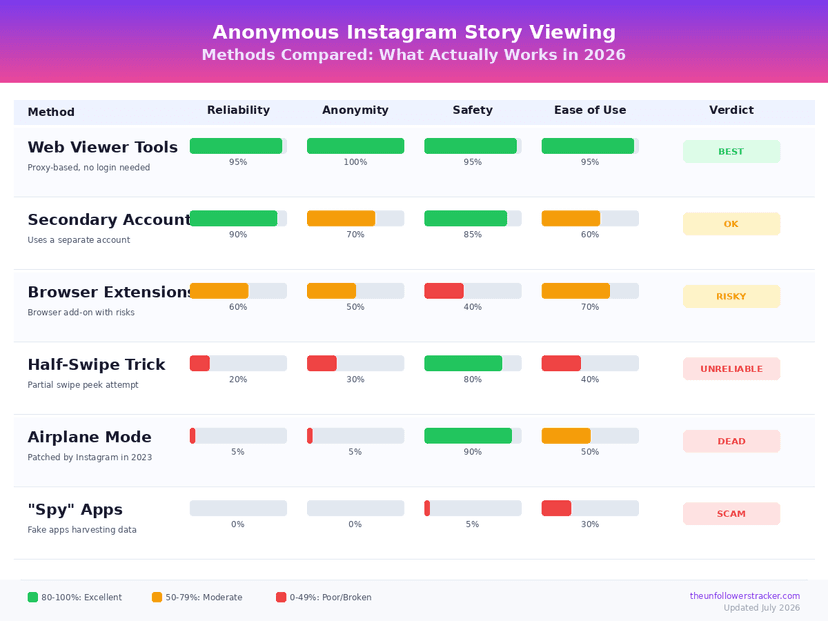
Below is a full comparison of every method people use to watch Instagram Stories without being detected. Some work reliably, others are hit-or-miss, and a few are outright myths.
| Method | Works? | Account Required? | Sees Private Accounts? | Risk Level |
|---|---|---|---|---|
| Web-based viewer tools | Yes (public accounts) | No | No | Low |
| Airplane mode trick | No (patched) | Yes | N/A | N/A |
| Half-swipe technique | Partially | Yes | Yes | Medium |
| Burner/secondary account | Yes | Yes (different) | If followed | Medium |
| Browser (not logged in) | No | N/A | No | N/A |
| Close Friends story hacks | No | N/A | N/A | N/A |
| Third-party "spy" apps | No (scams) | Asks for yours | Claims yes | Very High |
Method 1: Web-Based Anonymous Viewer Tools
Online Story viewer tools fetch content directly from Instagram's public-facing data without logging in with your account. Because you never use an authenticated session, your username never appears in the "Seen by" list. This is currently the most reliable method for watching Stories from public accounts without detection.
The Unfollowers Tracker Story Viewer works this way: enter a public username, and the tool retrieves active Stories for you to watch and optionally download. No login, no app install, and no trace left on the poster's account.
Advantages: completely anonymous, no account needed, works from any device with a browser, free to use. Limitations: only works with public Instagram accounts — if the owner set their profile to private, the tool cannot access their Stories because Instagram's API requires an authenticated follow relationship.
Method 2: The Airplane Mode Trick (No Longer Works)
This was once the most popular method shared across Reddit and TikTok. The idea: open Instagram, let Stories preload, switch to airplane mode, watch the Stories offline, then force-close the app before reconnecting. In theory, the view would never reach Instagram's servers.
In fact, Instagram patched this in late 2023. Instead, the app now queues a "Story viewed" event locally and sends it to the server the moment your device reconnects. Moreover, force-closing does not clear this queue. Consequently, multiple users have tested and confirmed: your name still shows up in "Seen by" even if you watched in airplane mode.
Method 3: The Half-Swipe Technique
Essentially, the half-swipe involves pressing and holding on the Story before the target account, then slowly swiping toward their Story without fully advancing. If done carefully, you can peek at an image Story without registering the view — because technically, you never fully "opened" their Story slide.
This method is unreliable for several reasons. First, for one thing, it only works on the first slide of a multi-slide Story. Second, video Stories begin playing and register a view even with a partial swipe. Third, Instagram has been updating the threshold for what counts as a "view," and many users report that the half-swipe now registers them regardless. As of mid-2026, this method works inconsistently, and you should not rely on it.
Method 4: Using a Secondary (Burner) Account
Creating a secondary Instagram account with a different name and profile photo lets you watch Stories without revealing your real identity. This works for both public accounts (follow not needed) and private accounts (if the target accepts your secondary account as a follower).
The downsides are practical. Managing a second account takes effort. If the target has a private profile, they might not accept a follow request from an account with no posts and no mutual followers. And Instagram actively detects and suspends accounts that look like bots or fakes — especially new accounts that only view content without posting.
Method 5: Viewing Stories via a Browser Without Logging In
Some guides suggest going to instagram.com/username in a browser where you're not logged in. While this lets you see a public profile's posts and bio, Instagram does not display Stories to logged-out visitors on its website. You'll see the profile grid but no Story ring. This method does not work for Story viewing.
Method 6: "Spy" Apps and Private Viewer Tools (Scams)
In contrast, apps claiming they can show you anyone's Stories — including from private accounts — without revealing your identity are almost universally scams. These apps typically require you to enter your own Instagram credentials, complete "human verification" surveys, or install adware. None of them deliver what they promise.
We've covered this in detail in our guide on private Instagram viewer scams. The short version: if a tool claims it can bypass Instagram's privacy settings to show private Stories, it's lying. Avoid entering your credentials into any third-party service.
What About Instagram Highlights?
Highlights — the circular icons below a profile's bio — are archived Stories the account owner has chosen to keep visible permanently. An important distinction: Instagram does not show a viewer list for Highlights. Once a Story expires and moves to a Highlight, the "Seen by" data is no longer accessible to the account owner.
This means you can freely browse anyone's Highlights from a public profile without them knowing — no special tools needed. Simply visit their profile and tap any Highlight circle. Instagram will not log or report your view.
Do Business Accounts Get Extra Viewer Data?
Business and Creator accounts on Instagram have access to Story Insights, which show aggregated metrics: reach, impressions, exits, replies, and navigation taps. However, these insights do not reveal additional viewer identities beyond the standard "Seen by" list. A business account sees the same viewer names a personal account does — just with added engagement statistics layered on top.
So watching a business account's Story anonymously using a web-based viewer tool works exactly the same as for personal accounts.
Step-by-Step: Watch Stories Anonymously Using a Web Viewer
Here's the simplest and most reliable way to view someone's Instagram Story without appearing in their viewer list:
Step 1: Make sure the account you want to view is set to public. For instance, you can check by visiting their profile — if you can see their posts without following, they're public.
Step 2: Go to the Unfollowers Tracker Story Viewer.
Next: Then, enter the target username in the search bar — no @ sign needed.
Step 4: Finally, browse their current Stories. You can view images, watch videos, and download any Story to your device.
Step 5: Close the tab when done. You used no login, created no "Seen by" entry, and shared no data with Instagram about your visit.
Can You View Instagram Stories Anonymously on iPhone vs. Android?
There's no difference between platforms when it comes to Story viewing privacy. Instagram generates the "Seen by" list server-side, not through your device's operating system. Whether you use an iPhone, Android phone, iPad, or desktop — the moment your logged-in account opens a Story, you appear in the viewer list.
The same applies to anonymous methods. Web-based viewer tools work identically across all devices and browsers because they don't rely on the Instagram app at all.
What About Instagram's Vanish Mode and Disappearing Messages?
Vanish Mode and disappearing messages are DM features — they have nothing to do with Story viewing. Enabling Vanish Mode does not hide your Story views. Some users confuse these privacy features, but they operate in completely separate areas of the app.
Frequently Asked Questions
Can someone see if I viewed their Story if I use a VPN?
A VPN changes your IP address, not your Instagram identity. If you're logged into Instagram and view a Story — with or without a VPN — your username appears in the "Seen by" list. A VPN does not make Story viewing anonymous.
Does Instagram notify someone when I screenshot their Story?
No. As of 2026, Instagram does not send notifications for screenshots of regular Stories. The only exception is Vanish Mode messages in DMs — those do trigger screenshot alerts. But for normal Stories, Highlights, Reels, and posts, screenshots are completely silent.
Can I view private account Stories anonymously?
No legitimate method allows you to view Stories from a private account without being in their follower list. Web-based viewer tools only work with public accounts. Any service claiming otherwise is a scam. The only workaround is using a secondary account that the target has accepted as a follower.
If I watch a Story anonymously, can the person still see the total view count?
When you view a Story through an external web tool, your view is not registered by Instagram at all. The tool fetches the Story data from Instagram's CDN — the account owner's "Seen by" list and view count remain unaffected. It's as if the view never happened from Instagram's perspective.
Will Instagram ever remove the "Seen by" feature from Stories?
There's no indication that Instagram plans to remove Story viewer lists. In fact, the trend has been toward more transparency — with Instagram testing a profile visitors feature in select markets during 2026. The "Seen by" list is a core part of the Story experience and a key engagement metric for creators.
Do Story viewer tools save my data?
Indeed, reputable tools like the Unfollowers Tracker Instagram Viewer don't require any login or personal information. Since these tools never handle your account credentials, they have nothing to store. Above all, always avoid services that ask for your Instagram password — those are harvesting credentials.
The Bottom Line
In 2026, the only consistently reliable way to view Instagram Stories without being seen is to use a web-based anonymous viewer tool. The airplane mode trick is dead, the half-swipe is unreliable, and "spy" apps are scams. For public accounts, tools like the Unfollowers Tracker Story Viewer offer genuine anonymity with zero risk to your account. For private accounts, there is no safe anonymous method — a secondary account is the only practical option, and it comes with its own drawbacks.
Track Your Instagram Unfollowers
Discover who stopped following you and optimize your growth strategy with our free tool.
Discover Unfollowers