Who Can See When You're Online on Instagram?
Only accounts you have exchanged direct messages with can see when you are online on Instagram. A green dot and an "Active now" label appear beside your name in their inbox. Followers who have never messaged you see nothing, and neither does anyone visiting your profile.
Who can see when you're online on Instagram?
The audience is smaller than most people assume: a message thread has to exist first. Someone who follows you, likes every post and has never opened a DM sees no dot, no timestamp and no trace of when you last opened the app — a distinction that matters more the larger the follower count, because Instagram activity status is scoped to conversations rather than to followers.
Nothing about activity status is on your profile. A visitor reading your posts learns only what the posts say, which is also true of anyone using an Instagram profile viewer to read a public account from the outside.
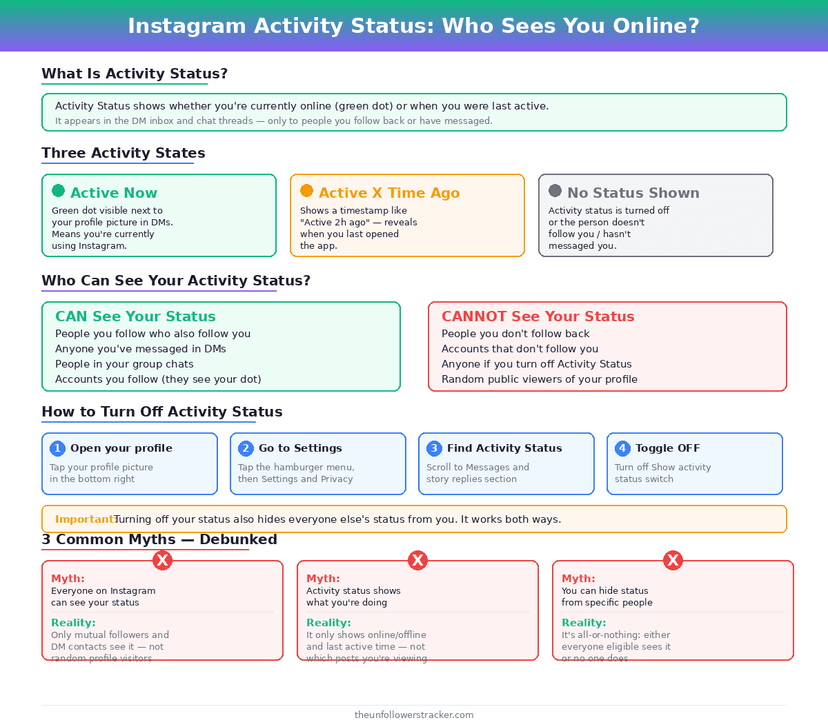
What does the green dot actually show?
The dot is coarser than it looks. A green dot means the app currently has you open, and "Active 5m ago" means you closed it 5 minutes ago — Instagram publishes no session length, no daily total and no record of what you looked at.
The label degrades through 4 stages: minutes, then hours, then "Active today", then nothing. Once a status passes roughly 24 hours, Instagram stops displaying it rather than showing a date, so there is no history to scroll back through.
How do you turn off activity status?
One switch controls the whole feature, and it lives with the messaging settings rather than the privacy ones — which is why people hunt for it in the wrong menu. Instagram activity status takes 4 taps to reach and applies the moment you flip it.
Step 1: Open your profile and tap the menu, then "Settings and activity"
The menu is the three-line icon in the top corner of your own profile.
Step 2: Tap "Messages and story replies"
Activity status is treated as a messaging feature, so it sits here and not under "Account privacy".
Step 3: Tap "Show activity status"
The screen holds a single toggle plus a short description of what it controls.
Step 4: Switch it off
The change applies immediately. Every thread you are part of loses your dot and your last-active time at once, with no notice to the people in them.
What do you give up by turning it off?
Turning off your own status turns off everyone else's for you. Instagram makes the setting reciprocal on purpose: an account that hides its own presence stops seeing green dots and last-active labels across the entire app.
That trade catches people out. If the reason for hiding is one specific person, the cost is losing the signal for every conversation you have.
| Setting | They see your dot | You see their dot |
|---|---|---|
| Show activity status ON, they have it ON | Yes | Yes |
| Show activity status OFF, they have it ON | No | No |
| Show activity status ON, they have it OFF | Yes | No |
| Both OFF | No | No |
| No DM thread has ever existed | No | No |
Can you hide your activity status from one person?
Instagram provides no per-person control. The toggle is all-or-nothing, so selecting an audience for it is not something the app supports as of September 2026 — unlike Close Friends, which caps at 1 list, or Favorites, which caps at 50 accounts.
Two blunter tools exist. Restricting an account moves its messages to a separate request folder and hides your activity status from it; blocking removes the thread from view entirely. Both do considerably more than hiding a dot, which is why the toggle is usually the better answer.
Does your activity status show up anywhere else?
The dot travels with your profile picture wherever a conversation exists — 4 places in all: the DM inbox list, the top of an open thread, the Instagram Direct icon, and the shared inbox with Messenger for accounts that linked the two after cross-app messaging arrived in September 2020.
None of those places are visible to accounts outside the thread. Read receipts are a separate setting with a separate switch, covered in Instagram DM read receipts.
Likes are the other activity people assume is private and is not: can people see what you like.
FAQ
Can someone see I'm online if we've never messaged?
No. Activity status appears only inside a direct message thread, so an account with no message history with you sees nothing at any point.
Does opening someone's profile show them I'm active?
No. Viewing a profile sends no signal of any kind. Instagram has never shipped profile-view notifications for personal accounts.
If I turn off activity status, can I still see who is online?
No. The setting is reciprocal — switching it off hides your status and removes your view of everyone else's at the same time.
How long does "Active today" stay visible?
Instagram stops showing a status once it passes roughly 24 hours, and it displays no date after that point. There is no way to view an older history, and no Instagram activity status data is exposed to third-party apps at any stage.
Does using Instagram on a browser show me as active?
Yes. Activity status follows the account, not the device, so a desktop session updates the same dot your phone does.

Track Your Instagram Unfollowers
Discover who stopped following you and optimize your growth strategy with our free tool.
Discover Unfollowers