Can People See What You Like on Instagram?
Not as a list. Nobody can browse everything you have liked, because the feed that once showed that — the Following activity tab — was removed in October 2019 and never replaced. Your likes are not published anywhere as a collection.
One exposure remains and it is the one that matters. Anyone looking at a post you liked can tap its like count and see your username in the list, and that has worked the same way since Instagram launched.
Who sees a like, and where?
Whether people can see what you like on Instagram changes with whose post it is rather than with your own settings, which is the part most people have backwards. Five situations cover all of it.
| Whose post you liked | Who sees your like |
|---|---|
| A public account | Anyone who opens the post |
| A private account you follow | That account's approved followers |
| Your own post | Anyone who can see the post |
| A post you liked then unliked | Nobody — the entry is removed |
| Any post, browsed as a list | Nobody — no such list exists |
The 1st row is the whole risk. A like on a stranger's public post is visible to every other person who opens that post, including people who follow neither of you.
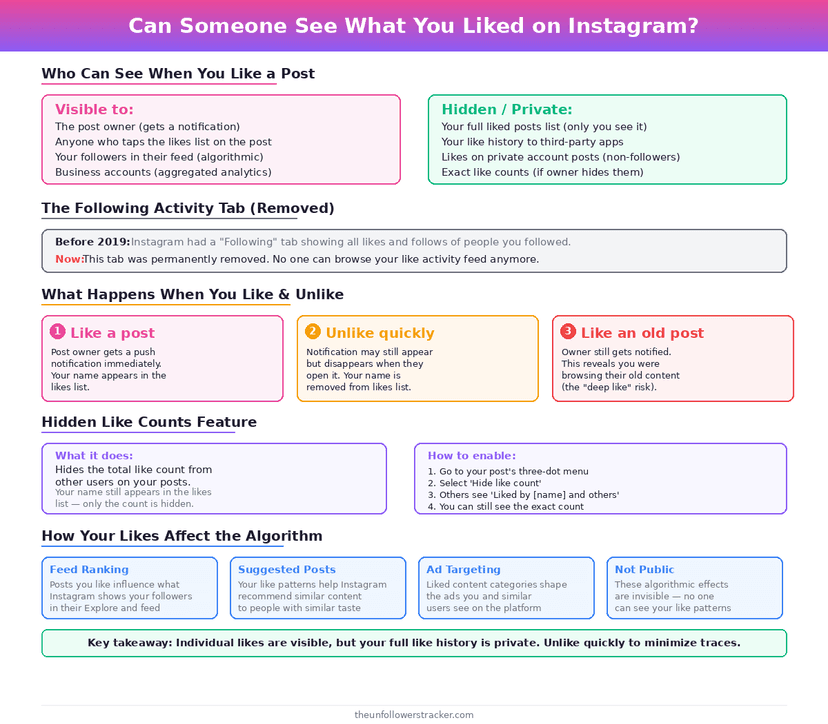
Can your followers browse your likes?
No, and this is what changed. From 2011 Instagram had a Following tab showing what the people you followed had liked, commented on and followed — and it removed the tab in October 2019.
The reason given at the time was that it surprised people: Instagram's head of product told BuzzFeed News that most users did not know the tab existed and did not realise it was showing their own activity to others.
Nothing replaced it. The same removal is why you cannot see who somebody recently followed either, covered in how to see who someone recently followed.
Step 1: See your own likes
Open your profile menu, then Your activity, then Likes. Instagram keeps every post you have liked there in reverse-chronological order, going back years on an old account.
That screen is yours alone. No account type, subscription or setting exposes it to anyone else, and no third party can read it.
Step 2: Unlike anything you want removed
Open the post from that list and tap the heart again. Your username leaves the post's like list immediately, and the like disappears from your own archive.
Unliking sends no notification. The original like may have sent one when you made it, which the unlike does not retract — the notification and the list are separate things.
Step 3: Check what else you are publishing
Likes are 1 of several activities that are visible without feeling public. Comments carry your username permanently, follows appear in your following list, and Story views appear in the author's viewer list.
The full inventory is in who can see my activity on Instagram. Searching is the exception in the other direction, and the answer is in can someone see if you searched for them.
Does hiding like counts hide who liked?
No. The setting that hides like counts removes the number from view and leaves the list of names completely intact, so tapping through a post still shows every username that liked it.
It works in both directions and neither hides identity. Hiding counts on your own posts changes what viewers see on your grid; hiding them in your feed changes what you see on other people's.
FAQ
The 5 questions below cover who sees a like, where they see it, and what changed when Instagram removed the activity feed in 2019. All answers reflect the app's behaviour in September 2026.
Can people see what I like on Instagram?
Only post by post. Anyone can open a post you liked and read your username in the like list, but nobody can browse your likes as a collection.
Can my followers see my likes in their feed?
No. The Following activity tab that did this was removed in October 2019 and nothing replaced it.
Where can I see my own liked posts?
Your activity, then Likes, in the profile menu. That list is visible only to you.
Does unliking remove me from the list?
Yes, immediately. It does not retract a notification the original like may have sent.
Does hiding like counts hide who liked a post?
No. It hides the number only. The list of usernames stays reachable by tapping through.

Track Your Instagram Unfollowers
Discover who stopped following you and optimize your growth strategy with our free tool.
Discover Unfollowers