What Does Seen Mean on Instagram DMs?
Seen under your last Instagram message means the recipient opened that chat with your message on screen. Instagram shows 3 states in order — Sent, Delivered, Seen — and stops at Delivered forever when the other person has read receipts switched off, which is a setting rather than a verdict on you.
Ask what does Seen mean on Instagram and most answers stop at "they read it", which is the half that changes how you read a silent thread. Since 2024, any account can turn Seen off, so a message that never reaches Seen no longer proves nobody read it.
Sent, Delivered, Seen: what is the difference?
Three statuses, 3 different claims, and only 1 of them is about a human. The other 2 describe machines: your phone, Instagram's servers, and their phone.
| Status | What it proves | What it does not prove |
|---|---|---|
| Sent | The message left your phone | That it reached them |
| Delivered | It arrived on their device | That they looked at it |
| Seen | They opened the chat | That they read the words |
| No status at all | Nothing | See Step 3 below |
The gap between Delivered and Seen is where the confusion lives. Delivered is their phone acknowledging a packet; Seen is a person tapping a thread. Only the second one involves a decision.
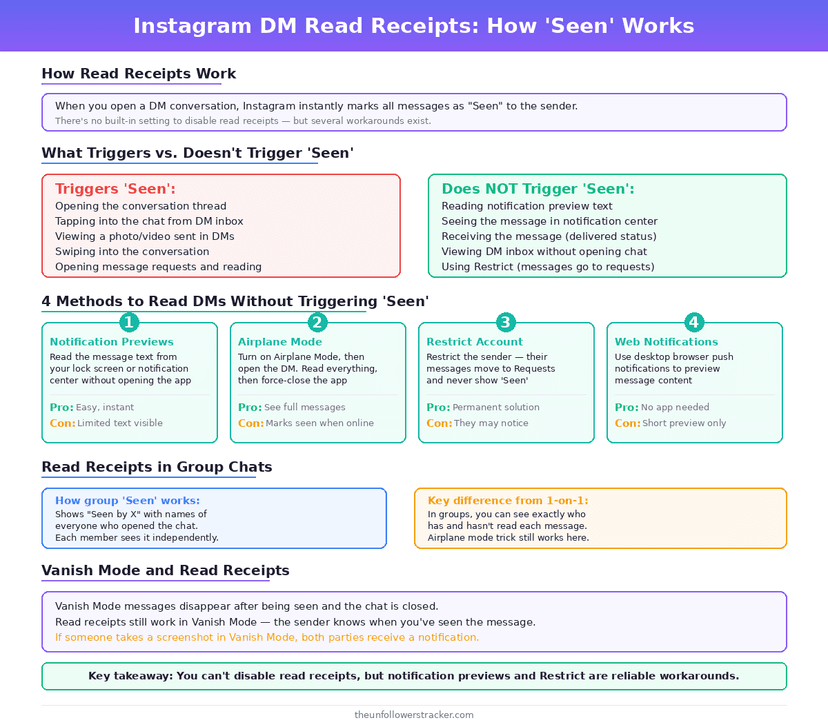
Step 1: Where does Seen appear?
Under your most recent message, on the right side of the thread, in small grey text. It attaches to the last message you sent rather than to each one, so a run of 5 messages carries a single status at the bottom.
Group chats work differently and tell you more. Instead of a word, Instagram shows the profile pictures of everyone who has opened the thread. They stack under your message, naming who read it and who has not.
Step 2: What if the status is stuck on Sent?
A status frozen at Sent points at delivery, not at the person. The message left your phone and Instagram has not confirmed it landed. That happens when their device is offline, out of storage, or closed on a weak connection.
Give it time before reading anything into it. Delivered normally follows within seconds and can lag by hours if their phone is off — 1 of the 2 devices in this exchange is somewhere you cannot see.
Step 3: What does no status at all mean?
No status means your message is sitting in their Requests folder, unaccepted. Instagram routes messages from people you do not follow there. The sender sees nothing until the recipient accepts the thread.
Being restricted looks identical from the outside. A restricted account's messages go to Requests and never report Seen, which looks exactly like a normal request from your side. The difference sits in restrict vs block vs mute.
Does Seen mean they read your message?
Seen proves the thread was open on their screen with your message visible. It does not prove attention. The 2 differ: a chat opened to find something else, a stray tap, and a careful read all produce the same word.
Read Seen as reaching a person's eyes rather than their mind. Instagram measures the screen, and it holds no state between opened and read.
Why does Seen never appear for some people?
Because either of you can turn read receipts off, and the switch is mutual. If they turned theirs off, their Seen stops reaching you; if you turned yours off, you lose theirs in the same move, in every chat the setting covers.
The symmetry catches people out. Someone who disabled receipts to stop being tracked also stopped being able to track. The mechanics, and the 3 places the toggle does not reach, are in how to read Instagram DMs without being seen.
Vanish mode is the 1 exception in the other direction. Disappearing messages report Seen no matter what either side has configured, and they report screenshots as well.
What does Seen mean on a Story?
A different thing entirely, and the shared word is why the question keeps getting asked. On a Story, Seen is a list: tap the viewer count and Instagram names every account that watched, for the 24 hours the Story exists.
No setting removes you from that list. The DM toggle governs DMs alone, so watching a Story anonymously is a different problem with a different answer, and the same is true of the green dot — that one is activity status.
Can you tell whether someone is ignoring you?
Not from the status, and the attempt is where most people misread the app. Seen with no reply and Delivered with no reply look like 2 different verdicts and are the same non-answer: 1 person has not written back.
Instagram gives you 3 machine states and 0 signals about intent. Anything past that is inference you are adding: how long they took, whether they were online, what the green dot meant. Instagram sent none of it.
FAQ
The 5 questions below cover what Seen proves, what it hides, and why it sometimes never arrives at all. All answers reflect app behaviour in September 2026.
What does Seen mean on Instagram?
Seen means the recipient opened the chat while your message was on screen. Instagram reports the screen, not attention, so Seen is not proof that anybody read the words.
Why does my Instagram message say Delivered but not Seen?
Two explanations fit: they have not opened the chat, or they have read receipts turned off. Both look identical from your side, and Instagram offers no way to tell them apart.
Does Seen have a timestamp?
No. Instagram attaches Seen to your last sent message with no time beside it, so the status tells you somebody opened the chat and never when.
Can someone see my message without it saying Seen?
Yes. A notification preview, an unaccepted request, and read receipts switched off all let a message be read with no Seen reaching you.
Does Seen work the same in group chats?
No. A group thread shows the profile pictures of everyone who has opened it rather than the word Seen, and the read-receipts toggle does not apply there.

Track Your Instagram Unfollowers
Discover who stopped following you and optimize your growth strategy with our free tool.
Discover Unfollowers