Instagram Restrict vs Block vs Mute: What Each Does
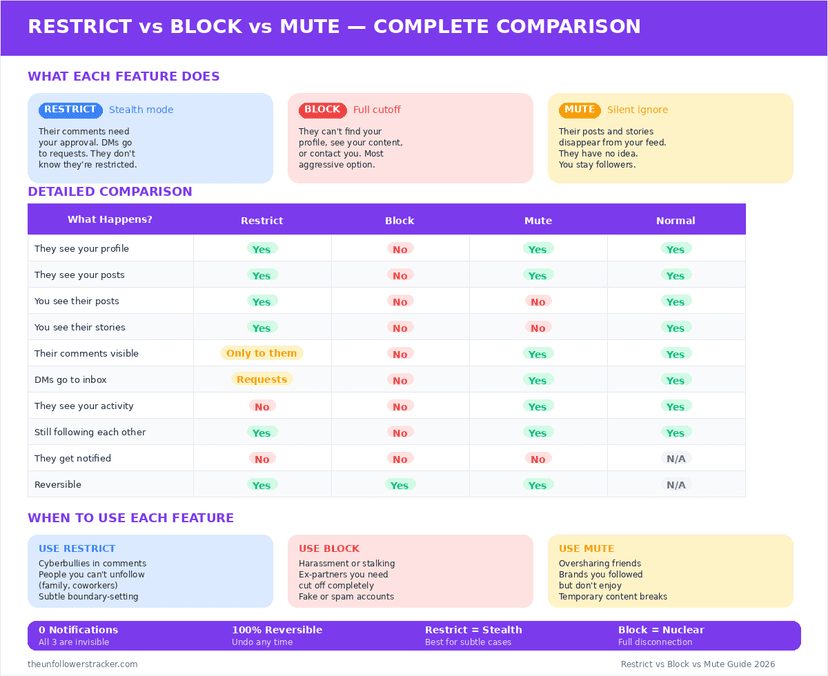
Mute changes what you see, restrict changes what they can do to you, and block removes you from each other entirely. None of the 3 sends a notification. Restrict is the one most people want and the one fewest people use: it hides their comments from everyone else and routes their messages away, silently.
What does muting actually do?
Muting is a filter on your own feed and nothing else. Their posts and Stories stop appearing for you, while everything on their side carries on unchanged — they can still see your posts, comment on them, message you and read your Stories.
Nothing about your account changes for them. Muting is the lightest of the 3 tools. It is also the only one that leaves the other person's experience completely untouched, which is why the signs of being muted are so hard to read from outside.
What does restricting someone do?
Restrict quarantines a person's interactions with you without cutting them off. Restrict changes 3 things at once. Their comments on your posts become visible only to them and to you, unless you approve them. Their direct messages move to your Message Requests folder. And they lose sight of your activity status and your read receipts.
The person is never told. From their side the app behaves normally: comments appear to post, messages appear to send, and the fact that nothing lands is invisible unless they compare notes with someone else.
What does blocking do?
Blocking removes both accounts from each other's view of Instagram. A blocked account cannot open your profile, see your posts or Stories, find you in search, message you or tag you. Instagram also removes the likes and comments that account left on your posts.
You lose the same access in reverse. Blocking is symmetrical, so this is the only one of the 3 that costs you something as well.
Restrict vs block vs mute, side by side
Restrict vs block on Instagram comes down to 11 differences, and mute differs from both on most of them. Every row below reflects app behaviour in September 2026. Read the Restrict column first: it is the only one of the 3 that changes what someone can do without changing what they can see.
| Mute | Restrict | Block | |
|---|---|---|---|
| They are notified | No | No | No |
| You see their posts | No | Yes | No |
| They see your posts | Yes | Yes | No |
| Their comments on your posts | Public | Visible only to them, until you approve | Removed |
| Their DMs to you | Normal inbox | Message Requests | Never arrive |
| They see your activity status | Yes | No | No |
| They see your read receipts | Yes | No | No |
| They can find you in search | Yes | Yes | No |
| Their old likes and comments | Stay | Stay | Removed |
| Reversible with no trace | Yes | Yes | Yes, but the gap is obvious |
| Easy for them to detect | Very hard | Hard | Easy |
The two bold rows in the Restrict column are why it exists. Restrict is the only option that takes away someone's view of when you are online while leaving the relationship apparently intact — activity status otherwise works as described in who can see when you're online.
How do you restrict someone on Instagram?
Restrict sits in 2 places on Instagram — the profile menu and the comment swipe — and the profile route is the one that always works. All 4 steps take under 10 seconds, and the person on the other end sees no change at any point in the process.
Step 1: Open their profile
Tap through from a comment, a message or search — any route to the profile page will do.
Step 2: Tap the three-dot menu in the top corner
The menu holds Restrict, Block and Report together, which is why the wrong one gets tapped.
Step 3: Tap "Restrict"
Instagram shows a short explanation of what changes. Confirming applies it immediately.
Step 4: Check Message Requests afterwards
Their existing thread moves out of your main inbox at once. Anything they send from now on lands in Requests, where you can read it without a read receipt.
Which one should you use?
Reach for restrict first in almost every case that is not abuse. It solves the common problem — someone whose comments you do not want public and whose messages you do not want in your inbox — without announcing anything.
Mute is for content rather than people: an account you like whose posting volume you do not. Block is for when you want them gone and do not mind that they will work it out — a blocked account cannot find your profile at all, which is not subtle.
If the goal is a smaller audience rather than one fewer person, none of the 3 is the right tool. Going private is, and it is covered in how to make your account truly private.
Removing a follower is the fourth option and the quietest of them — how removal differs from blocking.
FAQ
The 5 questions below are the ones that decide which of the 3 tools fits a given situation. All answers reflect app behaviour in September 2026.
Does Instagram tell someone I restricted them?
No. Restrict sends no notification and changes nothing they can see directly. Their comments still appear to post and their messages still appear to send.
Can a restricted person still message me?
Yes, but the messages land in your Message Requests folder rather than your inbox, and reading them there sends no read receipt.
Does blocking delete their old comments?
Yes. Instagram removes the likes and comments a blocked account left on your posts, and restores them if you unblock.
Can someone tell they've been muted?
Not directly. Muting changes nothing on their side, so the only clue is indirect — the tests people use are covered in how to tell if someone muted you.
Can I restrict someone who doesn't follow me?
Yes. Restrict applies to any account, follower or not, and works the same way for both.

Track Your Instagram Unfollowers
Discover who stopped following you and optimize your growth strategy with our free tool.
Discover Unfollowers