How to Tell If Someone Muted You on Instagram
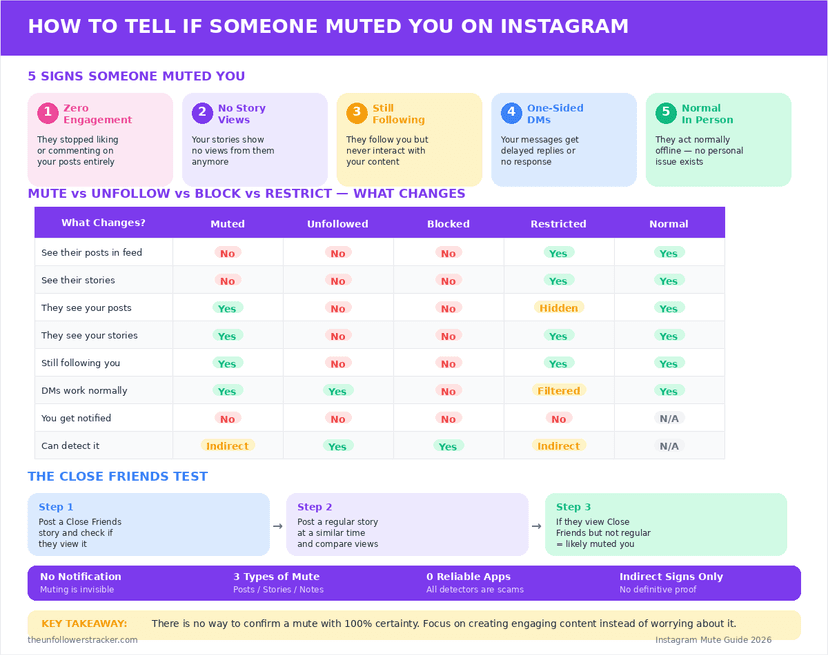
You cannot tell. Instagram sends no notification, shows no indicator, and gives the muted person nothing to check — and the deeper problem is that a mute produces exactly the same evidence as the algorithm simply not putting your post in front of somebody.
Every list of how to tell if someone muted you on Instagram is really a list of things that happen for 4 or 5 other reasons. The useful version of the question is what each signal narrows down, which is less than people hope and not nothing.
What does muting change?
It removes your posts, your Stories, or both from that person's feed while leaving the follow in place. They still follow you, they can still open your profile, and Instagram tells you nothing about any of it.
Mute is the quietest of the 3 tools, and the only one that changes what the person who used it sees rather than what you can do — the full comparison is in restrict, block or mute.
Why can no sign prove it?
Because the algorithm produces identical symptoms. Instagram has not shown posts in follower order since 2016, so a follower seeing nothing from you is the default state rather than the exception.
| Signal people quote | What else explains it |
|---|---|
| They stopped liking your posts | The algorithm stopped showing them |
| No Story views from them | They stopped opening Stories at all |
| They follow you but never interact | 1 of the 2 things most followers do |
| Your reach fell | Reach falls for the whole account, not per person |
| They reply in person, not online | Most people use the app less than you think |
The 2nd row is the one worth dwelling on. Muting somebody's Stories takes them out of your tray; it does not stop you opening their profile and watching from there, so a muted account can still appear on a viewer list.
What can you actually check?
Four checks, in order of how much they narrow things down. None of them answers how to tell if someone muted you on Instagram with a yes, and 2 of them rule out the alternatives people confuse with muting.
Step 1: Confirm they still follow you
Open your follower list and search the username. If they are gone, this was an unfollow rather than a mute, and the question changes entirely — the reasons are in why people unfollow.
Step 2: Open their profile from your own account
If the profile loads normally with posts visible, you are not blocked. Blocking and muting get confused constantly, and this check separates them in 5 seconds.
Step 3: Check whether it is only you
Look at whether your posts reach your other followers at the usual rate. A whole-account drop is a reach problem rather than 1 person's decision, and it is covered by how the algorithm works.
Step 4: Stop here
No further check resolves it, and that is the honest end of the method. Anything past this point tests a person rather than a hypothesis, and the answer does not get better for the effort.
What should you not do?
Do not build a test around them. Posting bait, watching who views what, asking mutual friends, or opening a second account to look — these produce noisy answers to a question that has no clean answer, and 1 of them will be noticed.
Muting is also not usually about you. People mute to quieten a busy feed, to avoid a topic, or because they follow 900 accounts and 20 of them post daily. Instagram built the feature precisely so nobody has to make it personal.
Does the same apply to Notes and messages?
Yes, and they are separate switches. Somebody can mute your Notes without muting your posts, and can mute a message thread without muting anything else, and none of the 3 tells you anything.
The one place a mute becomes visible is where the other person forgets it exists and says so. Instagram never leaks it; people do.
FAQ
The 5 questions below cover what a mute changes, why no signal proves one, and what the checks genuinely rule out. All answers reflect the app in September 2026.
How to tell if someone muted you on Instagram?
You cannot. Instagram sends no notification and shows no indicator, and every symptom of a mute is also a symptom of the algorithm not showing your posts.
Does Instagram tell you when someone mutes you?
No. Muting is silent by design and leaves nothing visible on either account.
If someone muted my Stories, do they disappear from my viewer list?
Not necessarily. Muting removes you from their Story tray, but they can still open your profile and watch, which registers as a normal view.
Does muting mean they unfollowed me?
No. A mute keeps the follow in place. Check your follower list — if the account is missing, that was an unfollow, not a mute.
Can an app tell me who muted me?
No. Instagram exposes no mute data to anyone, so any app claiming this is guessing from engagement or after your login.

Track Your Instagram Unfollowers
Discover who stopped following you and optimize your growth strategy with our free tool.
Discover Unfollowers