Instagram Vanish Mode: What It Hides and What It Doesn't
Instagram vanish mode clears a one-on-one chat once both people have seen the messages and closed it, and Instagram blocks screenshots of those messages outright. It hides the conversation from the two phones in it. It does not hide the conversation from Meta, and since 8 May 2026 Instagram DMs carry no end-to-end encryption at all.
What does vanish mode actually delete?
Messages leave both screens once the chat is seen and closed. Text, photos, videos and reactions all go together, no copy stays in the thread, and neither person can scroll back to reread what was said.
The deletion is local to the conversation, not to Meta. Instagram vanish mode removes what the two of you can see; Meta's own records of who messaged whom, when, and from where are unaffected by the mode.
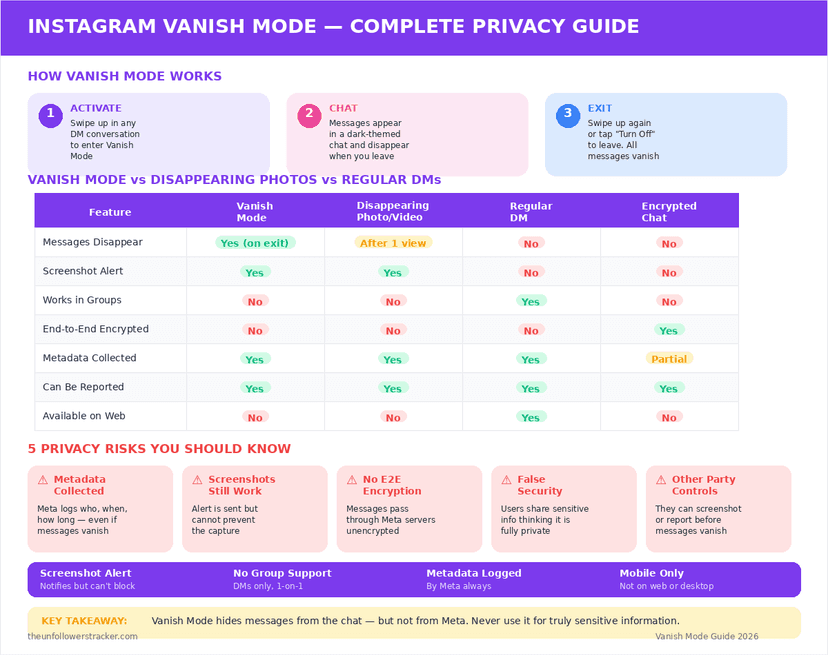
Can you screenshot a vanish-mode message?
Not on the device. Instagram rolled out screenshot prevention for vanish mode and view-once media in December 2024, so the capture fails rather than succeeding quietly, and where one still gets through the sender is told by name in the thread.
Vanish mode and view-once are the only 2 places on Instagram with any screenshot defence at all. Regular posts, Reels, Stories and normal DMs generate no alert and no block — that whole map is in which Instagram actions send a notification.
Is vanish mode encrypted?
Vanish mode has never been encryption, and as of 2026 there is no encryption underneath it either. Meta ended support for end-to-end encrypted messaging on Instagram on 8 May 2026, having announced it only through a terms update in March and citing very low usage (MacRumors, 8 May 2026).
That changes what the feature means. Before May 2026 a user could at least opt into encrypted chats; now Instagram messages, vanish mode included, travel under standard encryption that Meta itself can read. A disappearing message is a disappearing message on 2 phones, not a private one.
How do you turn vanish mode on and off?
The gesture is unusual, which is why people trigger it by accident and then cannot find the way out.
Step 1: Open a one-on-one direct message thread
Vanish mode exists only in individual chats. A group thread offers no way in.
Step 2: Swipe up from the bottom of the chat
Keep swiping past the normal scroll. The screen darkens and the words "You're in vanish mode" appear.
Step 3: Send what you want to send
Everything sent from this point disappears once both people have seen the chat and left it.
Step 4: Swipe up again to leave
The same gesture exits. Leaving clears the vanish-mode messages, and the normal thread returns exactly as it was.
Outside vanish mode the ordinary rules apply, including when "Seen" appears and what it tells the sender.
Where does vanish mode not work?
Two gaps catch people out. Vanish mode runs in one-on-one chats only, so a group conversation has no version of it, and it is absent from the desktop web version of Instagram entirely — a chat started in vanish mode on a phone simply is not there on a laptop.
| Vanish mode | Disappearing photo or video | Normal DM | |
|---|---|---|---|
| Deleted after viewing | Yes, once both leave the chat | Yes, after viewing | No |
| Screenshots blocked | Yes | Yes | No |
| Works in group chats | No | Yes | Yes |
| Works on desktop web | No | No | Yes |
| Readable by Meta | Yes | Yes | Yes |
| Recoverable by you | No | No | Yes |
What vanish mode does not protect you from
Four things survive it, and all four are ordinary. A second phone photographing the screen leaves no alert. A message read and remembered needs no copy. Meta holds the metadata regardless. And the person you are talking to can always repeat what you said.
Vanish mode is a tidiness feature that also raises the cost of casual capture. It is not a tool for anything that would matter if it were repeated, and treating it as one is the mistake this feature invites.
Vanish mode deletes on its own schedule; what happens to the rest of your DMs when the account goes is a different answer.
FAQ
Can you recover messages sent in vanish mode?
No. Once both people have seen the chat and left it, the messages are gone from the thread with no archive, no export and no support request that brings them back.
Does vanish mode work in group chats?
No. Instagram vanish mode is limited to one-on-one conversations. Group threads offer no way to enable it.
Does the other person know I turned vanish mode on?
Yes. The chat visibly changes for both people — the background darkens and a banner announces the mode — so it cannot be enabled quietly.
Can I use vanish mode on Instagram on a computer?
No. The feature is absent from the desktop web version, so a vanish-mode chat is reachable only from the mobile app.
Are Instagram DMs still end-to-end encrypted?
No. Meta ended support for end-to-end encrypted messaging on Instagram on 8 May 2026. Messages now use standard encryption, which leaves the content readable by Meta.

Track Your Instagram Unfollowers
Discover who stopped following you and optimize your growth strategy with our free tool.
Discover Unfollowers