What Happens to Your DMs If You Deactivate Instagram?
Deactivating Instagram does not delete a single message. Every DM you have ever sent stays in the other person's inbox, readable as before, with your name replaced by "Instagram User" and your profile picture gone. Reactivating restores your name to all of it.
Does deactivating Instagram delete your messages?
Instagram deletes nothing. Deactivating Instagram hides your profile, your posts and your follower list. The message history stays put: a DM lives in two inboxes rather than one, and only your own copy hangs off your account.
That surprises people who deactivate specifically to take a conversation back. Deactivating removes your presence, not your words — the sentences you sent are still on the other person's screen a minute later.
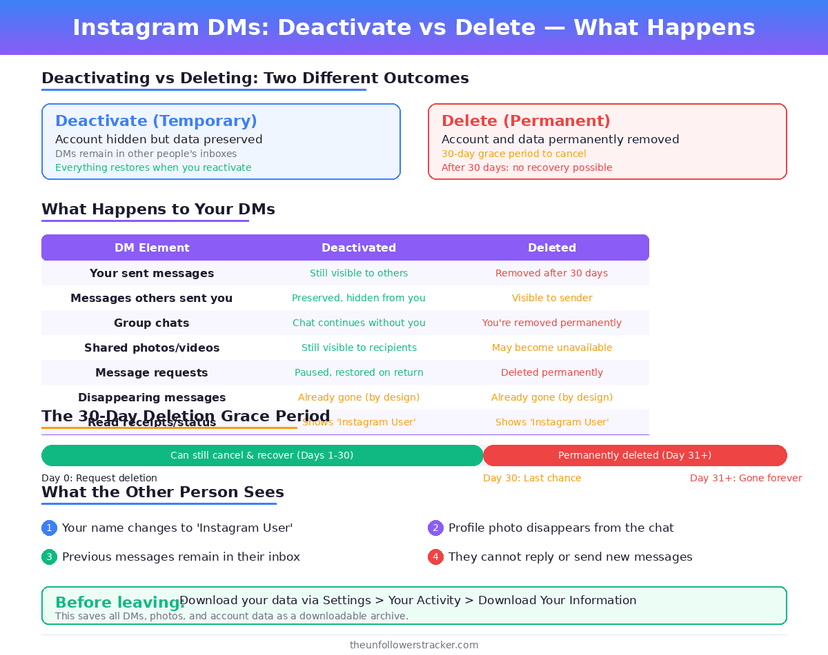
What does the other person actually see?
The other person sees the full thread with a stranger's name on it. Your messages stay in order and stay readable. The sender line reads "Instagram User", the avatar becomes a default silhouette, and tapping that name opens nothing at all — there is no profile behind it to visit.
The thread also stops working. New messages never reach a deactivated account, so anyone who replies writes into a dead conversation until you come back.
Deactivate, delete, unsend: what each one does
Three actions get confused with each other, and only 1 of the 3 removes a message from someone else's inbox. The table below sets out what each one touches, which is the fastest way to see why deactivating Instagram is the wrong tool for taking words back.
| Action | Your messages in their inbox | Your name on them | Reversible |
|---|---|---|---|
| Deactivate the account | Stay | "Instagram User" | Yes, by logging in |
| Reactivate | Stay | Your name returns | — |
| Delete the account | Stay | "Instagram User" | Only within 30 days |
| Delete a chat on your side | Stay | Unchanged | No |
| Unsend one message | Removed | — | No |
| Vanish mode message | Removed after viewing | — | No |
Unsend is the only row that reaches across. Deleting a conversation from your own inbox clears your copy and leaves theirs untouched, which is the single most common misunderstanding on this topic.
What happens to DMs if you delete the account instead?
Deleting removes the account permanently. The messages still stay. Instagram holds a deleted account for 30 days before erasing it. Logging back in inside that window cancels the deletion and restores everything under your name, which makes the first month a grace period rather than a decision.
After 30 days the account is gone for good. Copies of your messages stay in other people's inboxes, still labelled "Instagram User" — deleting your account never reaches into anyone else's data.
How do you remove a message from someone else's inbox?
Unsend is the only tool that reaches the other inbox, and it works on 1 message at a time. Instagram has shipped no bulk version of it in the 8 years since Unsend arrived in 2018, so the effort scales with the length of the conversation.
Step 1: Open the conversation
Unsend acts on individual messages, so the thread has to be open rather than selected from the inbox list.
Step 2: Press and hold the message you sent
A menu appears with the options available for that message. Only your own messages offer Unsend.
Step 3: Tap "Unsend"
The message vanishes from both sides at once. Instagram leaves no gap and no placeholder where it was.
Step 4: Repeat for every message you want gone
There is no bulk unsend and no "unsend last hour". Clearing a long conversation means tapping through it message by message, which is the practical reason people deactivate instead.
Does the other person get told you deactivated?
No notification goes out. Instagram announces nothing when an account deactivates. The change shows up only to someone who looks: the profile stops loading, and the DM name changes to "Instagram User".
Anyone who checks will work it out quickly. A deactivated account and a blocked account look similar from the outside, which is why people often reach the wrong conclusion about which one happened.
Deactivating is the reversible half of all this. Nothing is deleted, no 30-day clock starts, and your username is held rather than released — the steps, and the once-a-week limit, are in how to deactivate without losing anything.
Threads no longer shares this inbox at all. It got its own message system on 1 July 2025, along with a set of privacy rules that differ from Instagram's — what Threads shares and what it does not.
FAQ
The 5 questions below are the ones that decide whether deactivating Instagram does what someone hopes it will do. Every answer was checked against app behaviour in September 2026.
If I deactivate Instagram, do my messages disappear for the other person?
No. Every message stays in their inbox and stays readable as before. Only your name and picture change — to "Instagram User" and a default avatar.
If I delete my Instagram account, do the messages get deleted?
No. Deletion removes your account after 30 days and leaves everything you sent in other people's inboxes, permanently labelled "Instagram User".
Does deleting a chat delete it for both people?
No. Deleting a conversation clears your copy only. The other person keeps the whole thread, including everything you sent.
Can I still read my DMs while deactivated?
No. Deactivation signs the account out of everything, so you cannot reach the inbox until you log back in — at which point every thread returns intact.
Do disappearing messages behave differently?
Yes. A vanish-mode message clears itself once the recipient sees it, whatever happens to the account, and screenshotting one notifies the sender. The details are in our guide to vanish mode.

Track Your Instagram Unfollowers
Discover who stopped following you and optimize your growth strategy with our free tool.
Discover Unfollowers