Instagram Shadowban: How to Check and What to Fix
Instagram does not use the word and keeps no secret ban list. What exists is a recommendation limit: content that breaks the Recommendation Guidelines stops reaching people who do not follow you, while everything else carries on. Account Status tells you the moment it applies.
That single screen is the difference between diagnosing an Instagram shadowban and guessing at one. In the sense people mean the word, you can check it in about 30 seconds.
What does Instagram actually restrict?
An Instagram shadowban restricts 1 pipeline, not the account. Your posts still reach your followers, your profile still loads, your DMs still work. What stops is placement in Explore, Reels and suggested content for people outside your audience.
| What people think happens | What actually happens |
|---|---|
| The account hides from everyone | Followers see everything as usual |
| Instagram bans you silently | Account Status names the limit and the post |
| Nothing is checkable | A screen in Settings shows it |
| It lasts forever | It clears when the content does, or on appeal |
| Only rule-breakers get it | Borderline content counts too |
The last row catches most people. The Recommendation Guidelines set a higher bar than the Community Guidelines, so a post can be entirely allowed to stay up and still fail the test for recommendation.
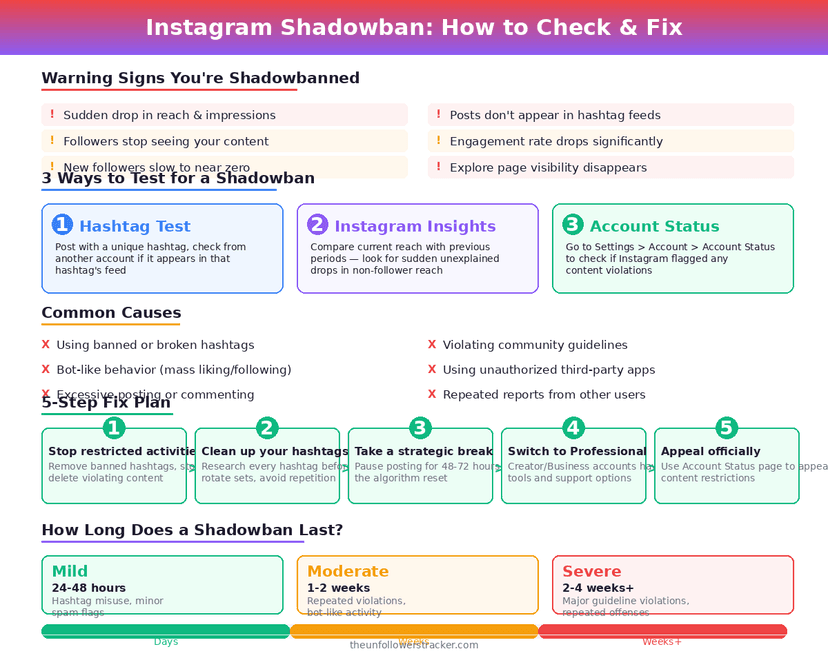
How do you check for a shadowban?
Four steps. The 1st answers whether you have an Instagram shadowban at all; the other 3 are what to do about the answer.
Step 1: Open Account Status
In Settings and activity, find Account Status. It reports whether Instagram can recommend your account to non-followers, and lists the content holding that back.
Step 2: Read what is limited, and why
Account Status names individual posts rather than passing a verdict on the whole account. A single Reel can hold the limit in place while everything else you posted is fine.
Step 3: Remove it or appeal it
Both options sit on the same screen. Delete the flagged post and the limit it causes ends; appeal instead and the post stays up during the review. Appeal when you think Instagram got the call wrong.
Step 4: Measure non-follower reach, not total reach
Insights splits reach into followers and non-followers. A recommendation limit touches only the non-follower line, so total reach tells you almost nothing about whether the problem cleared.
What is not a shadowban?
Four things people blame on one. Each has its own explanation, and none of them amounts to a restriction on your account.
| Symptom | The real cause |
|---|---|
| Reach fell after a viral post | The audience that arrived was not yours |
| Fewer likes than last month | Ordinary variance across posts |
| Hashtags do not bring views | Following hashtags ended 13 December 2024 |
| Followers dropped overnight | A bot sweep, like the one on 6–7 May 2026 |
The hashtag row is the most common misdiagnosis this year. Posts stopped reaching non-followers through tags because Instagram removed the feature, not because anything landed on your account.
Whether losing followers has anything to do with it is the subject of are shadowbans and unfollows connected.
What causes a recommendation limit?
Content Instagram will host but not promote: borderline sexual content, depictions of violence, misinformation that fact checkers flagged, tobacco and weapons content, and posts that read as engagement bait or spam.
Automation is the other reliable cause. Tools that follow, unfollow or comment on your behalf produce exactly the pattern Instagram limits, so disconnect them before trying anything else on this page.
How long does it last?
Until the cause goes. No fixed duration exists, no 14-day rule and no queue. Those numbers circulate because a limit that ends the moment you delete a post looks like a timer when you deleted the post 2 weeks earlier.
If Account Status is clean and reach is still low, the answer is not on this page. Reach falls for ordinary reasons far more often than for restrictions, and those are covered in Instagram algorithm myths and how the algorithm works.
FAQ
The 5 questions below cover what a shadowban really is, where to check, and which symptoms point somewhere else entirely. All answers reflect Instagram in September 2026.
Is an Instagram shadowban real?
Not under that name. Instagram limits recommendation of content that breaks its Recommendation Guidelines, and Account Status shows when the limit applies to you.
How do I check if I am shadowbanned?
Open Settings and activity, then Account Status. It reports whether your account can be recommended and names the content responsible.
How long does a shadowban last?
No fixed period exists. The limit ends when you remove the content causing it, or when an appeal succeeds.
Do hashtags cause shadowbans?
No. Hashtags stopped carrying posts to non-followers when Instagram removed hashtag following on 13 December 2024, which is a change rather than a penalty.
Can I appeal a recommendation limit?
Yes. Account Status offers an appeal on the affected content, and the post stays up throughout the review.

Track Your Instagram Unfollowers
Discover who stopped following you and optimize your growth strategy with our free tool.
Discover Unfollowers