Can Someone See If You Searched for Them on Instagram?
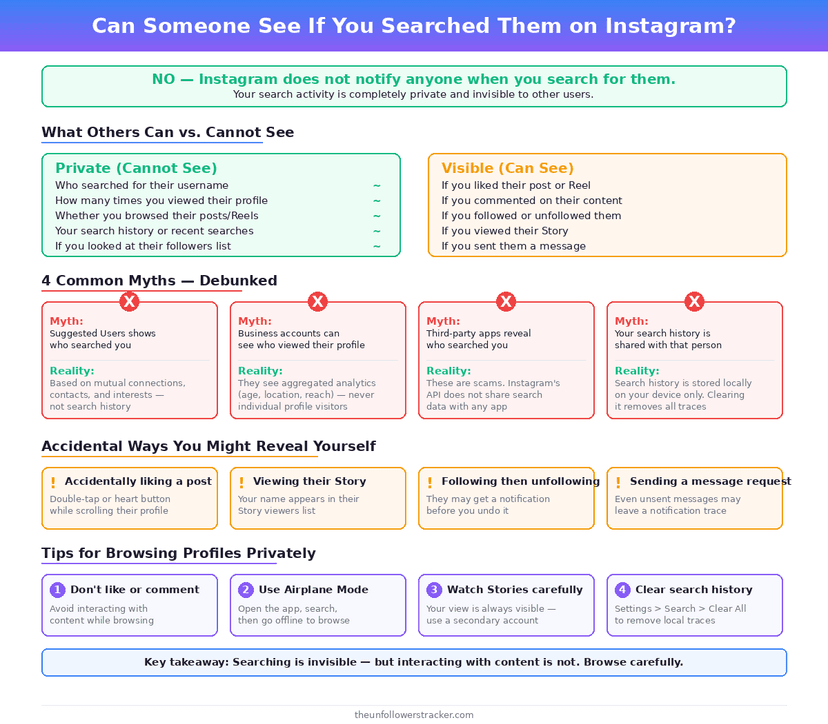
No. Instagram records your searches, keeps them in a list only you can open, and tells the person you searched for nothing at all. Whether you type a username once or 30 times, no notification is sent and nothing appears on their side.
The question people are usually asking underneath is a different one: who can read that list. The answer is you, anyone holding your unlocked phone, and Meta — and the middle one is the risk that actually materialises.
Who can see your Instagram searches?
Four parties are worth separating, because "private" means something different for each. Only 1 of them is the person you searched for, and they see nothing.
| Who | What they see |
|---|---|
| The person you searched for | Nothing — no alert, no list, no count |
| You | Your full recent-searches list, on the app |
| Anyone using your unlocked phone | The same list, in 2 taps |
| Meta | The search, as part of your account activity |
The 3rd row is the practical answer to can someone see if you searched them on Instagram. It is not the platform exposing you; it is a housemate, a partner or a colleague opening the search box on a phone you left unlocked.
Where does Instagram keep your search history?
In your account, not on the device, which is why it follows you to a new phone. The list sits under Settings and activity → Your activity → Recent searches, and it holds accounts, hashtags and places you have looked up.
Two consequences follow from it being account-bound. Logging in somewhere else brings the history with you, and logging out of a shared device does not delete anything — it only hides it until the next sign-in.
Your searches are also part of what Meta holds about you more broadly, alongside the far larger set of things you never typed at all — the scope of that is in what Instagram knows about you.
Does searching for someone change their suggestions?
No, and this is the myth worth killing carefully, because it sounds plausible. Searching for an account changes what you are shown, not what they are shown, and the 2 suggestion feeds are built separately.
Instagram assembles suggestions from mutual follows, synced contacts and accounts that interact with the same content. Somebody appearing at the top of your suggestions after you looked them up is your own history feeding back to you — it is not a signal travelling in the other direction.
The reverse belief, that your name surfaces in their suggestions because you searched, has no mechanism behind it. What each side can and cannot infer is laid out in can someone see if I viewed their profile.
How do you clear your Instagram search history?
Four steps, and the order matters: clearing the list is quick, but 2 of these change whether it fills up again.
Step 1: Open Recent searches
Go to Settings and activity → Your activity → Recent searches. This is the same list that drops down when you tap the search box, shown in full.
Step 2: Clear the whole list, or single entries
Clear all empties it in one action. To remove 1 name without touching the rest, tap the × beside that entry — useful when the problem is a single search rather than the history itself.
Step 3: Expect it to refill
Clearing is not a setting. Instagram starts recording again with your next search, and there is no switch that stops search history being kept.
Step 4: Lock the phone instead
Since the exposure is physical rather than platform-side, a passcode and a short auto-lock do more than clearing ever will. Clearing removes yesterday's evidence; a locked screen removes the access.
What actually reveals that you looked someone up?
Not the search — the tap after it. Opening the profile leaves nothing, but a Story view puts your name on the owner's viewer list for 24 hours, and a like or a follow notifies them immediately.
Signed out, even the tap leaves nothing. There is no account for Instagram to attach the view to, which is why a signed-out profile viewer returns the same public page without adding a line to anybody's history.
Accidental follows are the common one. Search brings up the account, the Follow button sits under your thumb, and an immediate unfollow does not always beat the push notification to their lock screen.
Searching while signed out avoids the recording entirely, because there is no account for Instagram to attach it to. That is a different route with different limits, and it is not the same thing as a profile-visitors feature, which does not exist.
FAQ
The 5 questions below cover what a search records, who can read it, and what clearing the list does and does not achieve. All answers reflect the app in September 2026.
Can someone see if you searched them on Instagram?
No. Searching sends no notification and appears nowhere on their account. Instagram keeps the search in your own history and shows it to nobody else.
Can someone tell how many times I searched for them?
No. The count exists only in your own recent-searches list, which is not visible to the person you searched for at any point.
Does clearing my search history delete it from Instagram?
It removes the entries from the list you can see. Instagram starts recording again immediately, and there is no setting that turns search history off.
Will they know if I search for them from a logged-out browser?
No, and nothing is recorded against you either, because there is no account for the search to attach to.
Does searching for someone push me into their suggestions?
No. Your searches shape your own suggestions. Their suggestions are built from their follows, contacts and activity, not from who looked them up.

Track Your Instagram Unfollowers
Discover who stopped following you and optimize your growth strategy with our free tool.
Discover Unfollowers