How to Deactivate Instagram Without Losing Anything
Deactivating Instagram hides your profile, posts, comments and likes while keeping all of it on Meta's servers. Nothing is deleted, your followers stay attached to the account, and logging back in restores everything at once. The control lives in Accounts Centre, and Instagram allows one deactivation a week.
What does deactivating Instagram actually do?
Deactivation makes the account invisible without unmaking it. Your profile stops loading for everyone, your posts vanish from feeds and hashtags, your comments disappear from other people's posts, and your username is held rather than released — nobody can claim it while you are away.
The data itself does not move. Photos, Reels, Stories archive, saved collections, follower list and message history all sit where they were, and none of it is counted as deleted, so no 30-day clock starts running.
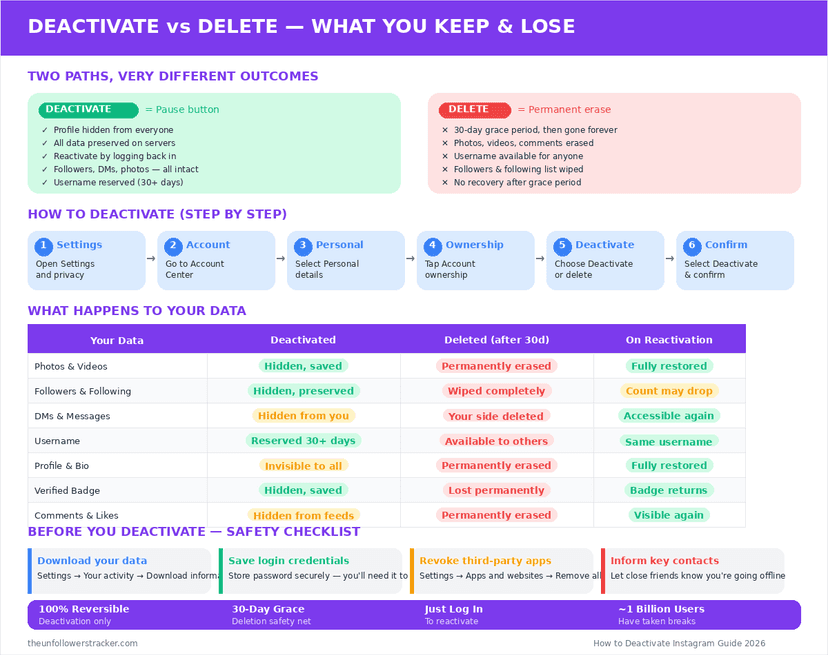
How do you deactivate your Instagram account?
Instagram moved this control into Accounts Centre, which is why the old instructions — "you can only do it from a browser" — no longer match the app. Six taps from your profile, as of September 2026.
Step 1: Open your profile and tap the menu
The three-line icon sits in the top corner of your own profile.
Step 2: Tap "Settings and activity", then "See more in Accounts Centre"
Accounts Centre is the Meta-wide settings layer shared with Facebook, and it sits at the top of the settings list.
Step 3: Tap "Personal details"
The section holds the controls that belong to the account itself rather than to the app.
Step 4: Tap "Account ownership and control"
Deactivation and deletion both live behind this entry, which is why it is easy to tap the wrong one at the end.
Step 5: Tap "Deactivation or deletion", then pick the account
Accounts Centre can hold several profiles. Select the Instagram account you mean before continuing.
Step 6: Choose "Deactivate account", enter your password and confirm
Read this screen carefully — the deletion option sits directly beside it. Instagram asks for a reason from a dropdown, then applies the change instantly.
Deactivate or delete: which one are you actually choosing?
The two options sit one tap apart and do opposite things. Deactivation is a pause; deletion starts a countdown.
| Deactivate | Delete | |
|---|---|---|
| Profile and posts | Hidden | Removed after 30 days |
| Your photos and Reels | Kept | Erased after 30 days |
| Followers | Kept | Gone |
| Username | Held for you | Released |
| Direct messages you sent | Stay in the other inbox | Stay in the other inbox |
| Your name in those DMs | "Instagram User" | "Instagram User" |
| Reversible | Yes, by logging in | Only within 30 days |
| How often allowed | Once a week | — |
Both rows about direct messages are the ones people get wrong. Neither action removes a message from anyone else's inbox — the full picture is in what happens to your DMs.
How long can you stay deactivated?
There is no time limit. You can deactivate Instagram indefinitely: the platform sends no reminder, applies no expiry, and never converts a long deactivation into a deletion.
The limit is on the switching, not the duration: one deactivation per week. Deactivate on Monday, log in on Tuesday to check something, and you cannot deactivate again until the following Monday — which is the single most common way people get stuck visible.
How do you reactivate?
Log in. That is the whole procedure: opening the app or instagram.com with your username and password restores the profile, the posts, the followers and the message history immediately, with no confirmation step and no waiting period.
Nobody is notified that you came back. The profile simply starts loading again for anyone who tries it.
What stays visible after you deactivate?
Deactivation is not erasure, and four things survive it. Messages you sent stay in other people's inboxes under "Instagram User". Screenshots other people took are theirs. Content reshared to someone else's Story or feed stays on their account. And search engines keep whatever they cached until they next crawl the now-missing page.
Anything that was public is also potentially archived elsewhere. A public profile can be read without an account at all — that is what an Instagram profile viewer does — so deactivating removes the live copy rather than every copy.
Should you lock the account down instead?
People who deactivate Instagram to escape one person usually pick the wrong tool, because it costs the whole account to solve a problem with a single account. Blocking removes them entirely, restricting silences them without telling them, and switching to a private account cuts off everyone you have not approved.
Deactivation earns its place for a different reason: a break from the app itself, where the point is that nothing of yours is reachable and nothing pulls you back. The full set of privacy controls is in our guide to locking down an Instagram account.
FAQ
Can people still find my profile while I'm deactivated?
No. The profile stops loading, your posts leave feeds and hashtags, and your comments disappear from other people's posts. Only your sent DMs remain, labelled "Instagram User".
Will I lose followers if I deactivate for a month?
No. Followers stay attached to the account for as long as it is deactivated, and they return with everything else the moment you log back in.
How many times can I deactivate?
Once a week. Instagram blocks a second deactivation inside seven days, so logging in to check something can leave the account visible for the rest of the week.
I chose "Delete" instead of "Deactivate" — can I undo it?
Yes, within 30 days. Logging back in during that window cancels the deletion and restores the account. After 30 days nothing can be recovered.
Does deactivating Instagram affect my Facebook account?
No. Accounts Centre asks which account you are deactivating, and the choice applies only to the one you pick. A linked Facebook profile keeps working.

Track Your Instagram Unfollowers
Discover who stopped following you and optimize your growth strategy with our free tool.
Discover Unfollowers