How to Spot and Remove Fake Instagram Followers
Fake Instagram followers are bot or dormant accounts that inflate your count and contribute nothing. They show 5 recognisable signals, removing one is silent, and their real cost is your engagement rate — not a penalty, because Instagram applies none for having them.
Meta clears out large numbers on its own schedule. The sweep on 6–7 May 2026 removed bot and dormant accounts in bulk, which is why so many creators watched their follower count drop by a step overnight that week.
What does a fake follower look like?
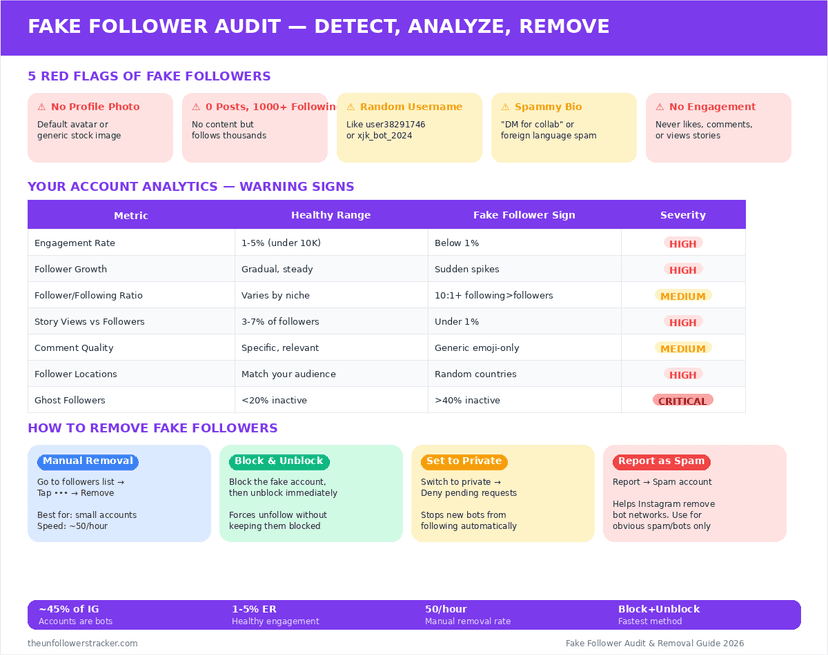
Five signals, and no single one is conclusive. An account showing 3 or more is worth removing; an account showing 1 is probably just a quiet person.
| Signal | What it looks like |
|---|---|
| No profile picture | Default silhouette, never changed |
| No posts, or 1 stock image | An empty grid |
| Following thousands, followed by nobody | A ratio of 3,000 to 12 |
| Username with random digits | user_39481 and similar patterns |
| Never engages with anything | No likes, no views, no comments, ever |
The 3rd row is the strongest of the 5. A real account that follows 3,000 people and has 12 followers is unusual; a bot with that ratio is the norm.
Do fake followers actually cost you anything?
Not directly. Instagram applies no penalty for the composition of your audience, and follower count is not a ranking signal — the ranking mechanics are in do unfollowers affect reach.
The cost is arithmetic. Engagement rate is engagement divided by followers, so 2,000 dormant accounts push that ratio down while contributing nothing to the top of it. Anyone assessing you — a brand, a partner, or Instagram's own insights — reads the smaller number.
Buying followers is a separate matter, and it breaks Instagram's terms. Bought accounts are also the first to disappear in a sweep, which produces exactly the overnight drop people then diagnose as a shadowban.
How do you remove them?
Four steps. Removing is not blocking, it is silent, and it is reversible only in the sense that they could follow you again.
Step 1: Open your follower list and sort
Your follower list shows the most recent first. Bots usually arrive in clusters, so scanning the newest 200 finds more of them per minute than working through the whole list.
Step 2: Check before removing
Open the account. Three of the 5 signals visible on the profile is enough; a dormant real person with a photo and posts is worth leaving, because they may come back.
Step 3: Remove, do not block
Tap the 3 dots beside the follower and choose Remove. Nothing is sent to them, and the difference from blocking is set out in removing followers without blocking.
Step 4: Work in small batches
Remove tens rather than hundreds in a session. Bulk actions across an account resemble automation, which is the one behaviour on this page that can genuinely attract a restriction.
Are follower-audit tools worth it?
The ones that estimate from public data are reasonable. They read what anybody can read — follower ratios, posting history, engagement — and produce a percentage that is a guess rather than a measurement.
The ones that ask for your Instagram password are a different thing entirely, and no audit is worth it. What a legitimate connection can and cannot reach is in what third-party apps can see.
No tool has access to a definitive list, because Instagram does not publish one. Every percentage you have seen quoted is a model's opinion.
FAQ
The 5 questions below cover how to identify fake Instagram followers, what they cost, and what removing them does. All answers reflect Instagram in September 2026.
How do I know if a follower is fake?
Look for a default profile picture, an empty grid, a following count far above the follower count, digits in the username and no engagement anywhere. Three or more together is a reliable signal.
Does removing a follower notify them?
No. Removing is silent. They are not told, and they can follow you again unless you block them.
Do fake followers hurt my reach?
Not through any penalty. They dilute your engagement rate, which is the number brands and your own insights read.
Why did I lose thousands of followers overnight?
Almost certainly a platform sweep. Meta removed bot and dormant accounts in bulk on 6–7 May 2026 and repeats the exercise periodically.
Can an app tell me exactly which followers are fake?
No. Instagram publishes no list, so every audit tool is estimating from public signals — and any tool asking for your password is after the account.

Track Your Instagram Unfollowers
Discover who stopped following you and optimize your growth strategy with our free tool.
Discover Unfollowers