Do Instagram Unfollowers Affect Reach? Full Creator Guide 2026


Yes — but not the way most creators think. Instagram's algorithm does not directly penalize you for losing followers. What it does is measure engagement rate relative to your audience size. When inactive followers, ghost accounts, or mismatched audiences inflate your follower count without engaging, your engagement rate drops — and the algorithm distributes your content to fewer people. The real question is not "did I lose followers?" but "which followers did I lose, and what does that tell me about my content?"

Instagram in 2026 runs on a simple principle: content that resonates gets distributed. Content that does not gets suppressed. Follower count is a vanity metric. Engagement rate — the ratio of interactions to audience size — is the metric that determines how broadly Instagram pushes your posts, Reels, and Stories.

This creates a counterintuitive dynamic: losing the right followers can actually improve your reach, while gaining the wrong followers can destroy it. This guide covers exactly how the algorithm interprets follower loss, what the 2026 ranking signals mean for creators, and how to build a tracking system that turns unfollow data into actionable content strategy.

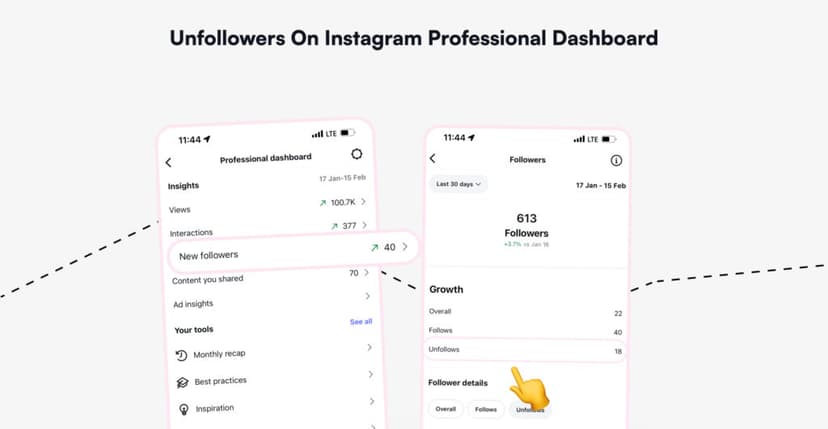
unfollowers on instagram professional dashboard

How Instagram's algorithm actually works in 2026

Instagram does not use one algorithm. It runs separate ranking systems for Feed, Stories, Reels, and Explore — each with different signals and priorities. Adam Mosseri confirmed the three most important ranking signals in January 2026.

Ranking signalWhat it measuresWeight for existing followersWeight for new audience (Explore/Reels)
Watch timeHow long viewers watch your contentHighHighest
Sends (DM shares)How often viewers share your content via DMModerateVery high — 3–5x more than likes
Likes per reachPercentage of viewers who likeHighHigh
SavesHow often viewers bookmark your contentModerateHigh
CommentsConversation depth on your postsModerateModerate
Profile visits after viewingWhether content drives profile explorationLowHigh (signals follow intent)

The critical shift in 2026: sends have overtaken likes as the primary distribution signal for reaching new audiences. Instagram treats a DM share as a stronger quality endorsement than a like because it involves a personal recommendation. For creators, this means content that people want to share privately now outranks content that simply accumulates public likes. This shift was part of the new Instagram features rollout in 2026.

What the algorithm does NOT measure

The algorithm does not track your follower count as a ranking signal. It does not penalize you for having fewer followers than last month. What it does measure is the ratio of engagement to audience — and that is where unfollowers become relevant.

How unfollowers actually affect your reach

The relationship between unfollowers and reach is indirect but powerful. Here is the mechanism, step by step.

The engagement rate equation

Engagement rate = (likes + comments + saves + shares) ÷ followers × 100

When you have 10,000 followers and 500 interactions per post, your engagement rate is 5%. If 2,000 of those followers are ghost accounts that never engage, your effective audience is 8,000 — but Instagram calculates the rate using the full 10,000. Your real engagement rate is 6.25%, but the algorithm sees 5%.

Remove those 2,000 ghost followers, and your measured engagement rate jumps to 6.25% — the number it should have been all along. The algorithm then distributes your content to more of your remaining audience, which generates more interactions, which further improves distribution. The cycle compounds.

Three scenarios: how follower loss affects reach

ScenarioWhat happensEffect on reachCreator action
Ghost followers removed (manual or Instagram purge)Follower count drops, engagement rate risesPositive — algorithm sees healthier ratioWelcome it — clean audience improves distribution
Engaged followers unfollow after bad contentActive audience shrinks, engagement rate may hold or dropNegative — lost real engagementAnalyze which content triggered the departure
Viral Reel brings low-quality followers who quickly unfollowTemporary spike then drop, engagement rate destabilizedNegative short-term — algorithm sees volatilityFocus on retention content, not viral chasing

Did You Know? Instagram periodically removes fake, inactive, and spam accounts from the platform in bulk purges. Adam Mosseri has stated that follower drops caused by these purges do not affect reach — the accounts removed were never engaging with your content in the first place. If you see a sudden follower drop across your entire niche, check whether Instagram announced a platform-wide cleanup before assuming a content problem.

Engagement rate benchmarks for 2026

Knowing whether your engagement rate is healthy requires context. Rates vary dramatically by account size — and smaller accounts consistently outperform larger ones.

Follower tierAverage engagement rateWhat it means
Nano (1K–10K)4–6%Tight-knit audience, high personal connection
Micro (10K–50K)2–4%Growing audience, moderate loyalty
Mid-tier (50K–200K)1.5–3%Wider reach, more passive followers
Macro (200K–500K)1–2%Large audience, lower per-follower engagement
Mega (500K+)0.5–1.5%Mass audience, engagement diluted

The platform-wide average across all account types sits at approximately 0.48% in Q1 2026. Creator accounts perform significantly better, with a median of 3.4–4.5% depending on tier.

Key insight: if your engagement rate is below the benchmark for your tier, your follower list likely contains a significant percentage of inactive or ghost accounts. Cleaning those accounts can immediately improve algorithmic distribution.

The ghost follower problem

Ghost followers are the silent killers of Instagram reach. They inflate your follower count without contributing any engagement — mathematically guaranteeing a lower engagement rate.

How to identify ghost followers

CharacteristicWhat to look for
No profile pictureDefault gray avatar
Zero or very few postsAccount created but never used actively
Username with random numberse.g., user38472917
Following 2,000+ accountsMass followers who follow everyone
No activity on your contentNever liked, commented, saved, or viewed stories
Account inactive for 12+ monthsNo recent posts or story activity
Bio contains suspicious linksSpam or promotional accounts

Safe removal protocol

Instagram allows you to remove followers manually through your follower list. The safe pace for removal is 30–50 per hour, with a daily maximum of 100–150. Removing too many too fast can trigger Instagram's action-block system, which temporarily restricts your account activity.

The process: go to your profile → Followers → find the ghost account → tap "Remove." This silently removes them from your follower list without blocking. They receive no notification.

For a detailed walkthrough of the full account cleanup process, see our Instagram cleanup guide.

The viral Reel trap: why fast growth causes fast unfollows

One of the most common creator frustrations in 2026: a Reel goes viral, brings thousands of new followers, and within two weeks half of them unfollow. The cycle feels like failure, but it is actually predictable algorithm behavior.

Why viral followers leave

A viral Reel reaches audiences far beyond your niche. These viewers follow impulsively based on one piece of content. When your next posts do not match the viral content that attracted them, they disengage — and eventually unfollow. When they leave, you need a plan to win back an audience.

This creates a damaging pattern:

  1. Viral Reel → massive follower spike
  2. Next 5–10 posts → low engagement from new followers (content does not match expectations)
  3. Algorithm detects declining engagement rate → reduces distribution
  4. New followers see less of your content → disengage further → unfollow
  5. Follower count drops back → engagement rate recovers → reach stabilizes

The entire cycle can take 2–4 weeks. The result: you end up roughly where you started, but with a temporary reach penalty during the contraction phase.

How to retain viral audience

The 48-hour window after a viral Reel is critical. Content posted in this window determines whether new followers stay or leave.

Do: post content that reinforces your core niche, pin your best-performing niche content to your profile grid, update your bio to clearly communicate what followers should expect.

Do not: try to replicate the viral format if it was off-niche, post nothing for several days (new followers see inactivity and disengage), pivot your entire content strategy based on one viral hit.

Did You Know? Instagram's 2026 algorithm uses a metric called "engagement velocity" — the speed at which interactions accumulate in the first 30 minutes after posting. Ghost followers and mismatched audiences drag down engagement velocity because they do not interact quickly (or at all). This early-window suppression means the post never reaches the wider audience that might have engaged with it. The damage from low-quality followers happens before your real audience even sees the content.

How to track unfollowers and connect them to content

Instagram's Professional Dashboard shows aggregate follower changes but never reveals individual unfollows. To build an effective content strategy, you need to connect follower loss to specific posts — and that requires data Instagram does not provide natively.

The content-correlation method

StepActionWhat it reveals
1Export Instagram data before publishing a key postBaseline follower snapshot
2Export again 48–72 hours after the postPost-publication snapshot
3Compare both lists in the Unfollowers TrackerExactly who left in that window
4Check the departed accounts — were they active engagers or ghost followers?Whether the loss was meaningful
5Repeat across 4–6 posts to identify patternsWhich content types drive unfollows

Step-by-step data export

  1. Open Instagram → Profile → Menu → Accounts Center.
  2. Navigate to Your Information and Permissions → Export Your Information.
  3. Select your profile, choose Device, set format to JSON, date range to All Time.
  4. Under "Choose specific information," select only Followers and Following.
  5. Tap Save and Start Export. Wait for the email.
  6. Download the ZIP file and upload it to the Unfollowers Tracker.
how exactly does the unfollowers tracker operate

Three unfollow patterns and what they mean

PatternWhat you seeLikely causeResponse
Spike after a specific post50+ unfollows within 24–48 hours of one postContent-audience mismatch — the post alienated a segmentReview the post's topic, tone, or format against your core audience
Steady weekly decline (10–30 per week)Consistent low-level follower loss over weeksNiche drift — your content is gradually moving away from what attracted followersFull content audit — compare recent posts to your highest-performing content
Sudden mass drop (hundreds overnight)Large-scale loss unconnected to any specific postInstagram spam purge, bot removal, or account cleanup by the platformNo action needed — these were not real followers
settings and activity

The creator settings most people miss

Two Instagram settings directly affect whether your content reaches the right audience — and most creators never check them.

Algorithm diagnostic check

Navigate to: Profile → Professional Dashboard → "New Ideas" → "Similar to Your Content." This section shows Reels that Instagram considers similar to yours. If the content shown is unrelated to your niche, Instagram's content classifier has miscategorized your account. Your Reels are being distributed to the wrong audience — which causes low engagement and unfollows from people who were never interested in your niche.

Fix: create 3–5 Reels that are explicitly on-niche, use niche-specific captions (not generic hooks), and engage with accounts in your niche to retrain the algorithm's categorization.

The VPN problem

Creators who use VPNs may notice sudden reach collapse. The mechanism: your VPN changes your apparent location → Instagram distributes your content to the wrong geographic audience → that audience does not engage → engagement rate drops → reach decreases → new followers from the wrong region arrive and quickly unfollow.

Fix: disable VPN when posting or engaging on Instagram. If you must use a VPN, set it to your actual geographic region.

Frequently Asked Questions

Do Instagram unfollowers directly affect my reach?

Not directly. Instagram's algorithm does not penalize you for losing followers. What it does measure is engagement rate — the ratio of interactions to follower count. When inactive or ghost followers inflate your follower count without engaging, your engagement rate drops, and the algorithm distributes your content less broadly. Losing inactive followers can actually improve reach by increasing your engagement rate.

What are the most important Instagram ranking signals in 2026?

Adam Mosseri confirmed three primary signals: watch time (how long people view your content), sends per reach (how often people share your content via DM), and likes per reach. For reaching new audiences through Explore and Reels, sends are weighted 3–5x higher than likes. For reaching existing followers, likes remain the strongest signal.

Why did I lose followers after a viral Reel?

Viral Reels attract audiences outside your niche. These followers follow impulsively based on one piece of content, then unfollow when subsequent posts do not match their expectations. This is normal and predictable. The best response is to post niche-reinforcing content within 48 hours of a viral hit to retain followers who align with your core audience.

Should I remove ghost followers to improve my reach?

Yes — but do it gradually. Ghost followers inflate your follower count without engaging, which depresses your engagement rate. Removing them improves the ratio and signals to the algorithm that your audience is active and engaged. Remove 30–50 per hour, maximum 100–150 per day, to avoid triggering Instagram's action-block system.

How do I check my engagement rate?

Divide total interactions (likes + comments + saves + shares) on a post by your follower count, then multiply by 100. For 2026 benchmarks: nano accounts (1K–10K) average 4–6%, micro (10K–50K) average 2–4%, mid-tier (50K–200K) average 1.5–3%. If your rate is below the benchmark for your tier, your audience likely contains a significant percentage of inactive accounts.

Does Instagram notify me when someone unfollows?

No. Instagram does not send any notification when someone unfollows, regardless of your account type — personal, creator, or business. Your follower count drops silently with no name, timestamp, or connection to specific content. The only way to identify who unfollowed is through the Unfollowers Tracker using your Instagram data export.

What is engagement velocity and why does it matter?

Engagement velocity is the speed at which interactions accumulate in the first 30 minutes after posting. Instagram uses this early-window signal to decide whether to distribute content more broadly. Ghost followers and mismatched audiences drag down velocity because they do not engage quickly, which suppresses the post before your real audience sees it.

How often should I track my unfollowers?

For most creators, a weekly check provides enough data to spot patterns without becoming obsessive. Export your Instagram data before and after key content decisions — sponsored posts, format experiments, or niche pivots — to correlate follower changes with specific content. Monthly trends matter more than daily fluctuations.

Can a sponsored post cause mass unfollows?

Yes. Sponsored content is one of the highest-risk moments for follower loss. Audiences follow creators for authenticity, and a hard sales push — especially one that feels off-brand — is a common unfollow trigger. Track unfollowers in the 48-hour window after sponsored posts to measure audience tolerance and refine future brand collaborations.

Is it better to have fewer engaged followers or more total followers?

Fewer engaged followers — every time. Instagram's algorithm rewards engagement rate, not follower count. An account with 5,000 followers and 5% engagement rate will receive better algorithmic distribution than an account with 50,000 followers and 0.5% engagement rate. Quality of audience is the single most important factor in Instagram growth in 2026.


Track who unfollows you, identify ghost followers, and monitor your audience quality with the Unfollowers Tracker. For anonymous Story viewing, explore the Instagram Story Viewer.

Tags: #instagram unfollowers #instagram reach #instagram algorithm 2026 #engagement rate #ghost followers #creator growth

Track Your Instagram Unfollowers

Discover who stopped following you and optimize your growth strategy with our free tool.

Discover Unfollowers

We use cookies. Policy