Can You See Who Shared Your Instagram Post?
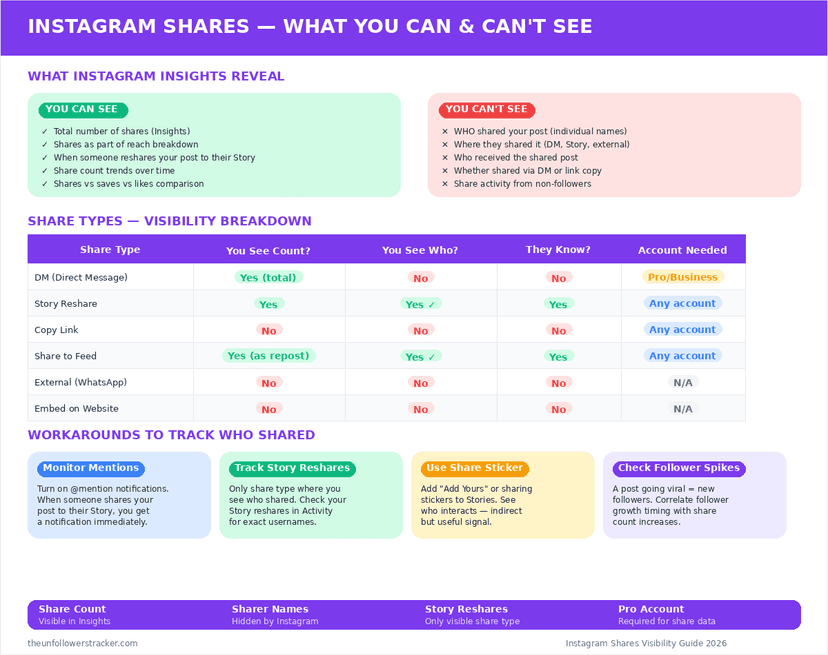
There is no list of people who shared your post, but there is 1 route that names them. Somebody who adds your post to their Story triggers a notification with their username in it. Somebody who sends it in a DM does not — that share adds to a count and nothing else.
Which shares name the person?
Story reshares, and only those. You can see who shared your Instagram post in exactly 1 case: an account taps "Add post to your story", and Instagram sends you a notification reading "[username] added your post to their story". The reshare carries a sticker linking back to you.
That notification is the whole of your visibility. It arrives once, sits in your activity feed, and there is no screen that collects past reshares into a list you can review later.
| How the post was shared | Do you learn who | Do you get a notification |
|---|---|---|
| Added to their Story | Yes, by username | Yes |
| Reshared to their feed | Yes, it is on their profile | No |
| Sent to 1 person in a DM | No | No |
| Sent to a group chat | No | No |
| Copied link, pasted elsewhere | No | No |
| Screenshotted and posted | No | No |
| Shared off Instagram entirely | No | No |
Six of those 7 rows are silent. The share count in Insights moves for several of them, so a number that jumped by 40 tells you the post travelled and nothing at all about where.
What do the Insights actually show?
A count, on professional accounts only. Instagram groups all 3 kinds of share — DM sends, Story adds and external links — into 1 "shares" figure, with no breakdown by type and no identities.
Personal accounts see nothing — not even that number. This is the same shape as saves, which are counted and never attributed, as covered in are your Instagram saved posts private.
How do you find a Story reshare you missed?
Notifications scroll away quickly, and there is no dedicated reshare tab. Four places are worth checking, in this order.
Step 1: Open your activity feed
The heart icon. Reshare notifications appear here alongside likes and comments, and they are easy to lose in a busy feed.
Step 2: Check your Story mentions
If they also tagged you, the mention lands separately and Instagram offers to add their Story to your own — which keeps it visible for 24 hours.
Step 3: Look at the reposter's profile
A Story lasts 24 hours; a reshare to their feed stays on their profile indefinitely, so that one you can find at any time.
Step 4: Accept that DM sends are gone
Nothing records them beyond the count. If the post travelled through private messages, no method recovers who moved it.
Can you stop people resharing your posts?
Yes, and this is the part most people never find. Instagram has a setting that turns off resharing to Stories entirely, and it is on by default — so every public post is resharable unless you changed it.
There is a blunter version too. A private account cannot be reshared to anyone's Story at all, which is one of the less-discussed effects of the privacy toggle covered in how to make your account truly private.
Why does Instagram name Story resharers but nobody else?
Because a Story reshare is a public act with attribution built in. The sticker carries your username and links to your post, so the reshare is already visible to that account's audience — telling you costs nobody any privacy.
A DM send is the opposite. It happens inside a private conversation, and naming the sender would expose a message the two people involved chose to keep between them. The rule across Instagram is consistent once you see it: public acts are attributed, private ones are counted.
FAQ
Can I see a list of everyone who shared my Instagram post?
No. There is no screen anywhere that lists who shared your Instagram post. The only shares you learn about individually are Story reshares, which arrive as a notification naming the account.
Does Instagram notify me when someone sends my post in a DM?
No. DM sends are invisible beyond adding to the aggregate share count on a professional account.
Can I see who shared my post if I have a Business account?
You see the total number of shares, never the identities. Account type changes the number you can see, not what it contains.
How do I stop people sharing my posts to their Stories?
Instagram has a setting that disables resharing to Stories, and it is on by default. Switching your account to private also blocks it entirely.
Does the share count include screenshots?
No. Instagram cannot detect a screenshot of a feed post, so anything that travelled as an image never appears in the count.

Track Your Instagram Unfollowers
Discover who stopped following you and optimize your growth strategy with our free tool.
Discover Unfollowers