What Is a Finsta on Instagram?
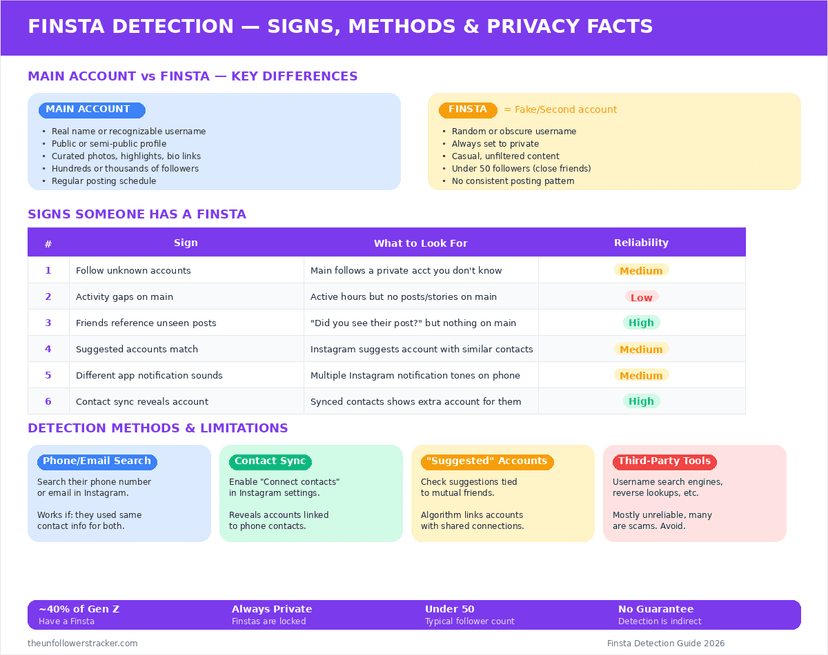
A finsta is a second Instagram account, kept private and shown to a small group — often 10 to 30 people rather than the hundreds who follow the main one. The name shortens "fake Instagram", though nothing about it is fake: it is an ordinary account used for a smaller audience.
It is not a feature. Instagram builds no finsta, offers no finsta setting and has no way to mark one account as another's secondary — which is also the reason the question of spotting somebody else's has no clean answer.
Is a finsta something Instagram makes?
No, and there is a well-documented moment that settled it. At a US Senate hearing in September 2021 a senator asked Facebook to "commit to ending Finsta", and the company's head of safety had to explain that a finsta is slang for a second account rather than a product anyone could end.
Nothing has changed in the 5 years since. Creating one means signing up again with a different email or phone number, setting it to private, and approving a short list of followers. Instagram treats the result as an unrelated account, and counts it against the 5 logins one device can hold at a time.
How is it different from the other private options?
Four ways of showing something to fewer people, and they are not interchangeable. The differences are about audience and permanence.
| Option | Who sees it | Separate account |
|---|---|---|
| Finsta | The handful you approve | Yes |
| Private main account | Everyone you approved, often hundreds | No |
| Close Friends | The list you pick, Stories only | No |
| Archive | Nobody but you | No |
Close Friends is the one people reach for instead, and it stops at Stories. A finsta covers posts, Reels, bio and username as well, which is the whole reason people bother with a second login.
Can you tell if someone has a finsta?
Not reliably, and any page promising a method is guessing. Instagram exposes no link between 2 accounts owned by the same person, no shared identifier and nothing in the API, so there is nothing to look up.
What people call methods are 3 inferences: a similar username, a familiar profile photo, an account following the same small circle. Each fits thousands of unrelated accounts among Instagram's 2 billion, and none of the 3 is evidence.
The one exception is not a method at all — Instagram may suggest a second account to somebody who has the phone number saved. That is a leak in the suggestion system rather than a way to search.
What actually links two accounts?
Three things, and all 3 are avoidable. Contact syncing is the big one: a phone number uploaded from anybody's address book can put a second account into their suggestions, which is the mechanism described in how Instagram suggests people.
Reused details come next — the same profile photo, a username built from the main one, a bio with the same joke in it. Instagram links nothing here; people do the linking themselves.
Accounts Centre is the third. Adding both accounts to the same one enables cross-posting and shared logins, and while it does not publish the pairing, it is a connection you created deliberately.
Step 1: Sign up with details you use nowhere else
A separate email address and, if possible, no phone number at all. A number reused from the main account is the single most common of the 3 leaks above, and the only one that works without you doing anything.
Use an email address that is not in anybody's contacts either. The suggestion system reads uploaded address books, and an address book contains email as readily as phone numbers.
Step 2: Turn contact syncing off before you follow anyone
Do this first, because syncing runs on its own once enabled. Open Accounts Centre, then Your information and permissions, then Manage contacts upload, and disconnect it — then delete anything already uploaded.
The order matters. Following people before turning syncing off gives Instagram a window in which to match your new account against uploaded numbers.
Step 3: Keep it out of Accounts Centre
Switching accounts through Accounts Centre is convenient and it is also the one deliberate link between them. Log in separately instead, and accept the extra taps.
Set the account to private in the same sitting. A finsta that is public for even an hour is a finsta that search engines and scrapers may have seen — the full privacy checklist is in how to make Instagram truly private.
FAQ
The 5 questions below cover what a finsta is, what it is not, and what can link it to a main account. All answers reflect Instagram's behaviour in September 2026.
What does finsta mean?
It is short for "fake Instagram" and means a second, private account kept for a small audience. The account itself is ordinary; only the audience is unusual.
Can Instagram see that two accounts belong to the same person?
Instagram holds signals that suggest it — device, email, phone number — but it publishes none of them, and no user-facing feature reveals the link.
How many Instagram accounts can I have?
You can own any number. The app allows 5 to be logged in at once on one device, and that limit is about simultaneous logins rather than ownership.
Will my finsta be suggested to people I know?
It can be, if contact syncing has uploaded the phone number or email you signed up with. Disconnect syncing and delete the uploaded contacts before following anybody.
Is having a finsta against Instagram's rules?
No. Multiple accounts are allowed, and a private second account breaks no rule as long as it does not impersonate somebody else.

Track Your Instagram Unfollowers
Discover who stopped following you and optimize your growth strategy with our free tool.
Discover Unfollowers