Can You See Who Views Your Instagram Reels?
No. Instagram gives a Reel's author 7 aggregate numbers and not a single name. There is no "Seen by" list for Reels the way there is for Stories, no setting that turns one on, and no app with access to the data — because Instagram never exposes it to anyone.
What does Instagram actually show a Reel's author?
Seven numbers, all totals: views, accounts reached, likes, comments, shares, saves and watch time. Each one counts something and names nobody. A Creator or Business account sees all 7 in Insights; a personal account sees the view count alone.
You can trace 2 of those 7 back to people, and only because those people chose to be visible: likes and comments are public acts, so tapping either count opens a list of usernames. The other 5 stay anonymous permanently.
| What you want to know | Does Instagram tell you |
|---|---|
| Who watched the Reel | No |
| How many watched | Yes |
| Who liked it | Yes — a public list |
| Who commented | Yes — a public list |
| Who shared it | No, only how many |
| Who saved it | No, only how many |
| Who watched it twice | No |
| How long people watched | Yes, as an average |
| Whether followers or strangers watched | Yes, as a percentage split |
The two bold "only how many" rows are where most of the confusion lives: shares and saves feel like they should name someone, and they never do.
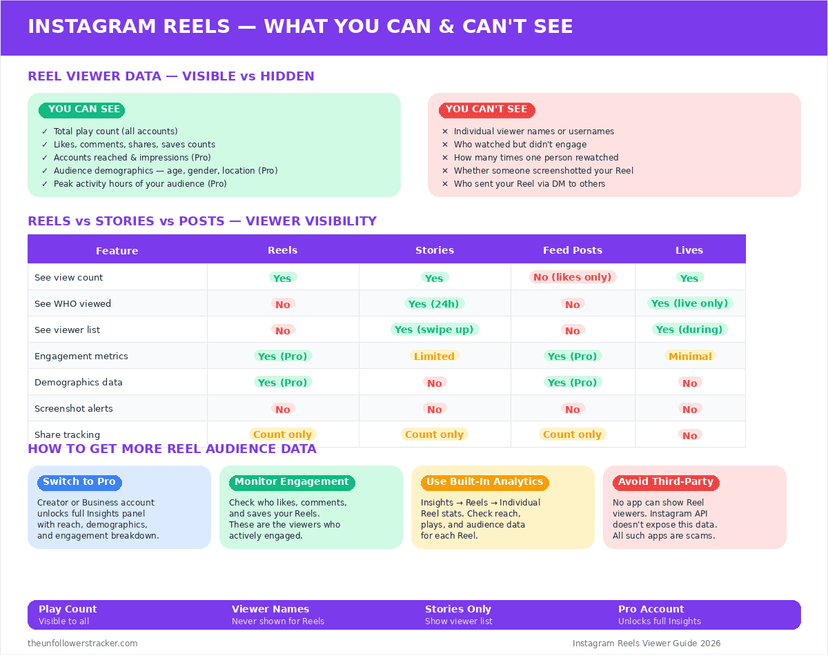
Why does Instagram name Story viewers but not Reel viewers?
Instagram built the 2 formats for opposite audiences. A Story goes to people who already follow you, so its viewer list is a conversation between people who know each other — and it lasts 24 hours, then disappears with the Story.
A Reel is built for distribution to strangers. A viewer list on a Reel that reached 40,000 accounts would be a list of 40,000 strangers, which is a privacy problem rather than a feature, and it would make people watch less freely.
Can you see who shared your Reel?
Only the number. Instagram counts all 3 kinds of share — sends to DMs, adds to Stories, and external links — then attaches no identities to any of them. The count moves; nobody who moved it is named, and there is no screen anywhere in the app that expands it into a list.
One indirect exception exists. When somebody reshares your Reel to their public Story or feed, that reshare sits on their account as visible content, so you can find it if you happen to look. Instagram points you at nothing — the full picture is in can you see who shared your Instagram post.
How do you read your own Reel insights?
The numbers that matter are not the ones on the front of the card. It takes 4 taps to reach the useful screen, and the order below puts the 2 most informative figures — reach and saves — ahead of the view count everyone looks at first.
Step 1: Open the Reel from your own profile
Insights are per-Reel, so start from the Reels tab on your profile rather than from the app-level dashboard.
Step 2: Tap "View insights" under the Reel
Only Creator and Business accounts show this link. A personal account gets the view count and nothing else.
Step 3: Read reach before views
Views counts plays, including repeats. Accounts reached counts people, and the gap between the two tells you whether a Reel was watched again or watched once by more people.
Step 4: Compare saves to likes
Saves are the strongest signal in the list and the quietest. A high save-to-like ratio means people keep the Reel rather than merely approve of it, which tells you more than a larger like count does.
Do apps that claim to show Reel viewers work?
None of them work, for a structural reason. Instagram's API hands no per-viewer data for Reels to any developer, so an app has nothing to read and invents whatever list it shows — usually from your recent likers or your followers.
The business model is the tell. These apps ask you to log in with Instagram, which hands over your account and reveals nothing about anyone else's. A tool that reads public data, like an Instagram reels viewer, never asks for a password.
Is Instagram going to add Reel viewer lists?
Nothing has been announced in the 6 years since Reels launched in 2020, and the incentive runs against it. Reels depend on strangers watching without friction, and a format that publishes who watched gets watched less.
The pattern holds across the platform. Instagram names viewers only where the audience is already known to the author — Stories, and disappearing DMs — and counts everywhere else.
FAQ
The 5 questions below are the ones that decide what a creator can and cannot learn about who views your Reels. All answers reflect app behaviour in September 2026.
Can I see who viewed my Instagram Reel?
No. Instagram provides a view count and no names. There is no viewer list for Reels on any account type, and no setting that enables one.
Can I see who shared or saved my Reel?
No, only how many did. Shares and saves are counted and never attributed, which is why they feel like missing information rather than a deliberate design.
Do Reels show viewers if I have a Business account?
No. A professional account unlocks the aggregate numbers — reach, watch time, the follower split — and never individual identities.
Can someone tell I rewatched their Reel?
No. Repeat plays move the view count and identify nobody, so watching something twenty times looks exactly like twenty different people watching once.
Why do my Reel views exceed my follower count?
Because Instagram distributes Reels to non-followers by design. The follower and non-follower split in Insights shows how much of that reach came from outside your audience.

Track Your Instagram Unfollowers
Discover who stopped following you and optimize your growth strategy with our free tool.
Discover Unfollowers