How to Read Instagram DMs Without Being Seen
Instagram has a real off switch. Settings, then Messages and story replies, then Show read receipts turns Seen off for every one-on-one chat, and a per-chat version does the same for 1 person. The trade is mutual: with it off, you also stop seeing when your own messages are read.
That switch shipped in 2024 and replaced every trick people used for the 14 years before it. The 5 methods after it exist for the 3 cases the toggle does not reach: group chats, vanish mode, and the person you have not replied to yet.
Which method fits your situation?
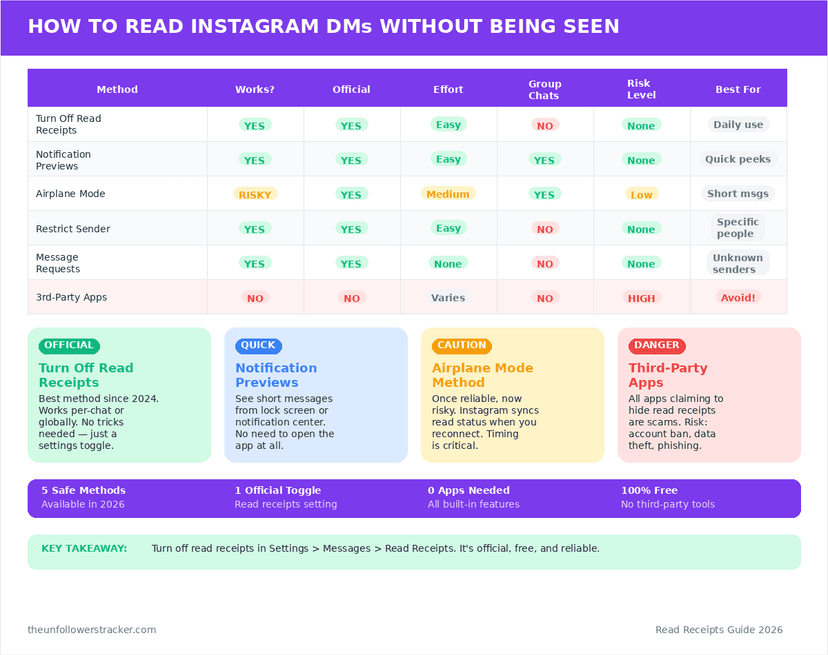
Six approaches, ranked by how little they cost you. The first 2 are settings Instagram ships and supports; the other 4 are consequences of how the app behaves, which means they hold only as long as that behaviour does.
| Method | Hides Seen from | What it costs you |
|---|---|---|
| Show read receipts, off | Every one-on-one chat | You stop seeing their Seen too |
| Per-chat read receipts, off | 1 person | Same, for that person |
| Notification preview | Anyone | You read 2 lines, no more |
| Leave it in Requests | Someone new | You cannot reply |
| Restrict the account | 1 person | Their comments go hidden too |
| Airplane mode | Anyone, briefly | Fails if the app reopens online |
Two rows carry a warning rather than a checkmark. Airplane mode is the trick most listicles lead with and the only method here that can undo itself silently. None of the 6 touch group chats.
Method 1: How do you turn read receipts off everywhere?
Three taps, one switch, every conversation at once. Open your profile, tap the menu, then Settings and activity. Open Messages and story replies and switch Show read receipts off. It applies to all one-on-one chats, past and future, with nothing to repeat per person.
Instagram made the switch mutual by design. From the moment it is off, nobody sees your Seen and you see nobody else's — there is no setting that keeps 1 direction and drops the other.
Method 2: Can you turn them off for one person?
Yes, and the per-chat copy of the setting is the better choice when the problem is 1 conversation rather than all of them. Open the chat, tap the person's name at the top, open Privacy & safety, and switch Read receipts off.
That thread now behaves as though the global setting were off, and your other chats are untouched. Mutuality still applies inside the thread: you lose their Seen along with yours, for that 1 person only.
Method 3: Does reading the notification count as seen?
No. A notification is drawn by your phone from data it already has, so reading one sends nothing back to Instagram. Nothing on the lock screen or in the notification shade opens the message on Instagram's side.
Length is the catch. A preview shows roughly 2 lines, and tapping it to read the rest opens the thread and marks the message read. Long-press to expand the notification instead of tapping it: expanding stays outside the app, tapping goes in.
Method 4: What happens in Message Requests?
Messages from people who do not follow you land in Requests, and Instagram treats that folder as unopened mail. You can read a whole thread there, for as long as you like, and the sender sees no Seen and no other signal.
Accepting is the irreversible half of it. The moment you accept — or reply, which accepts it for you — the thread moves to your inbox and the sender gets the Seen they were waiting for. Reading costs nothing; answering costs everything.
Method 5: Does Restrict hide your Seen?
Yes, and Instagram documents it: a restricted account cannot see when you have read its messages, and those messages move to Requests. Restrict is the tool built for the person you do not want to block outright.
Its reach beyond DMs is the reason to think first. Their comments on your posts become visible to them alone until you approve each one, and your activity status goes dark for them. The full comparison sits in restrict vs block vs mute.
Method 6: Does airplane mode still work?
Partly, and the failure is the half nobody mentions. The trick is to switch the phone to airplane mode, open the message while Instagram has no connection, then close the app fully before turning the radio back on.
Airplane mode works on the way in and breaks on the way out. The read event is queued on the device rather than cancelled, so an app still running when the connection returns flushes that queue and Seen appears — sometimes 5 or 10 minutes late, which reads to the sender as though you opened the chat and said nothing. Force-close Instagram from the app switcher before leaving airplane mode, every time, or use Method 1 and stop thinking about it.
What do none of these methods cover?
Three gaps survive all 6 approaches above, and each one is a place where Instagram reports your reading no matter which setting you changed.
Group chats. The read-receipts toggle does not apply to them. A group message shows the sender who has seen it, and no setting takes your name off that list.
Vanish mode. Disappearing messages report Seen regardless of your settings, and they report screenshots too — the details are in vanish mode and its privacy risks.
The web. instagram.com marks messages as read exactly as the app does, and carries no read-receipts setting of its own. Set the toggle on your phone: it is an account setting, so it travels to the browser with you.
"Seen" does not mean what most people assume it means — what the label reports and when it appears.
FAQ
The 5 questions below decide whether you can read Instagram messages without being seen in your own situation, and each one answers a different half of the problem. All answers reflect app behaviour in September 2026.
Can I read an Instagram message without the sender knowing?
Yes. Turn Show read receipts off in Settings, then Messages and story replies, and Seen stops appearing for every one-on-one chat you open.
Will they know I turned read receipts off?
Not directly. Instagram sends no notice and shows no badge — the only signal is that your Seen stops appearing, which looks the same as not opening the message.
Does turning off read receipts hide theirs from me?
Yes, and that is the entire cost of the setting. It is symmetrical: off means neither side sees the other's Seen, in every chat the toggle covers.
Do read receipts work in group chats?
Yes, and the toggle does not reach them. A group message shows the sender who has seen it, and no setting removes your name from that list.
Does airplane mode still hide Seen?
Only if you force-close Instagram before reconnecting. The read is queued on the device, so an app still open when the connection returns delivers the Seen late.

Track Your Instagram Unfollowers
Discover who stopped following you and optimize your growth strategy with our free tool.
Discover Unfollowers