Does Instagram Notify When You Download a Story?
No. Instagram sends no notification for downloads, saves or screenshots of Stories, posts and Reels, and it has not since a 2018 test was withdrawn. The exposure is 1 step earlier: opening a Story adds your name to its viewer list, which the author reads for 24 hours.
So the download is invisible and the viewing is not. Anyone asking does Instagram notify when you download a Story is usually trying not to be noticed at all, and the notification was never the thing that would give them away.
What does Instagram actually report?
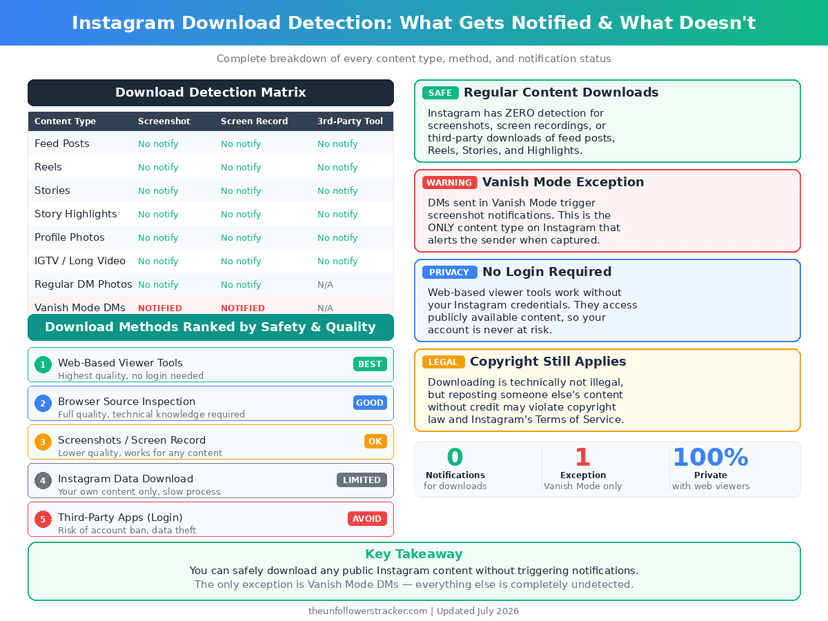
Four content types, 2 different answers, and 1 real exception. The table is the whole rule set — everything else people believe about screenshot alerts comes from the 2018 test that Instagram rolled back.
| What you do | Does the other person learn about it |
|---|---|
| Watch a Story | Yes — your name, for 24 hours |
| Screenshot a Story | No |
| Download or record a Story | No |
| Screenshot a feed post or Reel | No |
| Save a post or Reel | No, only the total count |
| Screenshot a disappearing DM photo | Yes, immediately |
| Screenshot a normal DM | No |
The 2 bold rows are the entire risk surface. One is a list of names the author can read at any time; the other is an alert delivered the second you take the screenshot, and it fires in vanish mode and on View Once photos.
What does the author see instead?
A viewer list, which is more informative than a download alert would be. Tap the count at the bottom of your own Story and Instagram names every account that opened it, in an order it decides, for as long as the Story lives.
Nothing in that list marks anyone as a downloader. Someone who watched once and someone who watched, screenshotted and saved appear identically, which is why the download question is the wrong one. The list is covered in full in what an anonymous Story viewer actually does.
Can you download a private account's Story?
No, and no tool changes that. A private account's Stories go only to approved followers. A downloader site has nothing to fetch, because the content never reaches a request that is not signed in as somebody who was let in.
Every site advertising "download private Instagram stories" therefore has 1 of 2 business models: it asks for your Instagram login and takes the account, or it shows you nothing after an ad wall. The tells are listed in how to spot fake private viewers.
If you already follow the account, the Story opens normally — and your name goes in the viewer list like everyone else's.
Step 1: Download your own content the supported way
Instagram gives you a full export of everything you have posted — photos, Reels, Stories, messages and your follower lists — and it is the only download route the app officially supports for your own content.
Open Settings, then Accounts Centre, then Your information and permissions, then Download your information. Instagram builds the archive and emails a link, usually within 24 hours, occasionally up to 30 days for a large account.
Step 2: Save a public Reel from the app
Public Reels carry a download button in the share sheet, added by Instagram itself. Using it tells the creator nothing about you: no name, no count, no entry in any list they can read.
Tap the paper-plane icon under the Reel and choose Download. The file lands in your camera roll with a watermark of the creator's handle. The option is missing when the creator has disabled it or the account is private, and no third-party site restores it without the same account risk as above.
A public Story carries no download button of its own. Saving one means fetching it the way a signed-out visitor already sees it, which is what the story downloader does — and it stops at the same line as everything else here, at accounts that are public.
Do screen recordings get detected?
No. A screen recording is the operating system copying pixels, and Instagram has no way to observe it happening — the same reason it cannot see a second phone pointed at the screen.
The single exception is disappearing DM media. There iOS and Android hand apps a screenshot signal, which Instagram forwards as an alert, and a recording counts the same as a screenshot. The mechanics are in screen recording and screenshot detection.
FAQ
The 5 questions below cover what Instagram reports when a Story, a Reel or a post leaves the app, and the 1 case where it reports something immediately. All answers reflect app behaviour in September 2026.
Does Instagram notify when you download a Story?
No. Downloads, saves and screenshots of Stories generate no notification. Opening the Story is what the author sees, because it puts you in the viewer list.
Does Instagram notify screenshots in 2026?
Only for disappearing photos and videos in DMs — View Once, Allow Replay and vanish mode. Everything else, including Stories and posts, sends nothing.
Can the person tell I downloaded their Reel?
No. Instagram shows creators a share count and a save count with no names attached, and a download to your camera roll does not appear in either.
Can I download a Story anonymously?
Not through Instagram. Watching is what registers, so the only way to open a Story without appearing in the viewer list is not to open it from your account.
Do private Story downloader sites work?
No. Private Stories are never served to a request that is not an approved follower, so those sites either take your login or show nothing.

Track Your Instagram Unfollowers
Discover who stopped following you and optimize your growth strategy with our free tool.
Discover Unfollowers