Can People See You Watching an Instagram Live?
Yes, and more openly than anywhere else on Instagram. Joining a Live puts your username in a list the host reads in real time — and any other viewer can open that same list by tapping the viewer count. Instagram provides no anonymous mode for Live, and no setting hides you.
Who can see that you are watching?
Everyone in the room, not just the broadcaster. The host sees a viewer list with usernames updating as people arrive and leave, and all of the other viewers can tap the count at the top of the screen to browse that same list. 2 audiences, 1 list.
That second half surprises people. Watching a Live is closer to walking into a room than to opening a page: the other guests can see who else came, and there is no way to stand at the back.
| What you watch | Who learns it was you | For how long |
|---|---|---|
| Instagram Live | The host and every other viewer | While you are watching |
| A Story | The author only | 24 hours |
| A Highlight over 48h old | Nobody | — |
| A Reel | Nobody — a count, no names | — |
| A feed post | Nobody | — |
| A profile | Nobody | — |
| A Live replay | Nobody — a view count only | — |
Live is the outlier in this table, and the only row where a stranger learns something about you. Every other format on Instagram is quieter than people assume; Live is louder.
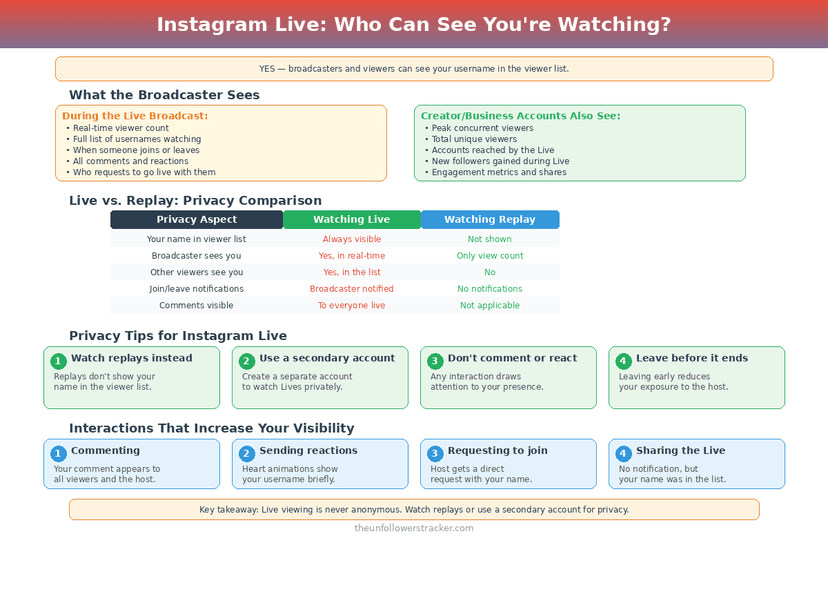
Does joining announce you to the room?
Joining announces you twice over. Instagram writes a "[username] joined" line into the activity stream that everyone present can read, and your name lands in the viewer list at the same moment. Arriving at a Live is an event, not a silent entry — the only 1 of Instagram's 7 content formats where that is true.
Leaving is quieter — no announcement fires when you go — but your name is gone from the viewer list, which a host watching the count will notice on a small broadcast.
Can you watch an Instagram Live anonymously?
No. There is no anonymous mode, no toggle, and no privacy setting that hides your username from the viewer list. Live is the one Instagram format built with no lurking option at all.
The workarounds people suggest do not work either. A private account still appears by name in the list. Muting the host does not hide you. And no third-party tool can join a Live on your behalf, because joining requires an authenticated account.
What about watching the replay instead?
The replay is the anonymous route, and it is the only one. Once a broadcast ends and the host saves it, the recording behaves like any other video: it collects a view count with no names attached.
So the honest advice for someone who does not want to be seen is to wait. A Live watched during the broadcast names you to a room; watched 1 hour later, the same content names you to nobody.
The mechanism differs from the 48-hour Story rule, but the principle is the one that also leaves an old Highlight anonymous while a fresh Story is not: what is live names you, what is archived does not.
How do you check who else is in a Live?
The list is 1 tap away, and it works the same whether you are the host or 1 of the viewers. 4 steps, about 5 seconds, and the same list is visible to everyone in the room at the same time.
Step 1: Join the Live
The viewer count sits at the top of the screen, beside the LIVE badge.
Step 2: Tap the viewer count
The full list of accounts currently watching opens. This is the same list the host sees.
Step 3: Scroll it
On a large broadcast the list is long and moves constantly as people arrive and leave. On a small one it is short enough to read in full.
Step 4: Decide before you stay
Anyone can do exactly what you just did. If being on that list matters, leave — your name disappears from it when you go.
Does the host get told after the broadcast?
Instagram gives the host a summary when a Live ends, and the useful part of it is the peak viewer count rather than a roster. The list of names exists only during the broadcast: it is live in both senses, and nothing preserves it once the stream stops.
Anyone who wanted to note a name had to do it while you were there. That is a meaningful difference from a Story, where the author can open the viewer list at leisure for 24 hours.
FAQ
The 5 questions below cover what is visible while you are watching Instagram Live, and all 5 answers reflect app behaviour in September 2026.
Can the host see me watching their Instagram Live?
Yes. Your username appears in the viewer list as soon as you join, and Instagram also writes a "joined" line into the activity stream.
Can other viewers see who is watching a Live?
Yes. Any viewer can tap the viewer count and browse the full list of accounts currently watching. This is the part most people do not expect.
Can I watch an Instagram Live anonymously?
No. Live has no anonymous mode and no setting that hides your username. Watching the saved replay afterwards is the only unnamed way to see the content.
Does my own account being private hide me in a Live?
No. A private account appears in the viewer list by username exactly like a public one.
Do people see when I leave a Live?
No announcement fires, but your name leaves the viewer list, which is visible on a small broadcast where the host is watching the count.

Track Your Instagram Unfollowers
Discover who stopped following you and optimize your growth strategy with our free tool.
Discover Unfollowers