Instagram Broadcast Channels: What Is Visible When You Join
Joining an Instagram broadcast channel is quiet: nothing appears on your profile, and your followers are told nothing. Taking part is not. Since December 2024 members can reply to messages and to each other, and a reply is visible to everybody in the channel.
Most advice about Instagram broadcast channels predates that change. A channel used to be a place you could read in silence; now it has 2 modes, and only 1 of them is private.
What is a broadcast channel?
Instagram broadcast channels are one-to-many message threads a creator runs for their followers. Instagram launched them in February 2023: the creator posts text, photos, video, voice notes and polls, and members react, vote and — since 2024 — reply.
Anyone who follows the creator can join. All their followers get 1 invitation notification when a channel opens; only the people who joined get anything afterwards.
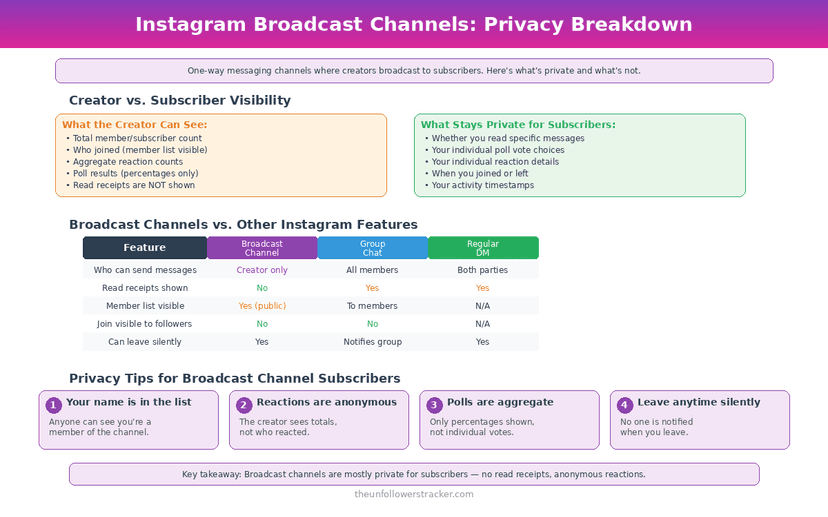
What can other people see?
Six actions, and the line runs between reading and writing. Nothing you read leaves a trace; everything you write is visible to the whole channel.
| What you do | Who sees it |
|---|---|
| Join the channel | Nobody is notified; no profile change |
| Read the messages | Nobody |
| React with an emoji | Everyone in the channel |
| Vote in a poll | The creator sees the total, not your name |
| Reply to a message | Everyone in the channel |
| Leave the channel | Nobody is notified |
The poll row is the one people ask about most. Instagram's channel insights report totals — interactions, story shares, poll votes — rather than a per-person breakdown, so a vote is a number rather than an attribution.
What does the creator get?
Aggregate numbers and whatever you wrote. Insights give the creator total interactions, story shares and poll votes across the channel, which describes the audience rather than any individual in it.
Your replies and reactions are the exception, and they are not analytics — they are content, with your username on them, readable by every other member. Treat a channel reply the way you would a public comment.
Membership of a paid channel works differently again, because a subscription involves a transaction — what that exposes is in subscriptions and subscriber privacy.
How do you control a channel you joined?
Four steps, from the lightest touch to leaving entirely. The 1st solves the most common complaint, which is volume rather than privacy.
Step 1: Mute it
Open the channel, tap the name at the top, and mute. Messages keep arriving and stop notifying you, which is usually the whole problem.
Step 2: Stay a reader
Reactions and replies are optional. A member who never writes anything leaves no trace in the channel at all, and no setting is needed to achieve that.
Step 3: Leave
Leaving is silent and reversible while the channel stays open to followers. Nothing is announced to the creator or to the other members.
Step 4: Deal with the person, not the channel
If the issue is the creator rather than the channel, leaving does not address it. The person-level tools, and what each one tells them, are in restrict, block or mute.
What changed in December 2024?
Instagram added replies, prompts and insights in one release, and the first of those changed the privacy shape of the feature. Before it, a channel was broadcast-only and membership was effectively invisible; after it, a channel holds a conversation between members.
Prompts push in the same direction. A Q&A or a daily check-in invites members to write, and writing is the act that makes you visible — none of which is hidden, and all of which is easy to walk into expecting the 2023 version.
None of this changes what Meta itself collects, which runs wider than any feature-level setting — the scope is in what Instagram knows about you.
FAQ
The 5 questions below cover what joining Instagram broadcast channels reveals, what the creator can see, and what replying changes. All answers reflect Instagram in September 2026.
Can people see that I joined a broadcast channel?
No. Joining sends no notification, changes nothing on your profile, and is not shown to your followers.
Can the creator see who voted in a poll?
Channel insights report totals — interactions, story shares and poll votes — rather than naming individual members.
Are my replies in a channel private?
No. Since December 2024 members can reply, and a reply is visible to everybody in the channel with your username attached.
Does leaving a channel notify the creator?
No. Leaving is silent, and you can rejoin while the channel remains open to the creator's followers.
Can I stay in a channel without the notifications?
Yes. Mute it from the channel name at the top. Messages still arrive and stop alerting you.

Track Your Instagram Unfollowers
Discover who stopped following you and optimize your growth strategy with our free tool.
Discover Unfollowers