Can People See Who You Subscribe To on Instagram?
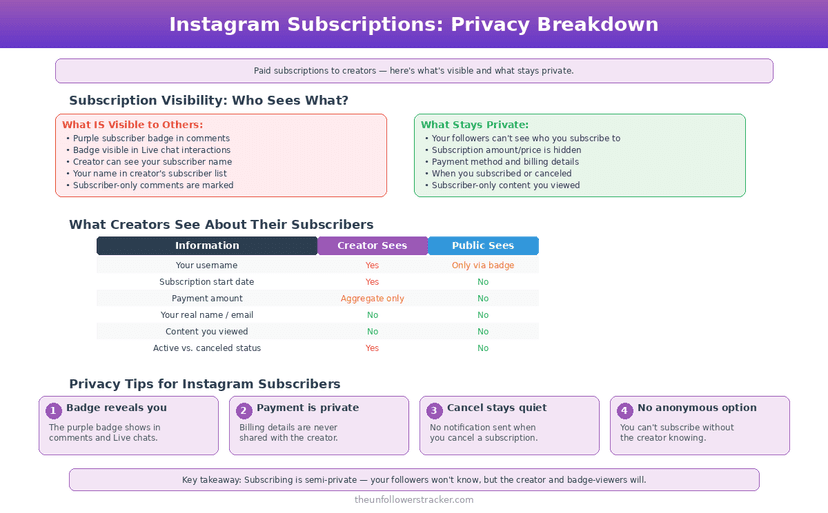
Your followers cannot see who you subscribe to on Instagram. No list exists on your profile and no tab shows your paid subscriptions. The creator you pay does see your name, and a purple badge appears beside your username whenever you comment on that creator's posts — which is where your subscription becomes visible to strangers.
Can your followers see your Instagram subscriptions?
There is no subscriptions list to find. Instagram publishes no tab, no count and no profile section listing the creators you pay, so someone visiting your profile learns nothing about it — the same silence that covers your Favorites and your saved collections.
That has held since the feature began, as a test with a small group of US creators in January 2022. Four years and eight price tiers later — Instagram fixes them at $0.99, $1.99, $2.99, $4.99, $9.99, $19.99, $49.99 and $99.99 a month — no version of the product has ever published who subscribes to whom.
The exposure comes from a different direction, and most people miss it: the purple subscriber badge attaches to you, not to the creator, and it travels with your comments.
Where does the purple badge show up?
The badge sits next to your username in exactly two places: the comments under that creator's posts, and the DM thread between the two of you. Anyone reading those comments — followers, strangers, the creator's whole audience — sees that you pay this creator.
The badge is not a setting. Instagram gives no toggle to hide it, so on the creator's content the choice is between commenting and staying anonymous. Reading subscriber-only posts without commenting leaves nothing public.
What does the creator know about you?
The creator knows your username and can look you up. Every professional account gets a subscriber list inside the professional dashboard, searchable by name, and it updates the moment a subscription starts — so "anonymous subscriber" is not a state that exists on this platform.
Here is the screen they open, so the extent of it is clear rather than assumed.
Step 1: Open the creator profile and tap "Professional dashboard"
The dashboard is the account-level analytics screen, available only to Business and Creator accounts.
Step 2: Tap "Subscriptions"
The section collects everything about the paid tier — earnings, cancellations and the subscriber roster.
Step 3: Tap "Subscribers"
The full list loads, ordered by most recent. Every username on it is a person currently paying.
Step 4: Search the list by name
The creator can type a username and jump straight to it. What they cannot do is export the list — Instagram provides no download, which is the only limit on this screen worth knowing about.
What stays private from the creator?
Your payment details never reach them. Apple or Google processes a subscription bought inside the app, and Meta pays the creator — so no card number, billing address or email address travels to the person you subscribe to. The creator sees one thing about the transaction: that it happened.
The creator also cannot see what else you subscribe to. Each subscription is scoped to one account, and Instagram exposes no cross-creator view to anybody.
Who sees what: the full picture
Every row below reflects Instagram's behaviour as of September 2026.
| Who | Sees your subscription | How |
|---|---|---|
| The creator you pay | Yes, by username | Subscriber list in the professional dashboard |
| Anyone reading that creator's comments | Yes, if you comment | Purple badge next to your username |
| Your own followers | No | No list, no tab, no count anywhere |
| Someone visiting your profile | No | Nothing on the profile changes |
| Other creators you subscribe to | No | Each subscription is scoped to one account |
| Instagram and Meta | Yes | Billing and access records |
| Third-party apps | No | No API field exposes subscriber identity |
What happens when you cancel?
Cancelling stops the next charge and leaves the current one alone. Access to subscriber-only posts runs to the end of the billing month you already paid for, and the purple badge disappears with the access. Instagram refunds nothing for the unused days.
Old comments are the loose end. A comment you left while subscribed stays where it is, and the badge on it drops off along with your subscriber status — so cancelling removes the marker going backwards as well as forwards.
Can you subscribe without the creator knowing it is you?
Not on a real account, and the workarounds cost more than they are worth. The subscription ties to the account that pays, so keeping a name off that list takes a second account, a second payment method and a second identity to maintain — three problems to avoid one username appearing on one list.
Reading a public profile is a different question with a simpler answer — no account is needed at all, as the Instagram profile viewer demonstrates. Paid subscriptions are the opposite case: the whole feature exists to connect a payment to a person.
A free broadcast channel works on different terms, because no transaction is involved. What joining one reveals, and what changed when replies arrived in December 2024, is in broadcast channels and what is visible.
Subscriptions need a professional account, and what switching type changes for everyone else is worth checking first.
FAQ
Can my followers see which creators I subscribe to?
No. Instagram publishes no list of your subscriptions anywhere on your profile, and there is no third-party tool with access to that data either.
Can I hide the purple subscriber badge?
No. Instagram provides no setting for it. The badge appears automatically beside your username in comments and DMs on that creator's content, and the only way to avoid it in public is to read without commenting.
Does the creator know my real name?
Only if your account carries it. The subscriber list shows the username and profile name on your Instagram account, and nothing from your payment method reaches the creator.
Do I keep access if I cancel halfway through the month?
Yes. Access runs to the end of the period you have already paid for, then stops. Instagram does not pro-rate a refund for the unused days.
Is a subscription the same as being on someone's Close Friends list?
No. A subscription is a payment you initiate and the creator can see; Close Friends is a list the author controls, which the people on it recognise by a green marker. The difference is set out in our guide to Instagram Favorites and Close Friends.

Track Your Instagram Unfollowers
Discover who stopped following you and optimize your growth strategy with our free tool.
Discover Unfollowers