Can Someone See If You Add Them to Instagram Favorites?
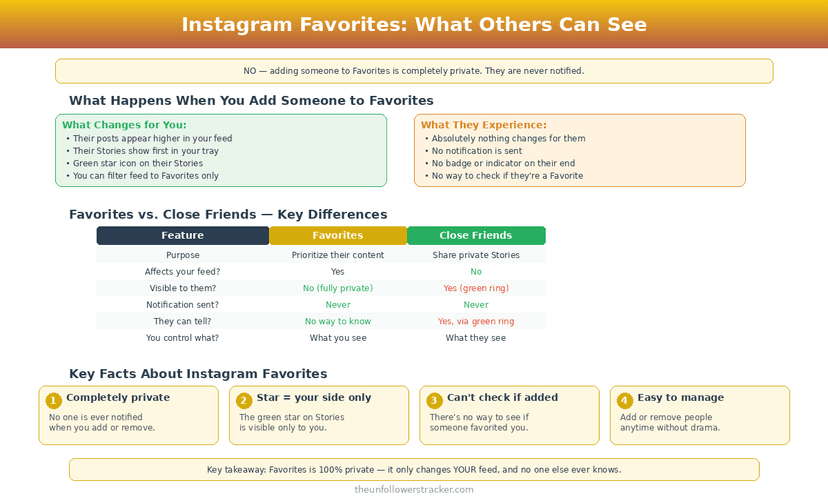
Nobody is told. Instagram's own announcement of the feature states that people are not notified when they are added to or removed from a Favorites list, and no account can view anyone else's list. The person you favourite sees no badge, no alert and no change in how your profile looks to them.
Does adding someone to Favorites notify them?
Instagram sends nothing. When you add someone to Favorites on Instagram, the only thing that changes is the order of your own home feed — their posts start appearing higher in it, and a star marks them so you know why.
The wording comes from Instagram directly. Announcing Favorites on 23 March 2022, the company wrote that you can hold up to 50 accounts and "people are not notified when they are added or removed" (Control Your Instagram Feed with Favorites and Following). That limit of 50 has not moved since.
Can people see your Favorites list on Instagram?
Your list is not published anywhere. Instagram builds no profile tab for it, no public count, and no route for another account to request it — the list exists only inside your own feed settings, the same way your muted accounts do.
Nobody can work it out from the outside either. Adding someone changes the order of posts on your screen, so there is no artefact on their side for anyone to notice.
Why did you see a green star, then?
The green star is a different feature, and this is where most of the confusion in this topic comes from. A green star marks a Close Friends post or Reel — content the author deliberately restricted to a chosen audience — and a green ring around a profile picture marks a Close Friends Story.
Favorites uses a plain star on posts in your own feed and no colour coding at all. The two features point in opposite directions:
| Favorites | Close Friends | |
|---|---|---|
| Who chooses | You, about accounts you follow | The author, about their audience |
| What it changes | The order of your feed | Who can see one post or Story |
| Is the other person told | No | They see the green marker |
| Can they tell they are on it | No | Yes, by the green star or ring |
| Visible marker | Plain star in your feed | Green star, green ring |
| Size limit | 50 accounts | No published limit |
| Who sees the marker | Only you | Everyone on the list |
Seeing a green star on someone's post means they put you on their Close Friends list. It says nothing about anyone's Favorites. Close Friends visibility is covered in our guide to Close Friends Stories.
How do you add or remove someone from Favorites?
The control is in the feed switcher rather than on the profile, which is why people struggle to find it. Four taps in each direction, and nothing you do here reaches the other account.
Step 1: Tap the Instagram logo at the top of your home feed
A dropdown opens with Following and Favorites beside the default feed.
Step 2: Choose "Favorites"
An empty list offers a button to add accounts; a filled one shows who is already on it.
Step 3: Tap "Manage" and search for the account
Only accounts you follow can be added. The search is limited to your following list.
Step 4: Tap "Add", or tap "Remove" to take them off
Removal is as silent as adding. There is no confirmation sent anywhere, and you can move an account on and off the list as often as you like.
Can someone work out that they are one of your Favorites?
Nothing on their side changes, so the honest answer is only if you tell them. A favourited account sees the same profile, the same follower count and the same story ring as before.
The one indirect signal is your own behaviour. Someone whose posts you suddenly start seeing first will also start getting your likes and replies faster, and a person watching closely might read something into that. The list itself gives nothing away.
Does Favorites change what the other person can see about you?
Favorites is a one-way filter on your own feed and touches nothing else. Adding an account does not follow them, does not unmute them, does not restore a story you hid, and does not change whether they can see your posts.
The same silence covers most of Instagram's personal-organisation features — saves and collections behave identically, as set out in does Instagram notify when you save a post.
Subscriptions work on a similar principle and expose slightly more: who can see that you subscribed.
Favourites are about what you keep; if the question is watching without appearing in the viewer list, the story viewer does that without an account.
FAQ
Does Instagram tell someone when I remove them from Favorites?
No. Removal sends no notification and leaves no trace, and Instagram's announcement covers removal in the same sentence as adding.
Is the Favorites list the same as Close Friends?
No. Favorites reorders your own feed and is invisible to everyone else. Close Friends restricts who can see a post or Story you publish, and the people on it see a green marker.
Can I see if someone added me to their Favorites?
No. Instagram gives no signal to the favourited account, and no third-party tool has access to that data either, because it never leaves the list owner's account.
How many accounts can I add to Favorites?
Up to 50, per Instagram's announcement of the feature in March 2022. Adding a 51st requires removing someone first.
Does adding someone to Favorites make them see my Stories differently?
No. Favorites has no effect on your own posting at all — it only changes the order in which their content reaches you.

Track Your Instagram Unfollowers
Discover who stopped following you and optimize your growth strategy with our free tool.
Discover Unfollowers