Instagram Close Friends: Who Can See a Close Friends Story?
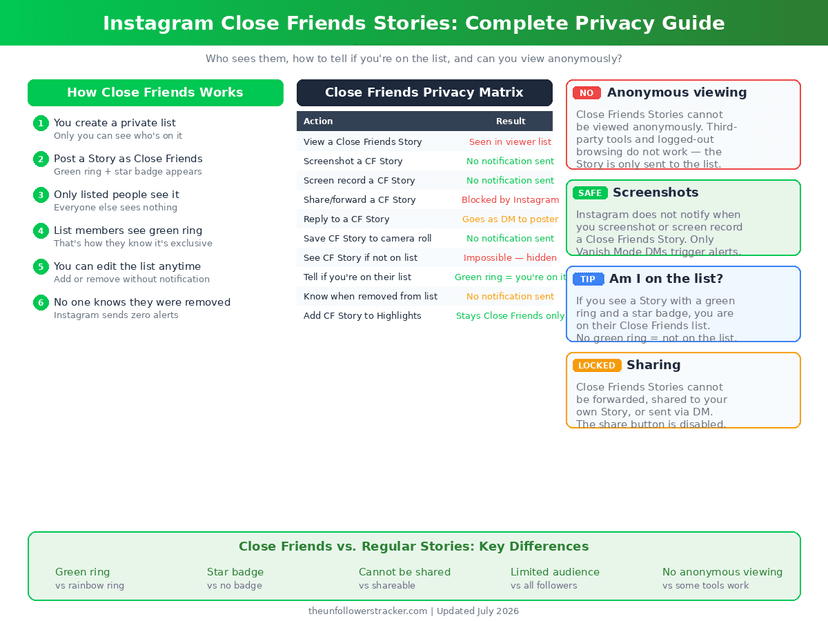
Only the accounts on your list. Instagram Close Friends narrows a Story to one list you control, marks it with a green ring for the people who get it, and shows nothing at all to everybody else. The list itself stays private, and nobody is notified when you add or remove them.
That last part is the useful half. People can tell they are on your list, because the green ring appears on their side — and they can never tell who else is, or when somebody was dropped.
Who can see what?
Four audiences, and the difference between the 2nd and 3rd rows is where most of the questions come from. Instagram tells nobody anything about the list.
| Person | What they see |
|---|---|
| On your Close Friends list | The Story, with a green ring |
| Following you, not on the list | Nothing — no gap, no marker |
| On the list, looking for the others | Nothing — the list is private |
| Removed from the list | No notification; Stories simply stop |
Nobody outside the list can tell a Close Friends Story exists. There is no placeholder and no "shared with close friends" notice on your profile, so the absence is invisible rather than conspicuous.
Is Close Friends only for Stories?
Not since November 2023, when Instagram extended it to feed posts. The same single list governs both, so adding somebody for Stories also gives them your Close Friends posts, and there is no way to keep 2 separate audiences.
Highlights follow the Story they were made from. A Close Friends Story saved to a Highlight stays restricted to the list rather than becoming public, which is the behaviour people most often expect to go wrong and it does not.
Can somebody watch a Close Friends Story anonymously?
No. The viewer list names everyone who watched, exactly as it does for a normal Story, and it holds those names for the 24 hours the Story runs. Nothing retracts a view once it registers.
External viewer sites cannot reach it either, and the reason is structural. Those tools read the public version of an account; a Close Friends Story is never public, so there is nothing for them to fetch — the mechanics of what they can reach are in viewing Stories without being seen.
What can leak a Close Friends Story?
The people you chose. Instagram disables resharing for Close Friends Stories, so nobody can add one to their own Story or forward it as a message — and that stops the easy route, not the obvious one.
Screenshots and screen recordings work normally and generate no alert. Close Friends is a smaller audience, not a technical protection, and the full picture of what a Story does and does not report is in can you see who screenshots your Story.
How do you manage the list?
Four steps. The first is the only one most people ever do, and the last is the one that keeps the list meaningful.
Step 1: Open the Close Friends list
From your profile menu, choose Close Friends. Adding and removing happens here, in one screen, and takes effect immediately for anything you post next.
Step 2: Post to the list
When you create a Story, tap Close Friends instead of Your story. The green ring is the confirmation, and it is worth checking before you post rather than after.
Step 3: Check the list before sensitive posts
The list persists between posts and quietly ages. Somebody added 2 years ago for one occasion is still there, and Instagram never prompts you about it.
Step 4: Remove people freely
Removing sends no notification and leaves no trace beyond Stories no longer arriving. If you want the wider account tightened as well, the full audit is in how to make Instagram truly private.
FAQ
The 5 questions below cover who sees a Close Friends Story, what the people on the list can work out, and what happens when you remove somebody. All answers reflect the app in September 2026.
Can people see who else is on my Close Friends list?
No. The list is private to you. Somebody on it knows they are on it, from the green ring, and can see nothing about anybody else.
Does Instagram notify someone when I add or remove them?
No. Adding is signalled only by the green ring appearing on a Story, and removal is signalled by nothing at all.
Can I see who viewed my Close Friends Story?
Yes. The viewer list works exactly as it does for a normal Story and names everyone who watched, for the 24 hours it runs.
Can Close Friends Stories be reshared?
No. Instagram disables resharing and forwarding for them. A screenshot still works, and it produces no alert.
Do Close Friends posts use the same list as Stories?
Yes, one list covers both since November 2023. There is no way to keep separate audiences for posts and Stories.

Track Your Instagram Unfollowers
Discover who stopped following you and optimize your growth strategy with our free tool.
Discover Unfollowers