What Happens When Someone Blocks You on Instagram?
Instagram tells you nothing. The account stops appearing in search, the profile stops loading, the follow disappears in both directions, and your existing message thread stays in the inbox without being able to send. Nothing announces any of it.
What happens when someone blocks you on Instagram is therefore a list of 10 things you find out by looking. The silence is deliberate: blocking exists to remove somebody without a confrontation, which means no step of it announces itself.
Everything that changes
Ten things move at once, which is why a block is easy to recognise once you know what to look at. The pattern is total removal in your direction only.
| What | After they block you |
|---|---|
| Their profile in search | Gone — the username returns nothing |
| Their profile by direct link | "Sorry, this page isn't available" or an empty profile |
| Their posts, Reels and Stories | Invisible to you |
| Their comments on shared posts | Hidden from your view |
| Your comments on their posts | Removed from your view |
| The follow, in both directions | Broken — neither side follows the other |
| Your DM thread | Still there; new messages will not send |
| Their profile photo in that thread | Replaced with a default silhouette |
| Tagging or mentioning them | No longer possible |
| A notification to you | None |
The follow row surprises people most. A block does not just hide the account — it unfollows in both directions, so unblocking later restores neither follow and both sides start from 0.
Instagram also extends a block to other accounts the same person creates, so a second profile made to get around it is covered by the original block rather than needing a new one.
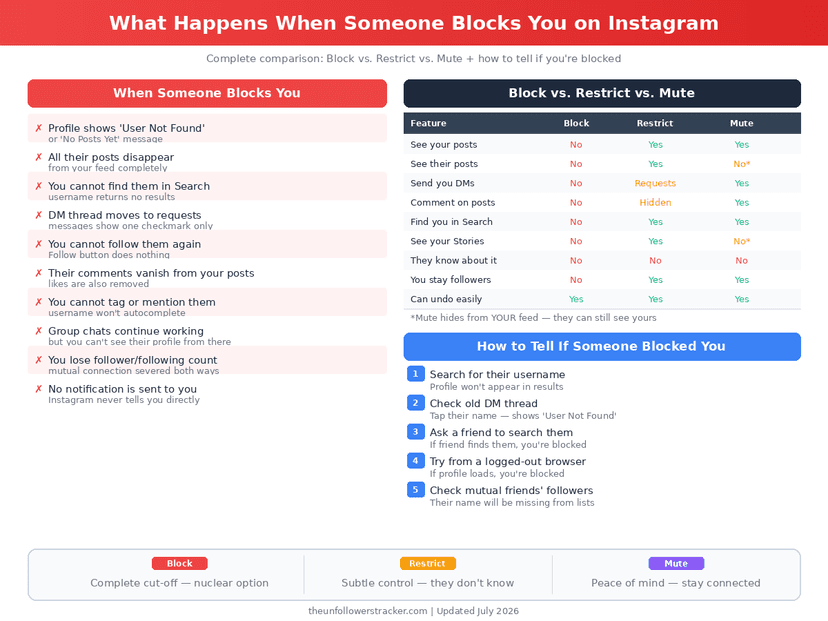
Blocked, deactivated, or deleted?
Three very different situations produce a missing profile, and 1 question separates all 3: is it missing for everybody, or only for you? A block is the only one of the 3 that is specific to your account.
Step 1: Search from your own account
Type the username. If nothing comes back, you have a candidate — but this looks identical for all 3 explanations, so it settles nothing on its own.
Step 2: Open the profile URL while logged out
Load instagram.com/username in a private browser window. A deactivated or
deleted account is unavailable to everyone, including a signed-out visitor; a
blocked account loads normally there.
A signed-out profile viewer runs the same test without a private window: it loads the public profile the way a stranger sees it, so a profile that appears there but not for you is a block rather than a deleted account.
Step 3: Ask somebody else, or use a second account
If another account sees the profile and yours does not, that is a block. This is the only check that distinguishes it cleanly, and it takes one message to a friend.
Step 4: Wait, if it might be a deactivation
A deactivated account comes back when its owner returns, and nothing about the process notifies anyone — what deactivation does and does not touch is in how to deactivate without losing anything.
What happens to your messages?
The conversation stays where it is. Your inbox keeps the thread and its history, their name may still appear, and their profile photo drops to a default silhouette — but anything you try to send from that point fails.
Old messages are not deleted on either side. A block stops future contact rather than erasing past contact, which is a distinction people often expect to work the other way.
Can they still see your account?
No, and this is where blocking differs from the 2 softer options. The block runs both ways: they cannot open your profile either, even if your account is public.
Restrict, added in 2019, is the version that limits somebody without cutting them off, and mute is quieter still. The differences are set out in restrict, block or mute.
Being removed from somebody's Stories is a smaller thing again, and it is frequently mistaken for a block. That one is in how to tell if someone blocked you from their Story.
FAQ
The 6 questions below cover what happens when someone blocks you on Instagram, how to tell it from a deactivation, and what becomes of the conversation you already had. All answers reflect the app in September 2026.
What happens when someone blocks you on Instagram?
The account disappears from search and from your feed, the profile stops loading, the follow breaks in both directions, and your DM thread stays without being able to send. Instagram notifies you of none of it.
Does Instagram notify you when someone blocks you?
No. There is no alert, no message and no marker. Everything about a block is discovered by noticing what stopped working.
Can I still see our old DMs after being blocked?
Yes. The thread stays in your inbox with its history, and their photo becomes a default silhouette. New messages will not send.
Does blocking unfollow us both?
Yes. The follow breaks in both directions, and unblocking later does not restore it — either side has to follow again.
How do I tell a block from a deleted account?
Open the profile while logged out. A deleted or deactivated account is unavailable to everyone; a blocked one loads normally for anybody else.
Can they see my profile while I am blocked?
No. A block works in both directions, so neither of you can open the other's profile, and it extends to new accounts the same person creates.

Track Your Instagram Unfollowers
Discover who stopped following you and optimize your growth strategy with our free tool.
Discover Unfollowers