Can You Tell If an Instagram Account Is Professional?
Usually yes, from the profile itself. A category label under the name and action buttons like Email, Call or Directions appear only on professional accounts, and both are visible to anyone. What you cannot see is the half that matters to the owner: Insights are private, and Instagram sends no announcement when somebody switches.
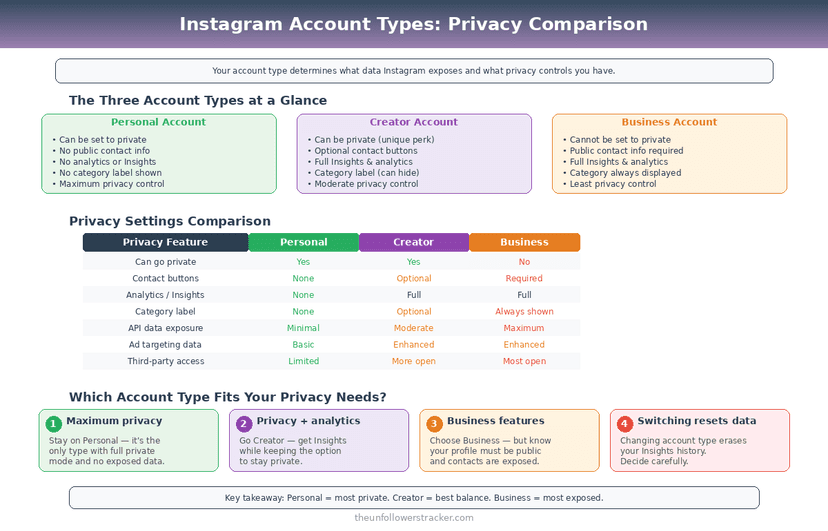
Professional covers 2 types, Business and Creator. They differ in the buttons they offer and barely at all in what they reveal about you.
What can other people see?
Six things people ask about, and only 2 of them change with account type. The other 4 look identical whichever type you pick, which is why an Instagram professional account is harder to spot than most people assume.
| What others see | Personal | Professional |
|---|---|---|
| Category label under the name | No | Optional |
| Email, Call, Directions buttons | No | Yes |
| Your posts, followers, following | Same | Same |
| Your Insights | No | No — owner only |
| Who viewed your profile | No | No |
| A notification that you switched | No | No |
The last row is worth stating plainly. Switching account type is invisible: your followers get nothing, your posts are untouched, and nobody is told.
Can a business account see who viewed your profile?
No. Instagram gives professional accounts a profile visits number in Insights — a count for the last 7 or 30 days — and never the accounts behind it. The same is true of reach, impressions and every other figure on that screen.
This is a design decision rather than a missing feature. Instagram does not record who viewed a profile at all, so no account type, subscription or app can surface a list that was never written.
Reports of a wider profile-view count surface every year and none has ever led back to Instagram. Even in those reports it is a count: neither the owner nor anyone else sees names.
Can a professional account be private?
You can switch a professional account to private, and doing so switches off Insights. Analytics require a public account, so the 2 things people usually want — data and privacy — are mutually exclusive here.
That trade catches out anybody moving to a Creator account for the metrics and then locking the profile. Decide which you want first: a private account with no Insights, or a public one with them.
Step 1: Check what type an account is
Open the profile and look under the name. A category — "Digital creator", "Restaurant", "Musician" — means professional, and so does any Email, Call or Directions button.
Absence proves nothing. The category label is optional, so a professional account that turned it off looks exactly like a personal one from the outside.
Step 2: Switch your own type
Open Settings, then Account type and tools, then Switch to professional account. Instagram asks you to pick a category and then to choose between Creator and Business, and both choices can be changed afterwards.
Choose Creator for a person and Business for an organisation. The practical difference is small: Business unlocks Directions and shop features, Creator offers a flexible inbox and a wider set of category labels.
Step 3: Switch back if it does not suit you
The same screen reverses it — Switch to personal account. Nothing is deleted and nobody is told: your posts, followers, username and DMs all survive the change untouched.
Insights history is the exception. Switching back ends data collection, and the figures do not come back retroactively if you switch to professional again later.
Switching type changes what other people see, not what Instagram collects — that side is the same for every account.
Does account type affect your reach?
No. The signals that rank content — watch time, likes per reach, sends per reach — are the same for every account type, and none of them read what type you are. The detail is in how the Instagram algorithm works.
What changes is what you can measure. A professional account sees which posts held attention; a personal one sees a like count and guesses.
Account type does not change presence: the green dot follows its own setting whichever type you pick.
FAQ
The 5 questions below cover what an account type reveals to other people, what it does not, and what switching costs you. All answers reflect Instagram's behaviour in September 2026.
How can I tell if someone has a professional Instagram account?
Look for a category label under their name or an Email, Call or Directions button. Both appear only on professional accounts, though the category can be hidden.
Can Instagram business accounts see who views their profile?
No. Insights give a profile-visits count for the last 7 or 30 days and never identify a single visitor.
Do my followers know if I switch to a professional account?
No. Instagram sends no notification, and nothing about your posts or follower list changes.
Can I use Instagram Insights on a private account?
No. Insights require a public account, so switching a professional account to private turns the analytics off.
What is the difference between Creator and Business?
Mostly the buttons and the category list. Business adds Directions and shop features for organisations; Creator suits individuals and offers a more flexible inbox.

Track Your Instagram Unfollowers
Discover who stopped following you and optimize your growth strategy with our free tool.
Discover Unfollowers