Does Instagram Notify Screenshots? Every Case in 2026
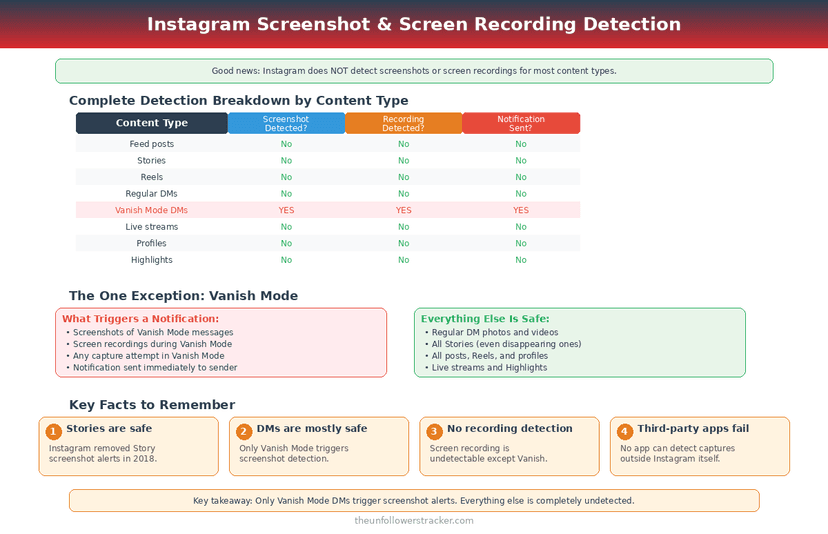
Instagram defends exactly 1 kind of content against screenshots: a disappearing photo or video sent inside a direct message, vanish mode included. Since December 2024 the app blocks the capture outright, and where one gets through the sender is told.
Screenshotting a post, a Reel, a Story, a profile, a comment or a normal DM sends nothing.
Does Instagram notify screenshots of Stories?
No alert goes out. Instagram tested Story screenshot notifications in 2018, withdrew the test the same year, and has not brought it back in the 8 years since — so a Story can be captured with no trace beyond your name in the "Seen by" list, which the view itself puts there.
The viewer list is the only signal a Story gives. Someone checking it learns you opened the Story and learns nothing about what you did next, which is a different problem covered in how to view Stories without being seen.
Which screenshot does Instagram act on?
One case, and it is narrow: a photo or video sent as a disappearing message in a DM. That covers a one-view or allow-replay media message and anything sent inside vanish mode. Instagram added screenshot prevention for exactly these in December 2024, so the capture usually fails instead of succeeding quietly.
Where a capture does land, the sender sees your name in the thread immediately. Instagram writes it into the conversation rather than sending a background notification, so both people can read it afterwards — the rest of the mechanics are in Instagram vanish mode.
Does screen recording behave differently from a screenshot?
Screen recording follows the same map. On surfaces with no screenshot alert there is no recording alert either; on the disappearing-DM surface, recording triggers the same notification a still capture does.
Instagram detects the capture event the operating system reports rather than inspecting the file, which is why the two behave identically. A camera pointed at the screen reports nothing to anyone and never has.
Every surface, and what it does
Does Instagram notify screenshots on a given surface? The table answers it for every place a capture is possible, checked against app behaviour in September 2026. Only 2 of the 12 rows produce an alert, and both are the same underlying thing: media that was sent to disappear.
| Surface | Screenshot | Screen recording |
|---|---|---|
| Feed post or carousel | No alert | No alert |
| Reel | No alert | No alert |
| Story | No alert | No alert |
| Highlight | No alert | No alert |
| Profile or bio | No alert | No alert |
| Comments | No alert | No alert |
| Normal DM text | No alert | No alert |
| Photo sent normally in a DM | No alert | No alert |
| Disappearing photo or video in a DM | Blocked | Blocked |
| Vanish mode message | Blocked | Blocked |
| Instagram Live | No alert | No alert |
| Someone else's saved collection | Not visible to you at all | — |
Saving a post is quieter still — it leaves nothing anywhere, as set out in does Instagram notify when you save a post.
How do you check whether a message will notify before you screenshot it?
The distinction is visible in the thread before you capture anything, and checking takes about 5 seconds. Two signals separate a message that will notify from one that will not: the background of the chat, and the way the media itself is presented in the thread.
Step 1: Look at the chat background
A dark background with a "You're in vanish mode" banner means every capture in this thread notifies. A normal background means the thread itself is safe.
Step 2: Look at the media before opening it
A disappearing photo arrives as a circle with "Photo" or "Video" beside it rather than as a visible thumbnail. A normal photo shows itself in the thread.
Step 3: Check whether it can be reopened
Tap out and back in. A disappearing message shows "Opened" and cannot be viewed again; a normal one is still there.
Step 4: Decide before you open, not after
The block and the alert both fire on capture, not on viewing, so the safe order is to identify the message type first and open it second.
Why did Instagram drop Story screenshot alerts?
The 2018 test made people stop screenshotting, and Instagram never restored it. The feature notified a Story's author when someone captured it, ran for a few weeks, and was withdrawn without a public explanation.
No serious reporting since has suggested it is returning. The incentive points the other way: screenshots move content off Instagram and into conversations, and a platform that punishes sharing gets less of it.
FAQ
The 5 questions below cover the cases people get wrong most often, and every answer reflects app behaviour in September 2026.
Does Instagram notify screenshots of Stories in 2026?
No. The 2018 test was withdrawn and has not returned. Your name appears in the "Seen by" list because you opened the Story, not because you captured it.
Will someone know if I screenshot their profile?
No. Profiles, bios, posts, Reels, Highlights and comments generate no capture alert of any kind.
Does Instagram notify screen recording of a Story?
No. Screen recording follows the same rule as screenshotting on every surface, so a Story recording is as silent as a Story screenshot.
What happens if I screenshot a vanish-mode message?
Instagram blocks the capture. If one gets through, the sender is told at once by name inside the thread. Vanish mode and disappearing DM media are the only places on Instagram with either defence.
Can a third-party app tell me who screenshotted my posts?
No. Instagram exposes no capture data through its API, so any app claiming to list screenshotters is inventing the list.

Track Your Instagram Unfollowers
Discover who stopped following you and optimize your growth strategy with our free tool.
Discover Unfollowers