Who Can See Your Instagram Notes?
An Instagram Note reaches one of two audiences, and you pick which when you post it: mutual followers — accounts you follow that follow you back — or your Close Friends list. Nobody else sees it, the Note disappears after 24 hours, and no view count exists for anyone, including you.
Are Instagram Notes public?
Notes are never public. Instagram offers no "everyone" option for them, so a Note cannot reach a stranger, a follower you do not follow back, or anyone browsing your profile — the Note does not appear on the profile at all.
The whole feature lives at the top of the direct message inbox, which is the clue to who it is for. Someone who has no reason to open a DM thread with you never encounters a Note in the first place.
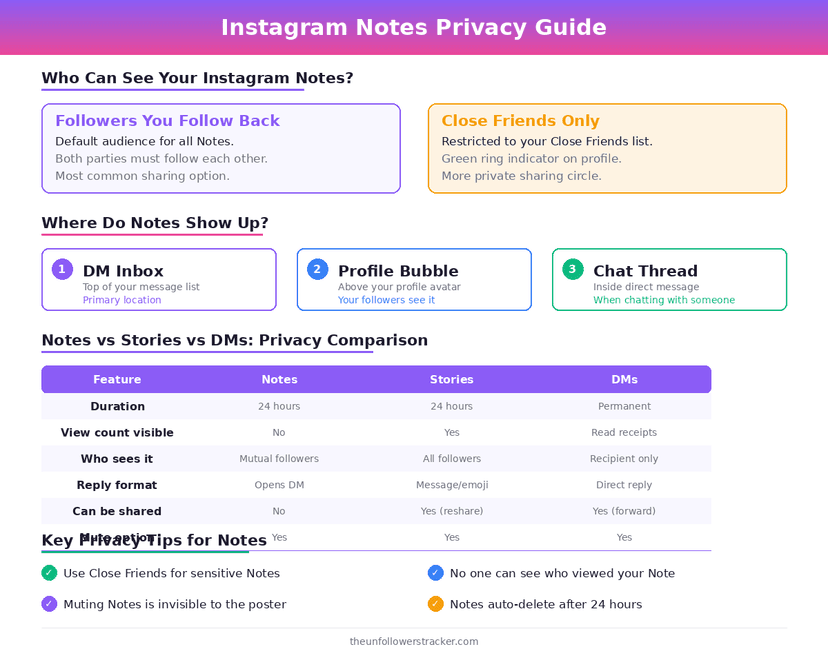
Who can see your notes on Instagram, exactly?
Who can see your notes on Instagram comes down to two audiences, chosen per Note. The default is "Followers you follow back", which is the mutual set; the alternative is "Close friends", the same list that drives green-marked Stories.
| Audience option | Who sees the Note | Do they know which option you chose |
|---|---|---|
| Followers you follow back | Accounts in your mutual set | No |
| Close friends | Only accounts on that list | No |
| Anyone else | Nobody — no such option exists | — |
| A follower you do not follow back | Never | — |
| Someone visiting your profile | Never | — |
Switching between the two is silent. A person who saw yesterday's Note and not today's learns nothing about why, because Instagram shows no audience label on a Note.
Can you see who viewed your Instagram Note?
No view list exists. Instagram gives Notes no viewer count, no "seen by" list and no analytics of any kind, which makes them the quietest surface on the platform — quieter than Stories, which do name every viewer.
Replies are the only feedback. Someone who taps your Note and types a response sends it as a normal direct message, so the only people you ever learn about are the ones who chose to speak.
How do you post a Note and choose who sees it?
The control appears while you write, not afterwards, and the audience cannot be changed once the Note is live.
Step 1: Open the direct message inbox
Tap the Direct icon in the top corner of the home feed. Your profile picture sits at the top of the list with "Leave a note" beneath it.
Step 2: Tap your own profile picture
The Note composer opens. You have 60 characters, spaces and emoji included.
Step 3: Tap the audience selector above the text box
The two options are "Followers you follow back" and "Close friends". Whichever you used last is preselected.
Step 4: Tap "Share"
The Note goes live immediately and expires 24 hours later. Deleting it early takes a long press on your own Note.
What can you put in a Note?
More than text, and the limits are tight. Alongside the 60-character line, Instagram supports a 2-second looping video and a 30-second music clip, so a Note can carry a face or a song rather than a sentence.
The character limit counts emoji as characters. A line that looks short on screen can hit the ceiling quickly once emoji are in it.
Do Notes show up in search or on your profile?
Notes stay inside the inbox. They are excluded from search, from Explore, from hashtag results and from your profile grid, and they leave nothing behind after the 24 hours are up.
Nothing about a Note is retrievable afterwards either. Instagram keeps no archive of expired Notes for you to browse, which is the opposite of Stories — those land in the archive automatically.
FAQ
Can people who don't follow me see my Notes?
No. A Note reaches only mutual followers or your Close Friends list, so an account you do not follow back can never see one regardless of settings.
Can I see who read my Instagram Note?
No. Notes carry no viewer list and no count. The only signal you get is a direct message from someone who chose to reply.
Does the other person know if I mute their Notes?
No. Muting a Note is silent, it applies only to your own inbox, and the person you mute keeps posting as normal with no indication that you stopped seeing them.
How long does an Instagram Note last?
24 hours, then it disappears with no archive. Deleting one sooner takes a long press on the Note followed by "Delete note".
Are Notes the same as Close Friends Stories?
No. A Note is 60 characters at the top of the DM inbox; a Close Friends Story is a full Story restricted to one list. They can share the same audience, which is why the two get confused — the difference between Instagram's audience lists is covered in our guide to Favorites and Close Friends.

Track Your Instagram Unfollowers
Discover who stopped following you and optimize your growth strategy with our free tool.
Discover Unfollowers