Instagram Collab Posts: Who Sees What You Share
A collab post is one post that lives on 2 profiles at once. It appears in both accounts' grids, reaches both audiences, and collects a single set of likes and comments shown identically on both. Accepting an invite publishes it to your followers — and hands your co-author the post's full insights.
What does accepting a collab invite actually publish?
Accepting puts the post in your grid and in your followers' feeds, exactly as if you had posted it yourself. Instagram prints your profile name on it publicly, above the image, beside the other account — 2 names, 1 post.
An Instagram collab post is not a copy. Exactly 1 post exists and both profiles point at it, which is why your side offers no delete button — you can remove yourself, and the post carries on under the original author.
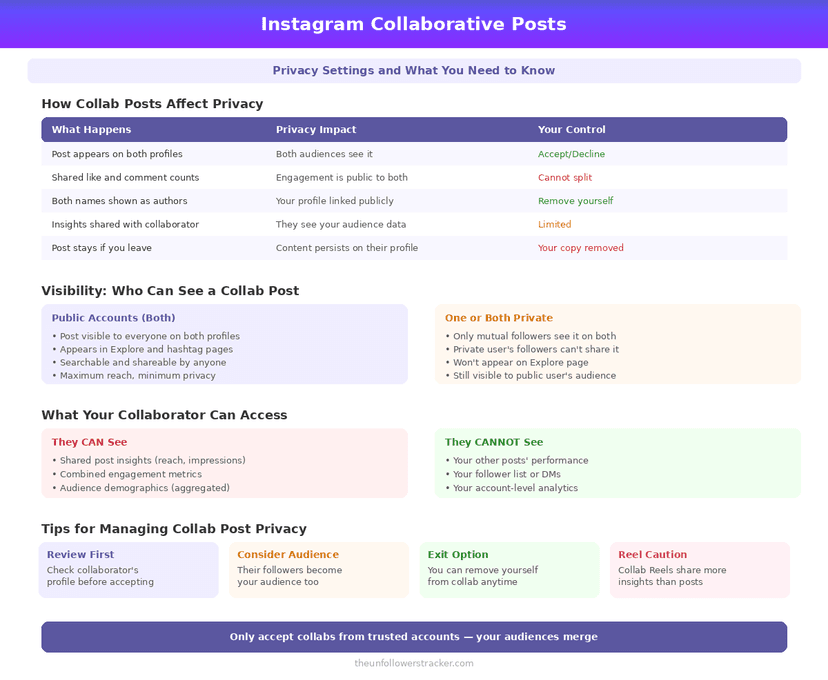
Who can see a collab post?
The audience is the union of both follower sets, plus whatever the more open of the 2 accounts exposes. If either collaborator runs a public profile, anyone who opens that profile reaches the post, however private the other account is.
That asymmetry is the part worth pausing on. A private account collaborating with a public one has published to the public account's audience, and the private setting does not travel with the post.
What can your collaborator see about you?
Your co-author gets the post's full insights, including how your audience behaved. On a professional profile that covers 5 metrics — reach, impressions, saves, shares and profile visits — and both accounts see the same numbers.
Your followers reach them in the ordinary way. Anyone who comments does so under a post that also sits on the collaborator's profile, username attached. Your follower list stays private, but the engaged part of it now stands in front of a new audience.
Collab post, tag, and mention: what each one does
| Collab post | Tag in a post | Mention in a caption | |
|---|---|---|---|
| Appears on your profile grid | Yes | Only in "Tagged" if you allow it | No |
| Reaches your followers' feeds | Yes | No | No |
| Your name shown above the post | Yes | No | In the caption text |
| You can approve before it appears | Yes, by accepting | Yes, with manual tag approval | No |
| Shares insights with the other account | Yes | No | No |
| You can remove yourself later | Yes | Yes | No |
| Requires you to follow each other | Only when an account is private | No | No |
Tag permissions are a separate control with its own setting, covered in Instagram tagged photos privacy.
Reshares are the other way a collab travels, and what the author can see about a share is less than people expect.
What happens if one account is private?
A private account can collaborate, on 1 condition: the 2 accounts have to follow each other. Instagram hides the "Invite collaborator" option when the invited account is private and does not follow the inviter, which explains most missing buttons.
The post itself never becomes private. Once accepted, it stays as visible as the most open profile it sits on, so a private collaborator's content reaches an audience their own settings would never have allowed.
How do you remove yourself from a collab post?
You can remove yourself at any point after accepting, and it takes 4 taps. Nothing expires and no window closes — an Instagram collab post accepted 2 years ago comes off your grid the same way one accepted this morning does.
Step 1: Open the collab post
Reach it from your own grid or from the other account's profile — either works.
Step 2: Tap the three-dot menu on the post
The menu shows different options for a collaborator than for the original author.
Step 3: Tap "Remove me from post"
Instagram asks for confirmation, because you cannot undo this yourself — only the original author can invite you back.
Step 4: Confirm
The post leaves your grid and your followers' feeds at once. It stays live on the original author's profile, and only they can invite you again.
What to check before you accept
3 things, in about a minute. Look at who else is on the post, because you inherit their audience. Read the caption, since it publishes under your name too. And decide whether you want that account's followers arriving in your comments, because that is what a collab post is for.
An unanswered invite expires on its own after 14 days, so declining by ignoring it is a real option.
A collab post reaches past your own privacy settings, so it is worth knowing what those settings do and do not cover before accepting one.
FAQ
Does a collab post appear on my followers' feeds?
Yes. Accepting publishes it to your followers exactly as a normal post would, and it appears in your profile grid alongside your own content.
Can I remove myself from a collab post after accepting?
Yes, at any time, through the post's three-dot menu. It disappears from your grid and your followers' feeds and stays live on the original author's profile.
Can a private account use collab posts?
Yes, but only with accounts it follows and that follow it back. The invite option is hidden otherwise, which is the usual explanation for a missing button.
Does my collaborator see my analytics?
They see the post's insights, including how your audience engaged with it. They do not get access to your account-level analytics or to your follower list.
What happens if I ignore a collab invite?
It expires after 14 days with no action needed. Ignoring an invite is a valid way to decline, and the other account is not told which way it went.

Track Your Instagram Unfollowers
Discover who stopped following you and optimize your growth strategy with our free tool.
Discover Unfollowers