Instagram Parental Controls: What Is Automatic, What You Set
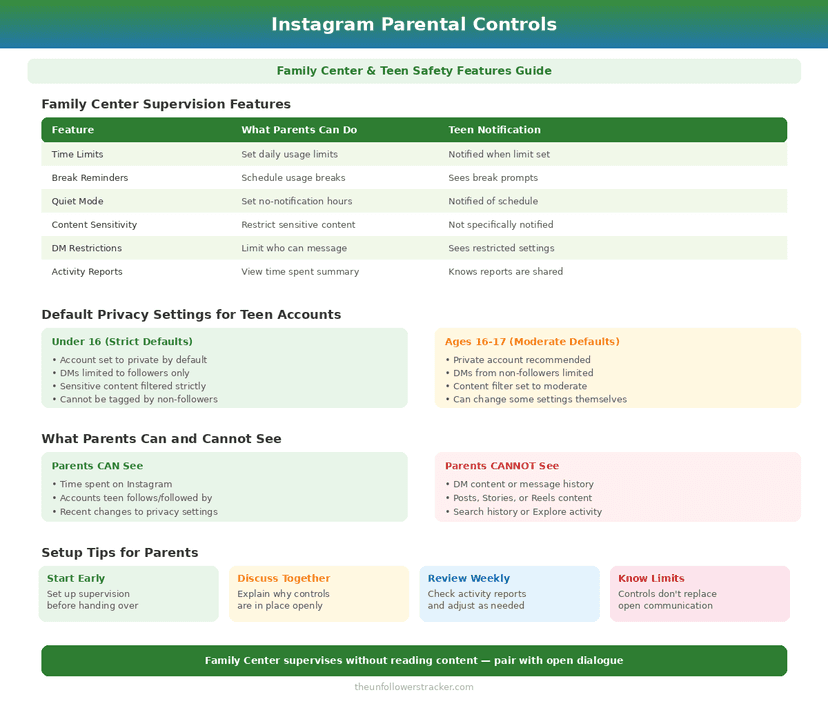
Instagram parental controls come in 2 layers. A Teen Account applies restrictions on its own — private by default, limited messaging, sleep mode from 10pm to 7am — and Family Center supervision adds what a parent sets by hand. Under-16s need a parent's permission to loosen any of it.
The distinction matters, because most of the protection is already on. Supervision does not switch safety on. It adds visibility, plus a few levers over an account Instagram has already locked down.
What does a Teen Account restrict by default?
Instagram moved teenagers into a restricted account type in September 2024, and every setting below applies before a parent does anything at all. A teenager who signs up alone still gets a private account, restricted messaging and an overnight quiet period, which is the opposite of how parental controls usually work.
| Setting | Default on a Teen Account |
|---|---|
| Account visibility | Private — the teen approves each new follower |
| Who can message them | Only people they follow or are connected to |
| Sensitive content | Explore and Reels show less of it |
| Sleep mode | On, 10pm to 7am — mutes notifications, auto-replies to DMs |
| Daily use prompt | A reminder to leave the app after 60 minutes |
| Changing any of it, under 16 | Requires a parent's permission |
The last row does the real work. A 15-year-old cannot quietly make the account public. Loosening a setting sends a request to the supervising parent, and the change waits.
What can a parent actually see?
Less than most parents expect, and Instagram chose that. Supervision reports who your teen deals with and how long they spend. It never reports what either side said.
| You can see | You cannot see |
|---|---|
| How much time they spend in the app | The content of any message |
| Which accounts they follow, and who follows them | What they post privately to Close Friends |
| Who they have exchanged messages with | The messages themselves |
| Which accounts they have blocked or reported | Their search history |
| Topics they have chosen to see more of | What they view without interacting |
The second column is a design decision, not a gap. A supervision tool that showed message content would be surveillance, and teenagers move to apps that lack it. Instagram gives parents patterns instead: who, how often, how long.
What changes under the August 2026 settlement?
A great deal, if a court approves it. Meta settled with 29 US states on 26 August 2026 for $18 billion over 10 years. Most of the agreed controls must then stay in place for a decade.
| Agreed change | What it does |
|---|---|
| 2-hour daily cap | Cumulative across Instagram and Facebook, for under-18s |
| Night mode | No access between midnight and 6am |
| 15-minute prompts | On top of the existing 60-minute reminder |
| School-hours muting | Notifications off 8am–3pm by default, except DMs and security alerts |
| Chronological feed | A parent can make the non-personalised feed the default |
| Autoplay off | Both parent and teen can require a deliberate tap for more |
| Hidden like counts | Reaction counts hidden by default under 18 |
Two cautions apply before you plan around this table. A judge has not yet approved the settlement, so none of it is guaranteed to be live on the day you read this, and it covers US accounts rather than the whole world.
How do you set up supervision?
Four steps, and either side can start. The other person must accept the invitation, which is the point: nobody can impose supervision silently.
Step 1: Open Family Center
In Settings and activity, find Supervision or Family Center. Both accounts have it, and each side sees a different set of options.
Step 2: Send or accept the invitation
A parent invites the teen, or the teen invites the parent. The link expires. Until the other side accepts, you see nothing at all.
Step 3: Set the daily limit and any scheduled breaks
Now set a daily allowance and block specific windows. Your limit is a hard stop, not a reminder.
Handling one specific person, rather than an audience, is a separate mechanism again: restrict, block or mute.
Step 4: Decide who approves setting changes
Approve each request from your teen individually, or hand the settings back for them to manage. The second option lifts the under-16 approval requirement on that account, so choose it deliberately rather than to stop the notifications.
What do these controls not do?
Instagram parental controls do not verify age. That is the weak point in the whole structure. Instagram infers whether an account belongs to a teenager, so a false birth year at sign-up skips the teen protections entirely, and nothing in Family Center corrects it later.
The controls also stop at Instagram's edge. They do not follow a teenager to another app, a browser, or a second account — and a second account takes minutes. Lock down the account you know about. Just do not read it as coverage.
For an account of your own rather than a teenager's, the settings are different and mostly manual — those are in how to make Instagram truly private.
None of it changes what Meta collects. Supervision limits what other users reach, never what the company records. The scope of that sits in what Instagram knows about you.
FAQ
The 5 questions below cover which Instagram parental controls apply on their own, what a supervising parent can and cannot see, and which parts of the August 2026 settlement are not in force yet. All answers reflect the app in September 2026.
Do Instagram parental controls work without setting anything up?
Yes. A Teen Account is private, restricts messaging and sensitive content, and runs sleep mode from 10pm to 7am before any parent is involved.
Can parents read their teen's Instagram messages?
No. Supervision shows who a teen has exchanged messages with and how long they spend in the app, never the content of a conversation.
Can a teenager turn the restrictions off?
Not under 16. Loosening a setting sends a request to the supervising parent, so it takes an approval, not a tap.
What happens at the 60-minute daily prompt?
It is a reminder, not a lock. Only a parent-set daily limit stops access when the teen reaches it.
Is the 2-hour daily limit in force now?
Not yet. It is part of a settlement agreed on 26 August 2026 that is pending court approval, and it covers US accounts.

Track Your Instagram Unfollowers
Discover who stopped following you and optimize your growth strategy with our free tool.
Discover Unfollowers