Do Instagram Unfollowers Affect Reach? Full Creator Guide 2026
Being a creator in 2026 is significantly harder than it was five years ago — a single well-crafted Reel can bring 10,000 new followers overnight. But at the same time it can trigger unfollowing with the same force a day later — and the Instagram algorithm will quietly reduce your reach after a sudden loss of followers. Success can be instant and sudden, which is exactly why tracking your Instagram unfollowers matters more than ever. In this guide, the non-obvious milestones of detecting and stopping follower drop are revealed — things no coaching course will teach, known mainly to established bloggers who have no interest in sharing them.
Instagram Unfollowers in Creator Accounts Now vs. Five Years Ago
Over the past three years, an incredibly powerful traffic source has emerged in the form of Reels, which Instagram actively promotes organically. The field of Instagram content has become far more crowded. A huge number of creators have flooded the platform, much of their content generated or polluted by artificial intelligence. Any serious Instagram strategy for 2026 must account for this new reality: gaining followers is harder, and keeping them — avoiding mass follower drop — is even harder. Creators who fail to monitor their Instagram unfollowers lose ground that is very difficult to recover.
Although there are now a staggering number of promotion techniques, Instagram's algorithms have been studied more thoroughly than ever. Understanding losing followers and what drives them is now a core skill — not an advanced one. This guide will help you navigate Instagram promotion strategies for 2026.
Why Creators Track Instagram Unfollowers Religiously
Why Instagram Hides Unfollowers — and Does Instagram Notify Unfollow for Creators?
Instagram deliberately conceals follower decline data from creators, and the reason is by design. The platform hides unfollow activity for three core reasons:
- To prevent harassment — knowing exactly who unfollowed could lead to targeted retaliation
- To reduce retaliation behavior — removing the data removes the incentive for conflict
- To keep users focused on engagement — Instagram wants creators focused on content, not on chasing lost followers
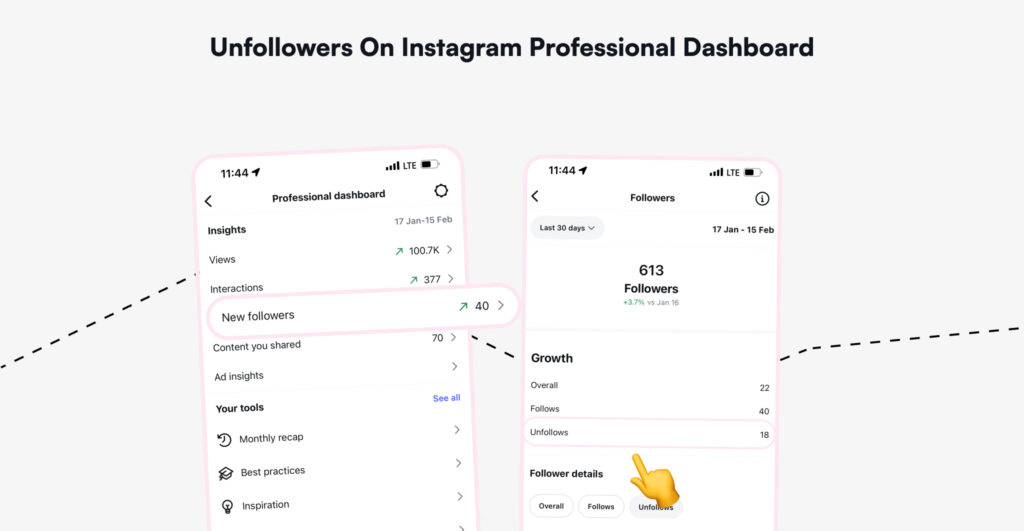
The result: Instagram shows a drop in your follower count. Nothing more. No names, no timestamps, no link to any specific post. Does Instagram notify unfollow for creators or bloggers? No — it never has, and that policy has not changed in 2026.
Can You See Who Unfollowed You on Instagram to Determine If Content Is Resonating?
Not directly inside the app. Here you can see just a number of unfollows. But you can build a system that tells you exactly this — covered in detail below.
Two Dimensions Every Instagram Creator Must Understand
Every creator's follower drop analysis operates on two dimensions: what is happening inside the account and what is happening outside the account — how Instagram's algorithm sees your content, and how your followers see it. Understanding and setting up both is the foundation of any effective Instagram strategy in 2026.
Two areas of focus cut through the noise.
Outside Hacks — What Your Instagram Unfollowers Data Is Really Saying to the Algorithm
The Unfollowers Data Instagram Deliberately Hides
The first dimension of analyzing an account's potential is monitoring the unfollow activity and count — and more specifically, the people behind the numbers.
How to See Who Unfollowed Me on Instagram for Free as a Creator
Instagram sends generous notifications about new followers and likes. But Instagram unfollowers — the people who quietly leave — are deliberately hidden. The platform reveals a drop in the count. Nothing more. No names, no dates, no connection to specific content.
Every unfollow is a data signal, not just a vanity number loss. Think of it like the bounce rate in web analytics: it tells a complete story, if someone is willing to read it.
How to See Who Unfollowed Me When Publishing Sponsored Posts or Creator Content
Sponsored posts and creator content are among the highest-risk moments for a follower drop. Audiences follow creators for authenticity, and a hard sales push — especially one that feels off-brand — is one of the most common unfollow triggers.
To track Instagram unfollowers tied to specific sponsored posts in the Instagram Unfollowers Tracker:
- Export your Instagram data archive before publishing the sponsored post and save the follower list.
- Export it again 48 hours after the post goes live.
- Compare the two lists using a follower drop analyzer tool — the diff shows exactly who left in that window.
- Cross-reference the departure timestamps against your posting time.
If a significant percentage of your unfollow activity cluster within 24 hours of a sponsored post, that is a clear signal: the content felt inauthentic, off-niche, or too commercial for your specific audience. This data is invaluable for negotiating content briefs with brands and protecting your follower base long-term.
Spike vs. Steady Decline of Instagram Unnollowers — Two Very Different Problems
A sudden spike in Instagram unfollowers after a specific post points to one bad content decision. A slow, steady weekly decline points to something deeper: niche drift or audience mismatch.
One is a warning. The other is a trend. Knowing which type is occurring changes the entire response.
| Unfollowers Pattern Type | Likely Cause | Creator Action |
| Post-spike drop | Content–audience mismatch | Review content pillars immediately |
| Steady weekly decline | Niche drift over time | Full content audit needed |
| Sudden mass drop | Controversy / bad collab | Strategy response required |
How to Track Instagram Unfollowers If You're an Instagram Creator
The Tool Instagram Doesn't Give Creators
At this stage of building an Instagram strategy for 2026, the practical question is: how does a creator actually access this data?
Instagram's Professional Panel shows aggregate drops but not individual acts. The identity of who left, when, and in connection with which content is completely invisible inside the app itself.
For creators who want to skip the manual spreadsheet process, an Instagram follower drop analyzer provides exactly what Instagram hides. Upload the data export from Instagram directly — no login, no password, no third-party account access required. The result is a clean, dated list of who stopped following and when.
This is where follower drop tracking starts paying off immediately. With that data in hand, the post-correlation analysis described throughout this guide becomes actionable in minutes rather than guesswork.
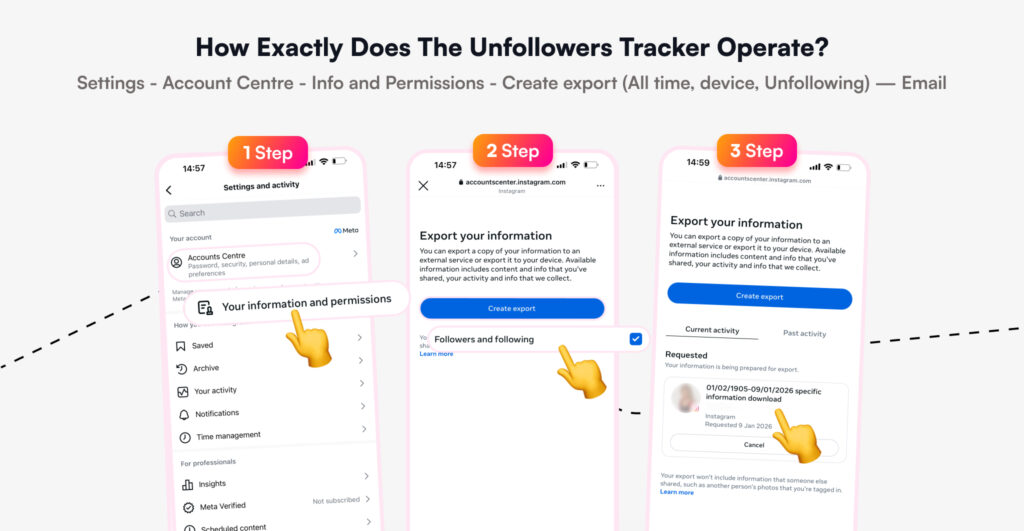
How to Export Instagram Data — Step by Step
- Open Instagram → Profile → Menu → "Your Activity" → "Download Your Information"
- Select "Followers and Following" → Format: JSON → All time → "Create Files"
- Instagram emails the archive within approximately five minutes
- Upload the JSON file to the Instagram followers analyzer tool and view the full results immediately
This takes about ten minutes the first time and becomes a five-minute routine after that.
What Studying Instagram Unfollowers Actually Reveals
Sacred Information Most Creators Never See
The specifics of when exactly and why people unsubscribe are among the most valuable pieces of data a creator can access. They reveal how content genuinely affects the audience and whether the creative direction is correct. That knowledge is half the battle.
Every follower is especially valuable — more so than a passive viewer — because clicking the Follow button is an active decision. When that person leaves, the unfollow is equally deliberate. It carries meaning.
The question is never just "who left" — it is "what did that person represent about the content's real audience?"
How Instagram Algorithm Interprets Follower Loss
Sudden unfollow spike = negative engagement signal
High drop within 24h = content mismatch
Low retention after viral Reel = weak audience fit
The 24-Hour Window
Most unfollowers leave within 24 hours of a specific post. This makes the timing of analysis critical.
Checking the Professional Panel activity section will often reveal a 7–10% follower drop over two or three days following specific content. That figure demands attention. But the raw number alone is not enough.
The real question is: who left, and which content triggered the departure?
Understanding what signals Instagram processes behind the scenes — including privacy behaviors — provides useful context for interpreting those follower drop signals.
Inside Hacks — Settings Causing Instagram Unfollowers
To maximize the chances of gaining followers, a creator must take several steps within Instagram settings that are not immediately obvious — but that can unlock the entire path forward.
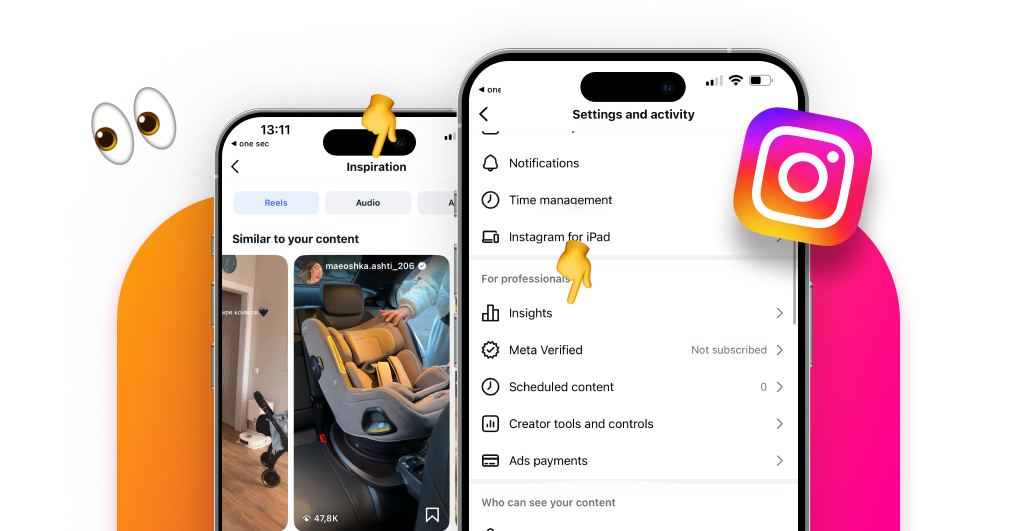
Fast check: One diagnostic check reveals whether algorithms are configured correctly. Navigate to: Profile → Professional Panel → "New Ideas" → "Similar to Your Content." If the Reels shown there are unrelated to the account's niche, the algorithms are misconfigured. Instagram is not showing the content to the right audience — and that mismatch directly causes unfollow activity.
The VPN Problem Nobody Talks About
This is critical for every creator to understand: views can drop dramatically due to VPN use. A creator may notice that Reels views suddenly collapse. The natural assumption is always that the content is the problem.
Your VPN changes → Your content gets wrong geo-distribution → It is seen by the wrong audience → You get a higher dislike rate.
Then something strange appears — followers from completely unrelated geographic regions start arriving. This is often caused by a VPN change that scrambles Instagram's location signals. The platform begins routing content to the wrong regional audience. And that mismatch triggers Instagram unfollowers, too.
Two adjustments in the right settings can restore the algorithm. Recovery can be visible within the first week — the kind of recovery that would be invisible without understanding what caused the collapse in the first place.
For a creator serious about growth, this is the critical gap to close while Instagram cleanup.
Frequently Asked Questions
How can a creator track follower drop without giving account access?
Export the Instagram data archive from the app's "Your Activity" section. Upload the JSON file to a follower drop analyzer tool. No login or password is required. The result shows exactly who stopped following and when. This is the safest and most accurate method for monitoring Instagram unfollowers available in 2026.
Can you see who unfollowed you on Instagram as a creator?
Not inside the app itself. Instagram never shows the identity of unfollow activity natively. However, by exporting your follower data before and after specific posts and comparing the lists with an analyzer tool, you can identify exactly who left and when. This is the only reliable way to see who unfollowed you as a creator.
Does Instagram notify unfollow for creators or bloggers?
No. Instagram does not send any notification when someone unfollows you, regardless of whether you are a regular user, a creator, or a verified account. Tracking unfollowers requires exporting data manually or using a third-party analyzer tool. The absence of such notifications is intentional — see the section above for why.
Do Instagram unfollowers affect reach and algorithm distribution?
Yes. Instagram's algorithm interprets consistent follower drop as a signal that the content is not resonating. Reach can decrease as a result, creating a compounding negative effect on organic distribution over time. This is why monitoring unfollowers is not just about vanity metrics — it directly affects how broadly Instagram distributes your content.
Final Thoughts: What Separates Creators Who Grow From Those Who Plateau
The non-obvious Instagram unfollowers milestones covered in this guide — algorithm configuration, viral audience mismatch, sponsored post drop analysis, and follower tracking systems — are what separate creators who plateau from those who grow.
Instagram in 2026 rewards those who understand their audience at a granular level. The platform will not provide that understanding directly. Knowing how to find, read, and act on Instagram unfollowers data is a core competitive advantage. The data exists — but creators have to go looking for it.
Start with one week of consistent tracking. The patterns become clear faster than expected.

Track Your Instagram Unfollowers
Discover who stopped following you and optimize your growth strategy with our free tool.
Discover Unfollowers